
Security Best Practices for Azure Synapse Analytics
Home > Best Practices > Security
🏡 Defense-in-Depth Security
Comprehensive security framework for protecting your Azure Synapse Analytics environment with enterprise-grade controls and compliance capabilities.
🔐 Identity and Access Management
🏗️ Security Foundation Identity and access management forms the cornerstone of your Synapse security architecture.
Security Architecture Overview
The following diagram illustrates the layered security architecture for Azure Synapse Analytics:
graph TB
    subgraph "Identity Layer"
        A[Azure Active Directory]
        B[Multi-Factor Authentication]
        C[Conditional Access Policies]
    end

    subgraph "Network Layer"
        D[Private Endpoints]
        E[Managed Virtual Network]
        F[NSG Rules]
        G[IP Firewall]
    end

    subgraph "Data Layer"
        H[Encryption at Rest]
        I[Encryption in Transit]
        J[Row-Level Security]
        K[Column-Level Security]
        L[Dynamic Data Masking]
    end

    subgraph "Application Layer"
        M[RBAC Controls]
        N[Workspace Permissions]
        O[SQL Permissions]
    end

    subgraph "Monitoring Layer"
        P[Azure Monitor]
        Q[Security Center]
        R[Audit Logs]
        S[Sentinel SIEM]
    end

    A --> M
    B --> A
    C --> A

    M --> N
    M --> O

    D --> E
    E --> F
    F --> G

    H --> L
    I --> L
    J --> L
    K --> L

    N --> P
    O --> P
    P --> R
    Q --> S
    R --> S

    style A fill:#4CAF50
    style D fill:#2196F3
    style H fill:#FF9800
    style M fill:#9C27B0
    style P fill:#F44336
🌐 Azure Active Directory Integration
🔐 Authentication Controls
| Security Control | Implementation | Compliance Level | Risk Mitigation |
|---|---|---|---|
| 🔐 AAD Authentication | Primary authentication method |  |  |
| 🤖 Managed Identities | Service-to-service authentication |  |  |
| 🔐 Multi-Factor Authentication | Required for all user access |  |  |
{
  "type": "Microsoft.Synapse/workspaces",
  "properties": {
    "identity": {
      "type": "SystemAssigned"
    },
    "azureADOnlyAuthentication": true,
    "trustedServiceBypassEnabled": false
  }
}
⚠️ Security Alert
Always enable AAD-only authentication to prevent SQL authentication bypass attempts.
🔒 Authorization Framework
| Authorization Layer | Control Type | Implementation | Security Impact |
|---|---|---|---|
| 🔐 RBAC (Built-in Roles) | Least privilege principle | Azure built-in roles |  |
| 📋 Custom Roles | Specialized access requirements | Custom role definitions |  |
| 🌐 Conditional Access | Context-based access control | Azure AD policies |  |
# 🔐 Assign appropriate Synapse roles
New-AzRoleAssignment -SignInName user@contoso.com `
    -RoleDefinitionName "Synapse SQL Administrator" `
    -Scope "/subscriptions/<sub-id>/resourceGroups/<rg>/providers/Microsoft.Synapse/workspaces/<workspace>"

# 🔍 Read-only access for analysts
New-AzRoleAssignment -SignInName analyst@contoso.com `
    -RoleDefinitionName "Synapse Artifact User" `
    -Scope "/subscriptions/<sub-id>/resourceGroups/<rg>/providers/Microsoft.Synapse/workspaces/<workspace>"
📋 RBAC Best Practices
- Start with least privilege
- Use built-in roles when possible
- Regular access reviews (quarterly)
- Implement break-glass procedures
🏭 Workspace-Level Security Controls
| Security Feature | Purpose | Implementation Complexity | Security Level |
|---|---|---|---|
| 🌐 IP Firewall Rules | Restrict network access by IP range |  |  |
| 🔗 Private Link | Secure VNet connectivity |  |  |
| 🌐 Managed VNet | Network isolation |  |  |
{
  "properties": {
    "managedVirtualNetwork": "default",
    "trustedServiceBypassEnabled": false,
    "azureADOnlyAuthentication": true,
    "publicNetworkAccess": "Disabled",
    "firewallRules": [
      {
        "name": "CorporateNetwork",
        "properties": {
          "startIpAddress": "10.0.0.0",
          "endIpAddress": "10.0.255.255"
        }
      }
    ]
  }
}
🔒 Network Security Layers
- Private Link - Secure VNet communication
- Managed VNet - Isolated compute environment
- IP Firewall - Additional IP-based filtering
- NSG Rules - Subnet-level traffic control
📜 Data Security
🔒 Data Protection Excellence
Implement comprehensive data protection controls to secure sensitive information at rest, in transit, and in use.
🔐 Encryption and Data Protection
🔒 Encryption Strategy
| Encryption Type | Implementation | Key Management | Compliance Impact |
|---|---|---|---|
| 🔒 At Rest | All storage encrypted by default | Microsoft or customer-managed |  |
| 💪 In Transit | TLS 1.2+ for all connections | Certificate-based |  |
| 🏭 TDE (SQL Pools) | Transparent database encryption | Service or customer-managed |  |
# 🔐 Configure customer-managed encryption
Set-AzSynapseWorkspace -Name $workspaceName `
    -ResourceGroupName $resourceGroupName `
    -KeyVaultUrl $keyVaultUrl `
    -KeyName $keyName `
    -KeyVersion $keyVersion

# 🔒 Enable TDE for dedicated SQL pools
Set-AzSqlDatabaseTransparentDataEncryption `
    -ResourceGroupName $resourceGroupName `
    -ServerName $serverName `
    -DatabaseName $databaseName `
    -State "Enabled"
🔑 Key Management Best Practices
- Use Azure Key Vault for centralized key management
- Implement key rotation policies (annual)
- Separate encryption keys by environment
- Monitor key access and usage
🎭 Sensitive Data Protection
| Protection Technique | Use Case | Implementation | Privacy Level |
|---|---|---|---|
| 🏷️ Data Classification | Discover and label sensitive data | SQL sensitivity labels |  |
| 🎭 Dynamic Data Masking | Hide sensitive data from unauthorized users | Column-level masking |  |
| 🔄 Data Anonymization | De-identify data for analytics | Tokenization, perturbation |  |
-- 🏷️ Data Classification - Label sensitive columns
ADD SENSITIVITY CLASSIFICATION TO
  customers.customer_table.credit_card_number
WITH (
  LABEL = 'Highly Confidential',
  INFORMATION_TYPE = 'Financial',
  LABEL_ID = '331c8da8-4c3c-4d3b-b4e1-3d5c8d3f4a2b',
  INFORMATION_TYPE_ID = 'd22fa6e9-5ee4-3bde-4c2b-a409604c4646'
);
-- 🎭 Dynamic Data Masking - Hide sensitive data
ALTER TABLE customers
ADD MASKED WITH (FUNCTION = 'partial(2,"XXXXXXX",0)')
FOR COLUMN credit_card_number;

-- Email masking
ALTER TABLE customers
ADD MASKED WITH (FUNCTION = 'email()')
FOR COLUMN email_address;
🔍 Data Protection Layers
- Discovery: Identify sensitive data automatically
- Classification: Label data based on sensitivity
- Protection: Apply appropriate controls
- Monitoring: Track access to sensitive data
📊 SQL Security Features
🔐 Advanced SQL Security Controls
| Security Control | Implementation | Granularity | Use Cases |
|---|---|---|---|
| 📋 Row-Level Security (RLS) | Filter predicates and policies | Row-level | Multi-tenant, regional data |
| 📜 Column-Level Security | GRANT/DENY permissions | Column-level | Salary data, PII protection |
| 🔍 SQL Vulnerability Assessment | Automated security scanning | Database-level | Compliance, risk management |
-- 📋 Row-Level Security Implementation
CREATE FUNCTION dbo.fn_territoryFilter(@TerritoryId INT)
RETURNS TABLE
WITH SCHEMABINDING
AS
RETURN SELECT 1 AS fn_securitypredicate_result
WHERE
    @TerritoryId = CAST(SESSION_CONTEXT(N'TerritoryId') AS INT)
    OR IS_MEMBER('db_datareader') = 1;

-- Apply security policy
CREATE SECURITY POLICY TerritoryFilter
ADD FILTER PREDICATE dbo.fn_territoryFilter(territory_id)
ON dbo.sales_data
WITH (STATE = ON);
-- 📜 Column-Level Security
-- Restrict salary access to HR role only
DENY SELECT ON employees(salary, bonus) TO analyst_role;
GRANT SELECT ON employees(salary, bonus) TO hr_role;

-- Create a view with masked sensitive columns
CREATE VIEW employees_public AS
SELECT
    employee_id,
    first_name,
    last_name,
    department,
    -- Salary hidden from non-HR users
    CASE WHEN IS_MEMBER('hr_role') = 1
         THEN salary
         ELSE NULL
    END AS salary
FROM employees;
🔒 Security Policy Management
- Test policies thoroughly before production deployment
- Monitor policy performance impact
- Document security predicates for maintenance
- Regular policy reviews and updates
🌐 Network Security
🏡 Network Defense Strategy
Implement multi-layered network security controls to protect against unauthorized access and data exfiltration.
🔒 Network Isolation Architecture
🔗 Private Endpoints Configuration
| Endpoint Type | Security Level | Use Case | Network Traffic |
|---|---|---|---|
| 🔗 Private Endpoints | Highest security | Production workloads |  |
| 🌐 Service Endpoints | Medium security | Legacy compatibility |  |
| 🌍 Public Endpoints | Basic security | Development/testing |  |
{
  "name": "synapse-sql-private-endpoint",
  "properties": {
    "privateLinkServiceConnections": [
      {
        "name": "synapse-sql-connection",
        "properties": {
          "privateLinkServiceId": "/subscriptions/<sub-id>/resourceGroups/<rg>/providers/Microsoft.Synapse/workspaces/<workspace>",
          "groupIds": ["Sql"],
          "requestMessage": "Private endpoint for Synapse SQL"
        }
      }
    ],
    "subnet": {
      "id": "/subscriptions/<sub-id>/resourceGroups/<rg>/providers/Microsoft.Network/virtualNetworks/<vnet>/subnets/<pe-subnet>"
    }
  }
}
🔗 Private Endpoint Best Practices
- Create separate private endpoints for different Synapse services (SQL, Dev, SqlOnDemand)
- Use dedicated subnets for private endpoints
- Configure private DNS zones for name resolution
- Monitor private endpoint connections
🏡 Network Security Groups (NSG)
| NSG Rule Type | Direction | Purpose | Security Impact |
|---|---|---|---|
| 📌 Restrictive Inbound | Inbound | Limit access to necessary ports only | |
| 📎 Controlled Outbound | Outbound | Prevent data exfiltration | |
| 📊 Application Security Groups | Both | Logical grouping of resources | |
{
  "securityRules": [
    {
      "name": "AllowSynapseSQL",
      "properties": {
        "protocol": "Tcp",
        "sourcePortRange": "*",
        "destinationPortRange": "1433",
        "sourceAddressPrefix": "10.0.0.0/16",
        "destinationAddressPrefix": "*",
        "access": "Allow",
        "priority": 100,
        "direction": "Inbound"
      }
    },
    {
      "name": "DenyAllInbound",
      "properties": {
        "protocol": "*",
        "sourcePortRange": "*",
        "destinationPortRange": "*",
        "sourceAddressPrefix": "*",
        "destinationAddressPrefix": "*",
        "access": "Deny",
        "priority": 4096,
        "direction": "Inbound"
      }
    }
  ]
}
🏡 NSG Security Strategy
- Default deny for all traffic
- Explicit allow rules for required traffic only
- Regular review of NSG rules
- Log and monitor denied traffic
🏡 Managed Virtual Network
| Feature | Security Benefit | Implementation | Risk Mitigation |
|---|---|---|---|
| 🔒 Data Exfiltration Protection | Prevents unauthorized data export | Managed VNet isolation | |
| ✅ Approved Private Endpoints | Controls outbound connectivity | Whitelist approach | |
| 📋 Network Monitoring | Detect suspicious activity | Azure Monitor integration | |
{
  "managedVirtualNetwork": {
    "type": "default",
    "preventDataExfiltration": true,
    "allowedAadTenantIdsForLinking": [
      "your-tenant-id"
    ]
  },
  "managedPrivateEndpoints": [
    {
      "name": "approved-storage-endpoint",
      "privateLinkResourceId": "/subscriptions/<sub-id>/resourceGroups/<rg>/providers/Microsoft.Storage/storageAccounts/<storage>",
      "groupId": "blob"
    }
  ]
}
🔒 Data Exfiltration Protection
When enabled, Synapse managed VNet prevents:
- Unauthorized data copying to external storage
- Connections to non-approved private endpoints
- Data transfer outside approved Azure AD tenants
🔑 Secret Management
🔐 Secure Credential Management
Implement centralized, secure credential management using Azure Key Vault integration.
🔑 Azure Key Vault Integration
📄 Secure Credential Storage
| Secret Type | Storage Method | Rotation Policy | Access Control |
|---|---|---|---|
| 📊 Connection Strings | Key Vault secrets | Every 90 days |  |
| 🔑 API Keys | Key Vault secrets | Every 30 days |  |
| 📜 Certificates | Key Vault certificates | Every 365 days |  |
# 🔑 Secure secret retrieval in Synapse Spark

# Using Key Vault-backed secret scope
connection_string = dbutils.secrets.get(
    scope="production-keyvault-scope",
    key="adls-connection-string"
)

# Using secrets in Delta Lake operations
df.write \
  .format("delta") \
  .option("checkpointLocation",
          f"abfss://container@storage.dfs.core.windows.net/checkpoints/") \
  .option("fs.azure.account.key.storage.dfs.core.windows.net",
          dbutils.secrets.get(scope="keyvault-scope", key="storage-key")) \
  .save("/delta/table")
🔄 Key Rotation Best Practices
- Automate rotation using Azure Automation or Logic Apps
- Implement dual-key strategy for zero-downtime rotation
- Monitor key usage and expiration dates
- Test rotation procedures regularly
🔐 Secure Parameter Management
| Parameter Type | Security Method | Implementation | Risk Level |
|---|---|---|---|
| 📊 Pipeline Parameters | Secure string type | Azure Synapse pipelines |  |
| 🔗 Linked Service Credentials | Key Vault integration | JSON configuration |  |
| 🌐 Environment Variables | Key Vault references | Runtime configuration |  |
{
  "name": "SecureAzureStorageLinkedService",
  "properties": {
    "type": "AzureBlobStorage",
    "typeProperties": {
      "connectionString": {
        "type": "AzureKeyVaultSecret",
        "store": {
          "referenceName": "ProductionKeyVaultLinkedService",
          "type": "LinkedServiceReference"
        },
        "secretName": "prod-storage-connection-string"
      }
    },
    "annotations": ["production", "secure"]
  }
}
{
  "name": "ProductionKeyVaultLinkedService",
  "properties": {
    "type": "AzureKeyVault",
    "typeProperties": {
      "baseUrl": "https://prod-synapse-kv.vault.azure.net/"
    },
    "description": "Production Key Vault for secure credential storage"
  }
}
🔐 Secure Configuration Pattern
- Store all credentials in Key Vault
- Reference secrets using linked services
- Never hardcode credentials in pipelines
- Use managed identities where possible
📈 Auditing and Monitoring
🔍 Security Observability
Implement comprehensive logging and monitoring to detect, investigate, and respond to security incidents.
📋 Comprehensive Audit Strategy
📈 Advanced Audit Configuration
| Audit Component | Log Categories | Retention | Compliance Impact |
|---|---|---|---|
| 🏭 Synapse Workspace | RBAC, pipelines, SQL requests | 90 days minimum | |
| 📊 SQL Pools | DDL, DML, login events | 1 year recommended | |
| 🔥 Spark Pools | Job execution, data access | 90 days minimum |  |
{
  "name": "synapse-diagnostic-settings",
  "properties": {
    "workspaceId": "/subscriptions/<sub>/resourceGroups/<rg>/providers/microsoft.operationalinsights/workspaces/<law>",
    "logs": [
      {
        "category": "SynapseRbacOperations",
        "enabled": true,
        "retentionPolicy": {"days": 365, "enabled": true}
      },
      {
        "category": "GatewayApiRequests",
        "enabled": true,
        "retentionPolicy": {"days": 90, "enabled": true}
      },
      {
        "category": "BuiltinSqlReqsEnded",
        "enabled": true,
        "retentionPolicy": {"days": 365, "enabled": true}
      }
    ]
  }
}
-- 📈 SQL Pool Auditing Configuration
CRETE SERVER AUDIT [SynapseSecurityAudit]
TO BLOB_STORAGE (
    STORAGE_ENDPOINT = 'https://auditlogs.blob.core.windows.net/',
    STORAGE_ACCOUNT_ACCESS_KEY = '<stored-in-key-vault>',
    RETENTION_DAYS = 365
)
WITH (
    QUEUE_DELAY = 1000,
    ON_FAILURE = CONTINUE,
    AUDIT_GUID = NEWID()
);

-- Enable audit for specific actions
CREATE SERVER AUDIT SPECIFICATION [SynapseAuditSpec]
FOR SERVER AUDIT [SynapseSecurityAudit]
ADD (SUCCESSFUL_LOGIN_GROUP),
ADD (FAILED_LOGIN_GROUP),
ADD (DATABASE_ROLE_MEMBER_CHANGE_GROUP)
WITH (STATE = ON);
🔍 Advanced Threat Protection Features
- SQL Injection Detection: Identify potential injection attacks
- Anomalous Database Access: Detect unusual access patterns
- Potentially Harmful Application: Monitor suspicious applications
- Brute Force Attacks: Detect password attack attempts
🚨 Security Monitoring and Response
| Monitoring Tool | Purpose | Detection Capability | Response Time |
|---|---|---|---|
| 🛡️ Azure Security Center | Vulnerability assessment |  |  |
| 🔍 Azure Sentinel | SIEM and SOAR capabilities |  |  |
| 🚨 Security Alerts | Real-time incident notification |  |  |
// 🔍 Azure Sentinel - Synapse suspicious activity query
SynapseSqlPoolExecRequests
| where TimeGenerated > ago(1d)
| where Command contains "DROP" or Command contains "DELETE"
| where Identity !in ("service-account@company.com")
| project TimeGenerated, Identity, Command, Database, ClientIP
| summarize Count = count() by Identity, ClientIP
| where Count > 10
| order by Count desc
# 🚨 Configure security alerts for anomalous activities
$alertRule = @{
    name = "SynapseAnomalousLogin"
    description = "Detect suspicious login patterns to Synapse"
    severity = "High"
    query = @"
        SigninLogs
        | where TimeGenerated > ago(1h)
        | where AppDisplayName contains "Synapse"
        | where ResultType != "0"
        | summarize FailedAttempts = count() by UserPrincipalName, IPAddress
        | where FailedAttempts > 5
    "@
    frequency = "PT5M"
    timeWindow = "PT1H"
}

New-AzSentinelAlertRule @alertRule
🚨 Security Incident Response Plan
- Detection: Automated alerts and monitoring
- Investigation: Use Sentinel workbooks for analysis
- Containment: Disable accounts, block IPs
- Eradication: Remove threat, patch vulnerabilities
- Recovery: Restore services, monitor for reoccurrence
- Lessons Learned: Update procedures and controls
📋 Compliance and Governance
🏛️ Regulatory Excellence
Implement comprehensive governance frameworks to meet regulatory requirements and maintain data integrity.
🏠 Data Governance Framework
🗺️ Data Lineage and Discovery
| Governance Component | Tool | Capability | Compliance Benefit |
|---|---|---|---|
| 🔍 Data Discovery | Azure Purview | Automated data classification |  |
| 🗺️ Data Lineage | Purview + Synapse integration | End-to-end data tracking |  |
| 📋 Metadata Management | Purview Data Catalog | Centralized metadata repository |  |
{
  "purviewIntegration": {
    "enabled": true,
    "purviewResourceId": "/subscriptions/<sub>/resourceGroups/<rg>/providers/Microsoft.Purview/accounts/<purview>",
    "managedIdentity": {
      "type": "SystemAssigned"
    }
  },
  "dataLineage": {
    "captureMode": "Automatic",
    "includeSystemMetadata": true
  }
}
🔍 Data Classification Strategy
- Public: No restrictions (marketing data)
- Internal: Company confidential (business metrics)
- Confidential: Restricted access (customer PII)
- Restricted: Highest protection (financial, health data)
📋 Regulatory Compliance Controls
| Compliance Framework | Requirements | Implementation | Audit Frequency |
|---|---|---|---|
| 🌍 GDPR | Data subject rights, consent management | Privacy controls, data masking |  |
| 🏥 HIPAA | PHI protection, access logging | Encryption, audit trails |  |
| 💼 SOX | Financial data controls, change management | Segregation of duties, approval workflows |  |
-- 🗺️ Data retention policies for compliance
ALTER TABLE customer_data SET TBLPROPERTIES (
  -- GDPR: Right to be forgotten (7 years)
  'delta.logRetentionDuration' = 'interval 2555 days',

  -- Operational efficiency (30 days for deleted files)
  'delta.deletedFileRetentionDuration' = 'interval 30 days',

  -- Compliance metadata
  'compliance.framework' = 'GDPR',
  'compliance.dataClassification' = 'PersonalData',
  'compliance.retentionPeriod' = '7years'
);

-- HIPAA-compliant table for healthcare data
ALTER TABLE patient_records SET TBLPROPERTIES (
  'delta.logRetentionDuration' = 'interval 2190 days', -- 6 years
  'compliance.framework' = 'HIPAA',
  'compliance.dataType' = 'PHI',
  'compliance.encryptionRequired' = 'true'
);
🗺️ Data Residency Compliance
🚀 Security DevOps (SecDevOps)
🔒 Shift-Left Security
Integrate security controls throughout the development lifecycle for continuous security validation.
🔄 Security-Integrated CI/CD
🏗️ Secure Deployment Pipeline
| Pipeline Stage | Security Control | Implementation | Automation Level |
|---|---|---|---|
| 📋 Code Commit | Static analysis, credential scanning | GitHub Advanced Security |  |
| 🏗️ Infrastructure | Template validation, policy compliance | Azure Policy, Bicep | |
| 🧪 Testing | Security testing, vulnerability scanning | Automated test suites |  |
| 🚀 Deployment | Secure configuration, access validation | ARM templates, RBAC |  |
# 🚀 Azure DevOps pipeline with security controls
name: SecureSynapseDeployment

trigger:
  branches:
    include: [main]

stages:
- stage: SecurityScan
  displayName: 'Security Validation'
  jobs:
  - job: StaticAnalysis
    steps:
    - task: CredScan@3
      displayName: 'Credential Scanner'
    - task: SdtReport@2
      displayName: 'Security Analysis Report'
    - task: AzurePolicyCheck@1
      displayName: 'Policy Compliance Check'

- stage: Deploy
  displayName: 'Secure Deployment'
  dependsOn: SecurityScan
  condition: succeeded()
  jobs:
  - job: DeployInfrastructure
    steps:
    - task: AzureResourceManagerTemplateDeployment@3
      inputs:
        azureResourceManagerConnection: '$(serviceConnection)'
        resourceGroupName: '$(resourceGroup)'
        location: '$(location)'
        csmFile: 'templates/synapse-secure.bicep'
        overrideParameters: |
          -workspaceName $(workspaceName)
          -enablePrivateLink true
          -enableManagedVNet true
          -enableDataExfiltrationProtection true
🔒 Security Gate Criteria
- Zero high-severity vulnerabilities
- No exposed credentials or secrets
- All security policies compliant
- Encryption enabled for all data stores
🛡️ Security Posture Management
| Management Activity | Frequency | Automation | Responsibility |
|---|---|---|---|
| 🔍 Security Assessment | Monthly |  | Security team |
| 🛠️ Vulnerability Scanning | Weekly | | DevOps team |
| 📈 Security Metrics | Daily | | Monitoring system |
| 📋 Compliance Review | Quarterly |  | Compliance team |
# 📈 Automated security posture assessment
$securityBaseline = @{
    "encryption" = @{
        "atRest" = $true
        "inTransit" = $true
        "customerManagedKeys" = $true
    }
    "networking" = @{
        "privateEndpoints" = $true
        "managedVNet" = $true
        "publicAccess" = $false
    }
    "access" = @{
        "aadOnlyAuth" = $true
        "mfaRequired" = $true
        "rbacEnabled" = $true
    }
    "monitoring" = @{
        "auditingEnabled" = $true
        "advancedThreatProtection" = $true
        "diagnosticLogging" = $true
    }
}

# Validate current security posture against baseline
function Test-SynapseSecurityPosture {
    param($WorkspaceName, $ResourceGroupName)

    $workspace = Get-AzSynapseWorkspace -Name $WorkspaceName -ResourceGroupName $ResourceGroupName
    $violations = @()

    if (-not $workspace.Encryption.CustomerManagedKeyDetails) {
        $violations += "Customer-managed encryption not enabled"
    }

    if ($workspace.PublicNetworkAccess -eq "Enabled") {
        $violations += "Public network access is enabled"
    }

    return $violations
}
📈 Security Metrics Dashboard
- Security Score: Overall security posture (0-100)
- Vulnerability Count: High/Medium/Low severity issues
- Compliance Status: % compliant with security policies
- Incident Response Time: Average time to resolution
🎆 Security Excellence Summary
🏡 Defense-in-Depth Achieved
Implementing a comprehensive security strategy requires coordinated controls across all architectural layers.
📋 Security Implementation Checklist
| Security Layer | Implementation Status | Key Controls | Risk Mitigation |
|---|---|---|---|
| ✅ Identity & Access | Complete | AAD, MFA, RBAC, Conditional Access |  |
| ✅ Data Protection | Complete | Encryption, Classification, Masking |  |
| ✅ Network Security | Complete | Private Link, NSG, Managed VNet | |
| ✅ Monitoring & Audit | Complete | Logging, SIEM, Threat Detection |  |
| ✅ Governance | Complete | Policies, Compliance, Lineage | |
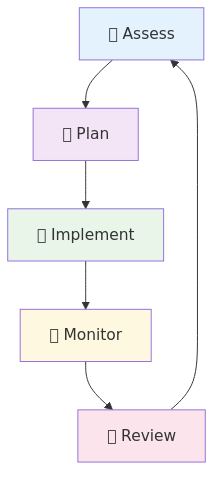
🔄 Continuous Security Improvement
📚 Additional Resources
| Resource Type | Description | Link |
|---|---|---|
| 📚 Official Documentation | Microsoft's comprehensive security guidance |  |
| 📋 Security Checklist | Detailed security implementation checklist | Security Checklist |
| 🔧 Troubleshooting | Security issue resolution procedures | Troubleshooting Guide |
🔒 Security is a Journey Security is not a one-time implementation but an ongoing process of continuous improvement. Regular reviews, updates, and adaptations to emerging threats ensure your Azure Synapse Analytics environment remains secure and compliant.
🚀 Next Steps Ready to implement these security controls? Start with our security implementation checklist and troubleshooting guide.