
Network Security Best Practices
Home > Best Practices > Network Security
Overview
This guide covers network security best practices for Azure Synapse Analytics, including private endpoints, network isolation, firewall configuration, and secure connectivity patterns.
🔐 Network Security Architecture
Implementing robust network security is critical for protecting your Azure Synapse Analytics environment.
-
🔒 Private Endpoints
Secure private connectivity to Azure services
-
🛡️ Firewall Configuration
IP-based access control for Synapse workspace
-
🛡️ Network Isolation
Isolate workspaces and data stores in virtual networks
-
🚀 Secure Connectivity
Establish secure connections between networks
Private Endpoints
Security Alert
Public network access should be disabled for production environments to minimize the attack surface.
Azure Private Endpoints provide secure connectivity to Azure Synapse Analytics services from your virtual network:
- Private Endpoint Components for Synapse Analytics:
- SQL on-demand endpoint
- SQL dedicated pool endpoint
- Development endpoint
- Web endpoint
- Serverless SQL endpoint
- Spark endpoint
{
  "name": "pe-synapse-sql",
  "properties": {
    "privateLinkServiceId": "/subscriptions/<subscription-id>/resourceGroups/<resource-group>/providers/Microsoft.Synapse/workspaces/<workspace-name>",
    "groupIds": ["Sql"],
    "privateLinkServiceConnectionState": {
      "status": "Approved",
      "description": "Auto-approved",
      "actionsRequired": "None"
    },
    "customDnsConfigs": [...]
  }
}
Firewall Configuration
Configure IP firewall rules to restrict access to your Synapse workspace:
| Rule Type | Purpose | Example |
|---|---|---|
| Allow Azure Services | Enable Azure services to access Synapse | Set "Allow Azure services" to "Yes" |
| Client IP | Allow specific client IP addresses | 192.168.1.10 |
| IP Range | Allow a range of IP addresses | 192.168.1.0/24 |
| Corporate Network | Allow connections from corporate network | 10.0.0.0/8 |
ARM Template for Firewall Rules
Network Isolation
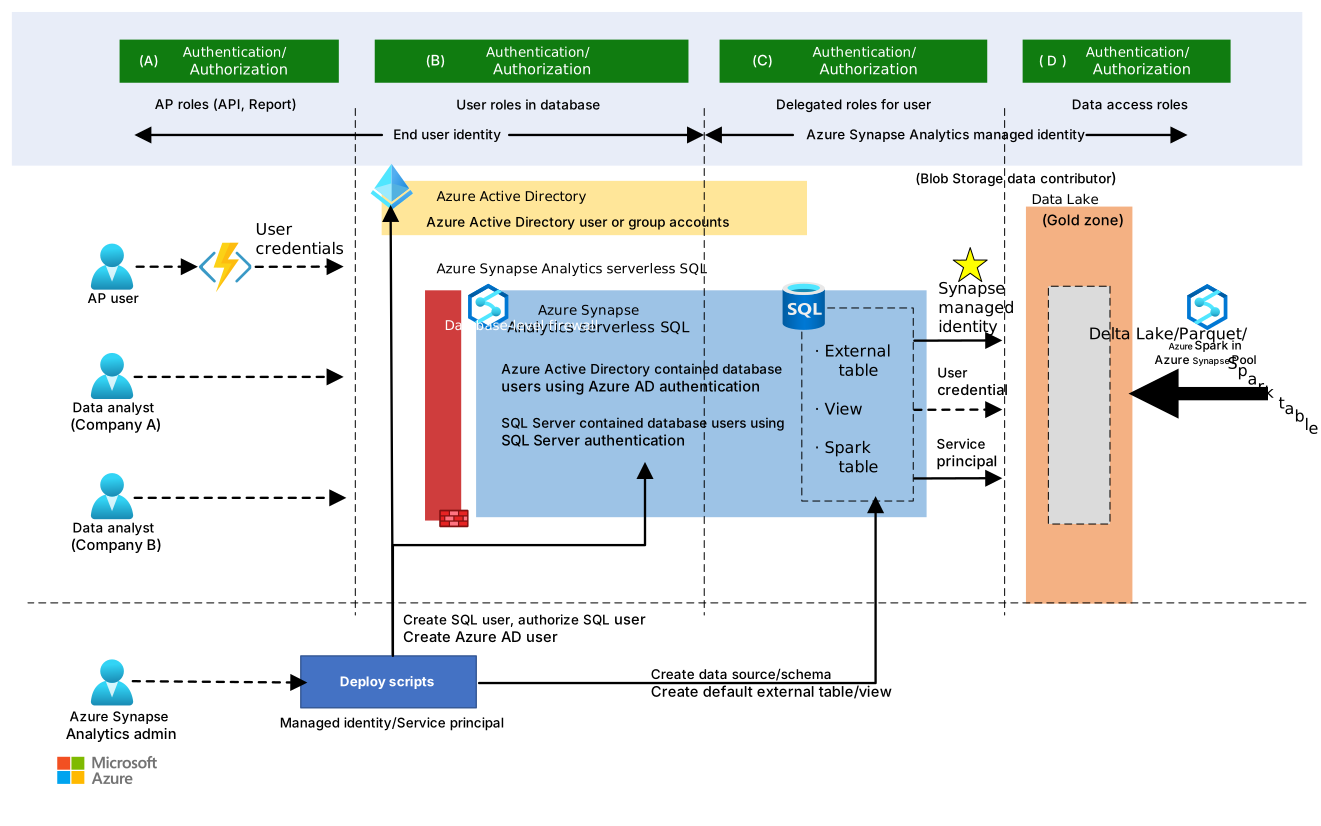
Implement these network isolation practices:
- VNet Integration - Place Synapse workspace in a virtual network
- Network Security Groups (NSGs) - Control traffic flow between subnets
- Service Endpoints - Secure Azure service connections
- Private DNS Zones - Resolve private endpoint DNS names
- Managed VNet - Enable managed virtual network for Synapse workspace
Best Practice
Use separate subnets for different Synapse components to apply granular NSG rules.
# Example: Create managed private endpoint
$synapseWorkspace = "mysynapseworkspace"
$resourceGroup = "myresourcegroup"
$dataLakeAccountName = "mydatalakeaccount"
$subscriptionId = "<subscription-id>"

# Get workspace information
$workspace = Get-AzSynapseWorkspace -Name $synapseWorkspace -ResourceGroupName $resourceGroup

# Create managed private endpoint to storage account
$dataLakeId = "/subscriptions/$subscriptionId/resourceGroups/$resourceGroup/providers/Microsoft.Storage/storageAccounts/$dataLakeAccountName"

New-AzSynapseManagedPrivateEndpoint -WorkspaceName $synapseWorkspace `
  -Name "synapse-datalake-pe" `
  -DefinitionName "Microsoft.Storage/storageAccounts" `
  -TargetResourceId $dataLakeId
Secure Connectivity
Establish secure connections between your on-premises network and Azure Synapse Analytics:
- ExpressRoute - Dedicated private connection to Azure
- VPN Gateway - Encrypted connection over public internet
- Azure Bastion - Secure RDP/SSH access to VMs
- Just-in-time Access - Temporary privileged access
Integration Point
Azure Private Link and ExpressRoute work together to provide secure, private connectivity from on-premises environments to Azure Synapse.
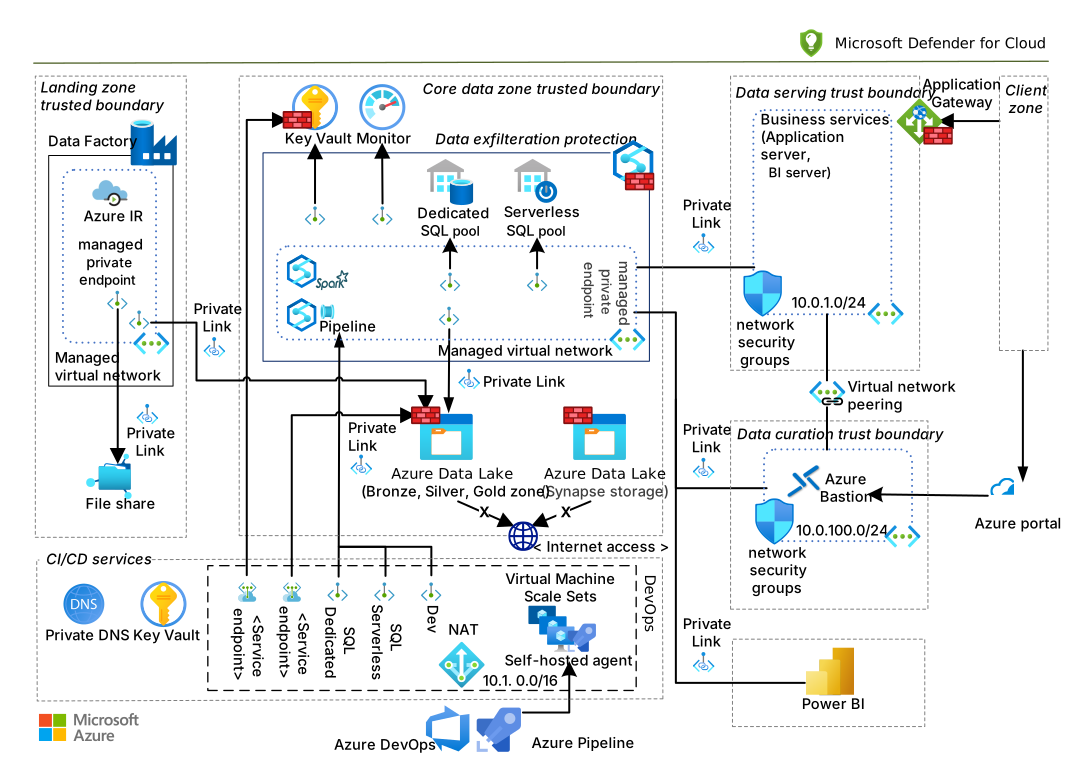
Defense-in-Depth Strategy
Implement a defense-in-depth strategy for network security:
| Layer | Controls | Purpose |
|---|---|---|
| Perimeter | Azure Firewall, DDoS Protection | Protect against external threats |
| Network | NSGs, Private Endpoints, UDRs | Control traffic flow |
| Resource | Workspace firewall, managed VNet | Restrict direct resource access |
| Data | Encryption, access policies | Protect data at rest and in transit |
| Identity | Azure AD, MFA, Conditional Access | Control authentication and authorization |
Implementation Checklist
- Enable managed virtual network for Synapse workspace
- Configure private endpoints for all Synapse components
- Set up private DNS zones for private endpoints
- Configure NSGs with least-privilege access rules
- Implement Azure Firewall for outbound filtering
- Enable Azure DDoS Protection Standard
- Configure ExpressRoute or VPN connectivity
- Set up Azure Bastion for secure administrative access
- Implement Just-in-Time access for emergency scenarios
- Document network topology and security controls