
Automated Testing for Synapse Analytics
Home > DevOps > Automated Testing
Overview
This guide covers automated testing strategies for Azure Synapse Analytics, including pipeline testing, data validation, and continuous integration approaches.
🧪 Testing Framework
A comprehensive testing strategy ensures reliable and stable Azure Synapse Analytics implementations.
-
⚡ Pipeline Testing
Validate pipeline execution and data transformation accuracy
-
📋 Data Validation
Verify data quality, completeness, and correctness
-
📝 Notebook Testing
Test Spark notebooks and SQL scripts
-
🔗 Integration Testing
Validate end-to-end processes and integrations
Pipeline Testing
Best Practice
Use parameterized pipelines to facilitate testing across different environments.
Test your Azure Synapse pipelines with these strategies:
- Unit Testing - Test individual activities with sample data
- Integration Testing - Test pipelines with realistic but constrained data sources
- End-to-End Testing - Validate full pipeline functionality in a test environment
- Performance Testing - Measure pipeline execution times with varied data volumes
# Example: Python test for validating pipeline execution results
import pytest
from azure.identity import DefaultAzureCredential
from azure.synapse.artifacts import ArtifactsClient

@pytest.fixture
def synapse_client():
    credential = DefaultAzureCredential()
    return ArtifactsClient(
        endpoint=f"https://myworkspace.dev.azuresynapse.net",
        credential=credential
    )

def test_data_transformation_pipeline(synapse_client):
    # Run the pipeline
    run_response = synapse_client.pipeline_runs.create_pipeline_run(
        pipeline_name="DataTransformationPipeline",
        parameters={"env": "test", "inputData": "sample-data.csv"}
    )

    # Wait for completion and assert success
    run_status = wait_for_pipeline_completion(synapse_client, run_response.run_id)
    assert run_status.status == "Succeeded"

    # Validate output data
    output_data = read_output_data()
    assert len(output_data) > 0
    assert all(required_field in output_data[0] for required_field in ["id", "name", "value"])
Data Validation
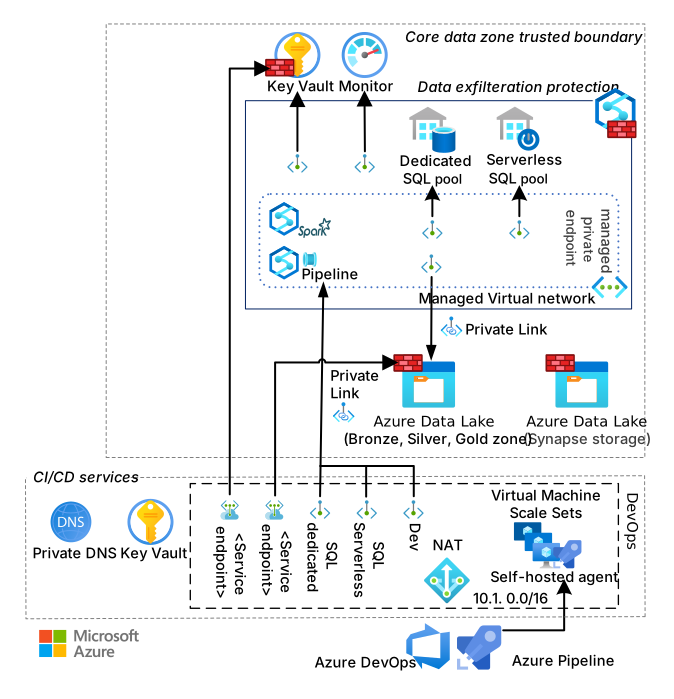
Implement these data validation techniques:
| Validation Type | Description | Implementation |
|---|---|---|
| Schema Validation | Verify correct data structure | Use Great Expectations or Spark schema validation |
| Data Quality | Check for nulls, duplicates, and outliers | Create SQL or Spark assertion queries |
| Referential Integrity | Verify relationships between datasets | Use foreign key checks or join validations |
| Business Rules | Validate business-specific rules | Implement custom validation logic |
Data Validation Example
# Using Great Expectations for data validation
import great_expectations as ge

# Load data
df = ge.read_csv("processed_data.csv")

# Define expectations
validation_result = df.expect_column_values_to_not_be_null("customer_id")
assert validation_result.success

validation_result = df.expect_column_values_to_be_between(
    "transaction_amount", min_value=0, max_value=100000
)
assert validation_result.success

validation_result = df.expect_column_values_to_be_in_set(
    "status", ["completed", "pending", "failed"]
)
assert validation_result.success
Notebook Testing
Test Spark notebooks and SQL scripts using automated frameworks:
- Papermill - Parameterize and execute notebooks as part of testing
- pytest-spark - Run Spark tests in isolated contexts
- DBT test - Test SQL transformations with standard test cases
- JUnit - Test Java/Scala Spark code
# Example: Testing a Spark notebook with papermill
import papermill as pm
import pandas as pd

# Execute the notebook with test parameters
result = pm.execute_notebook(
    'data_transformation.ipynb',
    'output_notebook.ipynb',
    parameters={
        'input_path': 'test-data.csv',
        'output_path': 'test-output.csv'
    }
)

# Validate outputs
output_df = pd.read_csv('test-output.csv')
assert output_df.shape[0] > 0  # Output has rows
assert 'transformed_column' in output_df.columns  # Expected column exists
Integration Testing
Important
Integration tests require careful data management to avoid affecting production environments.
For effective integration testing:
- Create isolated test environments with proper access controls
- Use representative but anonymized test data
- Implement test data generators for edge cases
- Automate environment setup and teardown
- Test all integration points including external systems
# Example: Azure DevOps pipeline for Synapse integration testing
trigger:
- main

pool:
  vmImage: 'ubuntu-latest'

steps:
- task: UsePythonVersion@0
  inputs:
    versionSpec: '3.9'
    addToPath: true

- script: |
    pip install -r tests/requirements.txt
    pytest tests/integration/ --junit-xml=test-results.xml
  displayName: 'Run integration tests'

- task: PublishTestResults@2
  inputs:
    testResultsFormat: 'JUnit'
    testResultsFiles: 'test-results.xml'
  condition: succeededOrFailed()
Testing Best Practices
- Automate everything - Include tests in CI/CD pipelines
- Isolate environments - Use separate test environments
- Clean test data - Ensure tests clean up after themselves
- Idempotent tests - Tests should be repeatable with consistent results
- Parallel execution - Design tests to run in parallel when possible
- Comprehensive coverage - Test normal flows, edge cases, and failure scenarios