
Azure Synapse Analytics Security Reference
Home > Reference > Security Guide
Overview
This document provides comprehensive security guidance for Azure Synapse Analytics, covering key security aspects across various compute engines and data layers.
Network Security
Network Isolation
-
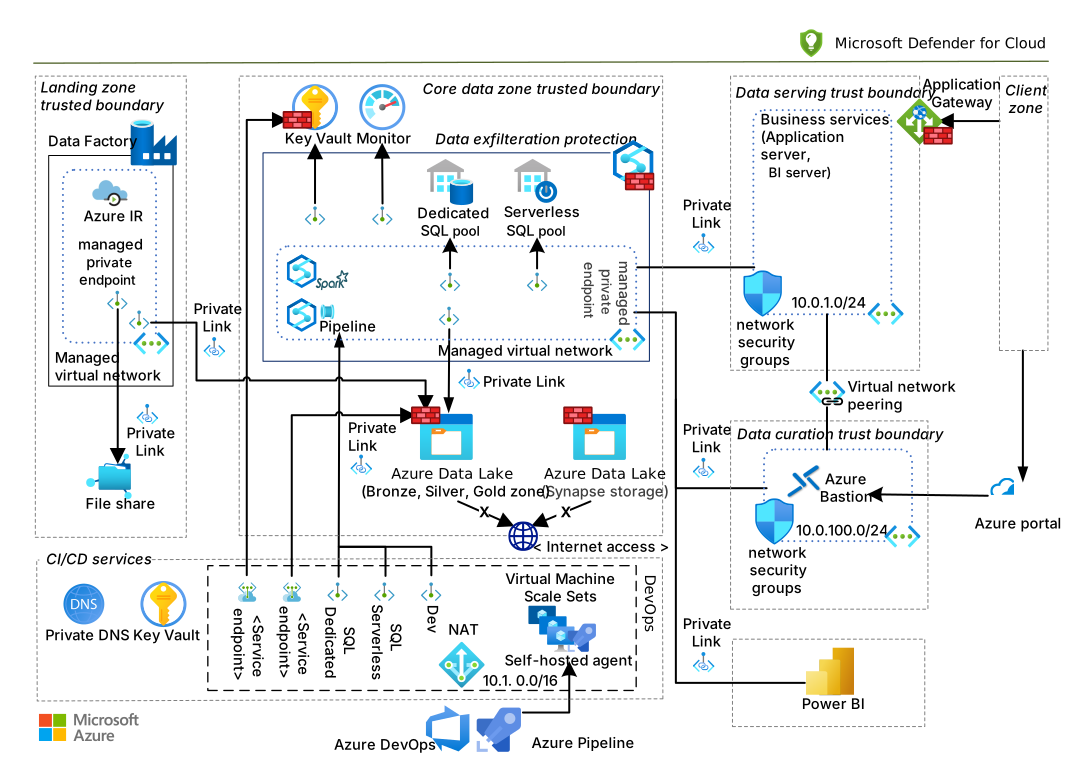
Use private endpoints to ensure data flows through Azure backbone network
-
Configure managed virtual networks for Synapse workspaces
-
Use IP firewall rules to restrict access
-
Enable service endpoints for added protection
Connectivity
Authentication and Authorization
Authentication Methods
-
Microsoft Entra ID (formerly Azure AD) integration
-
Multi-factor authentication
-
Managed identities for Azure resources
-
Service principals with limited scopes
Role-Based Access Control (RBAC)
-
Synapse RBAC roles:
-
Synapse Administrator
- Synapse Contributor
- Synapse Compute Operator
- Synapse Artifact Publisher
-
Synapse Artifact User
-
Azure RBAC roles integration
-
Custom role definitions
Data Protection
Encryption
-
Encryption at rest (storage level)
-
Encryption in transit (TLS 1.2+)
-
Customer-managed keys integration
-
Double encryption support
Data Access Controls
-
Column-level security
-
Row-level security
-
Dynamic data masking
-
Azure Purview integration for data governance
Monitoring and Auditing
Audit Logging
-
Integrate with Azure Monitor
-
Workspace diagnostic logging
-
SQL audit logging
-
Apache Spark application logs
Security Alerts
-
Azure Defender for SQL
-
Microsoft Sentinel integration
-
Anomaly detection
-
Threat protection
Best Practices
Serverless SQL Pool Security
-
Implement proper access controls on underlying storage
-
Use managed identities for storage access
-
Apply appropriate RBAC permissions
-
Enable diagnostic logging
Spark Pool Security
-
Configure secure access to notebooks
-
Use secret scopes for sensitive information
-
Isolate development, test, and production workspaces
-
Implement proper package management
Shared Metadata Security
-
Control database and table permissions
-
Implement column-level security for sensitive data
-
Use row-level security for multi-tenant scenarios
-
Regularly audit security permissions
Code Examples
Configuring Column-Level Security
-- Create users
CREATE USER DataAnalyst WITHOUT LOGIN;
CREATE USER DataScientist WITHOUT LOGIN;

-- Grant access to the table
GRANT SELECT ON SalesData TO DataAnalyst, DataScientist;

-- Deny access to sensitive columns for DataAnalyst
DENY SELECT ON SalesData(CustomerEmail, CreditCardNumber) TO DataAnalyst;
Implementing Row-Level Security
-- Create security predicate function
CREATE FUNCTION dbo.fn_securitypredicate(@Region AS VARCHAR(100))
RETURNS TABLE
WITH SCHEMABINDING
AS
RETURN SELECT 1 AS fn_result
       WHERE @Region = 'North America'
       OR USER_NAME() = 'dbo'
       OR USER_NAME() = 'GlobalAnalyst';

-- Create security policy
CREATE SECURITY POLICY RegionalDataFilter
ADD FILTER PREDICATE dbo.fn_securitypredicate(Region)
ON dbo.SalesData;
Setting Up Dynamic Data Masking
-- Apply masking to sensitive columns
ALTER TABLE dbo.Customers
ALTER COLUMN Email ADD MASKED WITH (FUNCTION = 'email()');

ALTER TABLE dbo.Customers
ALTER COLUMN PhoneNumber ADD MASKED WITH (FUNCTION = 'partial(0,"XXX-XXX-",4)');

ALTER TABLE dbo.CreditCards
ALTER COLUMN CardNumber ADD MASKED WITH (FUNCTION = 'partial(0,"XXXX-XXXX-XXXX-",4)');