Quickstart
Get a working Cloud-Scale Analytics platform deployed and flowing data in 60–90 minutes (prerequisites met). The main path below deploys the platform end-to-end. Pick a sub-quickstart from the cards below to dive into a specific scenario.
-
Full platform deploy
Infrastructure → seed data → dbt medallion → streaming → Purview. The 7-step main path.
-
Vertical example (USDA)
Run the USDA agriculture vertical end-to-end without full infra (local Databricks or DuckDB).
-
Portal (FastAPI + React)
Run the data-onboarding portal locally with the shared backend and React frontend.
-
Platform services
Deploy the Functions-based platform services (validation, marketplace, AI integration).
-
Azure Government
Deploy with FedRAMP-compliant configuration to USGov regions.
-
Teardown
Tear down a deployed environment safely (with cost-safety guards).
Cost safety
CSA-in-a-Box provisions Synapse, Databricks, ADX, Event Hub, and other billable services. A forgotten demo environment can accrue $1,000+/day. Always run Teardown when you're done.
The 7-step path at a glance
flowchart LR
    classDef step    fill:#0078D4,stroke:#003E6F,color:#FFFFFF,stroke-width:2px,font-weight:bold
    classDef io      fill:#F3F2F1,stroke:#605E5C,color:#1F1F1F
    classDef done    fill:#107C10,stroke:#054B05,color:#FFFFFF,stroke-width:2px

    S1[1 Prereqs<br/>5 min]:::step
    S2[2 Login<br/>2 min]:::step
    S3[3 Deploy IaC<br/>25 min]:::step
    S4[4 Seed data<br/>10 min]:::step
    S5[5 dbt build<br/>15 min]:::step
    S6[6 Streaming<br/>10 min]:::step
    S7[7 Purview<br/>10 min]:::step
    OK[Working<br/>platform]:::done

    S1 --> S2 --> S3 --> S4 --> S5 --> S6 --> S7 --> OK

    A[Azure CLI<br/>Bicep<br/>Python 3.11+]:::io --> S1
    B[Subscription<br/>Tenant ID]:::io --> S2
C[Bronze→Silver→<br/>Gold tables]:::io --> S5Prerequisites
| Tool | Minimum Version | Check |
|---|---|---|
| Azure CLI | 2.50+ | az version |
| Bicep CLI | 0.25+ | az bicep version |
| Python | 3.10+ | python --version |
| dbt | 1.7+ | dbt --version |
| git | 2.x | git --version |
Step 1: Deploy infrastructure
# Clone the repo
git clone <CLONE_URL>
cd csa-inabox

# Set up Python environment
make setup  # or make setup-win on Windows

# Deploy to dev (what-if first)
bash scripts/deploy/deploy-platform.sh --environment dev --dry-run

# Deploy for real
bash scripts/deploy/deploy-platform.sh --environment dev
The deployment script deploys three landing zones in order:
- ALZ (Management) — logging, monitoring, policies
- DMLZ (Data Management) — Purview, Key Vault, shared services
- DLZ (Data Landing Zone) — ADF, Databricks, Synapse, ADLS, Event Hub
Step 2: Load sample data
CSA-in-a-Box ships with realistic seed data:
| Dataset | Rows | Quality Issues |
|---|---|---|
sample_customers.csv | 200 | ~5% (bad emails, missing names) |
sample_orders.csv | 2,000 | ~5% (null customer_id, future dates, negative amounts) |
sample_products.csv | 50 | Clean |
sample_invoices.csv | 500 | ~3% (null order_id, negative amounts) |
sample_payments.csv | 400 | Clean |
sample_inventory.csv | 300 | ~3% (null product_id, negative qty, overreserved) |
sample_warehouses.csv | 8 | Clean |
raw_sales_orders.csv | 1,000 | ~5% (negative prices, future dates, invalid qty) |
# Option A: Upload to ADLS Gen2 (requires deployed storage account)
python scripts/seed/load_sample_data.py \
    --storage-account <your-storage-account> \
    --container raw

# Option B: Load via dbt seed (local or Databricks)
cd domains/shared/dbt
dbt seed --profiles-dir .
Step 3: Run the dbt pipeline
Each domain has its own dbt project. Run them in order:
# Shared domain (foundation — customers, orders, products)
cd domains/shared/dbt
dbt deps
dbt seed
dbt run --select tag:bronze
dbt run --select tag:silver
dbt run --select tag:gold
dbt test

# Finance domain (invoices, payments, reconciliation)
cd ../../finance/dbt
dbt deps
dbt seed
dbt run --select tag:bronze
dbt run --select tag:silver
dbt run --select tag:gold
dbt test

# Inventory domain (stock levels, warehouses, reorder alerts)
cd ../../inventory/dbt
dbt deps
dbt seed
dbt run --select tag:bronze
dbt run --select tag:silver
dbt run --select tag:gold
dbt test

# Sales domain (sales orders, metrics)
cd ../../sales/dbt
dbt deps
dbt seed
dbt run --select tag:bronze
dbt run --select tag:silver
dbt run --select tag:gold
dbt test
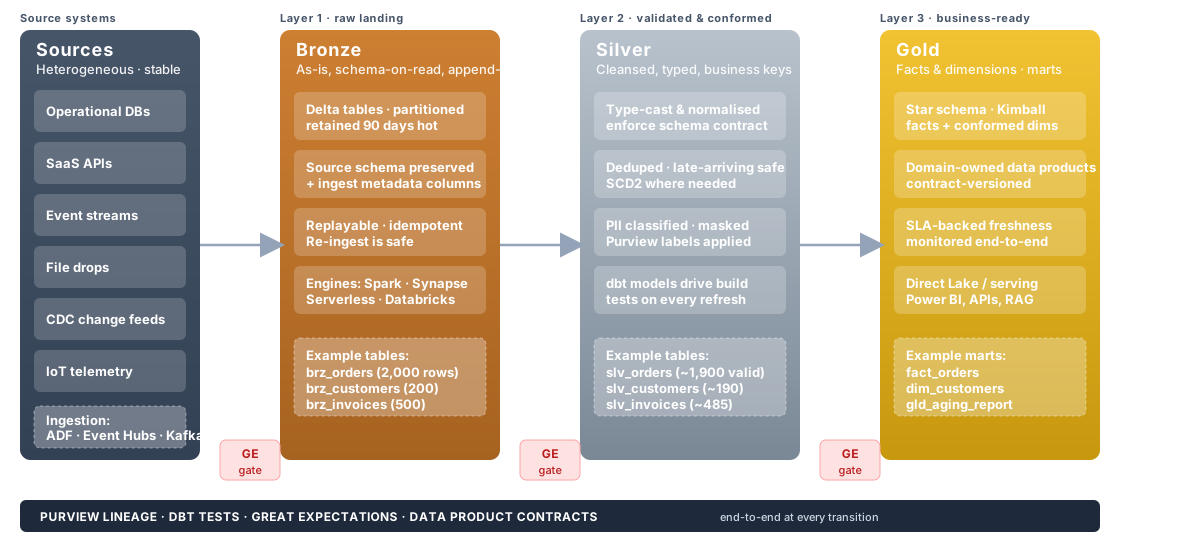
Expected Row Counts
Shared Domain
| Layer | Model | Expected Rows |
|---|---|---|
| Bronze | brz_orders | 2,000 |
| Bronze | brz_customers | 200 |
| Bronze | brz_products | 50 |
| Silver | slv_orders | 2,000 (all rows, ~100 flagged invalid) |
| Silver | slv_customers | 200 (all rows, ~10 flagged invalid) |
| Silver | slv_products | 50 |
| Gold | fact_orders | ~1,900 (valid orders only) |
| Gold | dim_customers | ~190 (valid customers only) |
| Gold | dim_products | 50 |
| Gold | gld_daily_order_metrics | ~1,095 (unique dates) |
| Gold | gld_customer_lifetime_value | ~190 |
| Gold | gld_monthly_revenue | ~36 (months x countries) |
Finance Domain
| Layer | Model | Expected Rows |
|---|---|---|
| Bronze | brz_invoices | 500 |
| Bronze | brz_payments | 400 |
| Silver | slv_invoices | 500 (all rows, ~15 flagged invalid) |
| Silver | slv_payments | 400 |
| Gold | gld_aging_report | ~485 (valid invoices) |
| Gold | gld_revenue_reconciliation | ~2,000+ (full outer join orders↔invoices) |
Inventory Domain
| Layer | Model | Expected Rows |
|---|---|---|
| Bronze | brz_inventory | 300 |
| Bronze | brz_warehouses | 8 |
| Silver | slv_inventory | 300 (all rows, ~11 flagged invalid) |
| Silver | slv_warehouses | 8 |
| Gold | dim_warehouses | 8 |
| Gold | fact_inventory_snapshot | ~289 (valid inventory) |
| Gold | gld_reorder_alerts | varies (products below reorder point) |
| Gold | gld_inventory_turnover | ~50 (one per product) |
Sales Domain
| Layer | Model | Expected Rows |
|---|---|---|
| Bronze | brz_sales_orders | 1,000 |
| Silver | slv_sales_orders | 1,000 (all rows, ~45 flagged invalid) |
| Gold | gld_sales_metrics | varies (date × region × channel) |
Step 4: Run ADF orchestration (optional)
If ADF is deployed, trigger the master pipeline:
az datafactory pipeline create-run \
    --factory-name <adf-name> \
    --resource-group <rg-name> \
    --name pl_medallion_orchestration \
    --parameters '{"domain":"shared","entities":["sample_customers","sample_orders","sample_products"]}'
The orchestration pipeline:
- Ingests each entity to Bronze (parallel ForEach)
- Runs dbt Bronze models
- Runs dbt Silver models
- Runs dbt Gold models
- Sends alerts on failure
Step 5: Explore the data
Query Silver (validation results)
-- See flagged records in Silver
SELECT order_id, is_valid, validation_errors
FROM silver.slv_orders
WHERE is_valid = FALSE
LIMIT 20;
Query Gold (business metrics)
-- Daily revenue
SELECT order_date, total_orders, total_revenue, cancellation_rate_pct
FROM gold.gld_daily_order_metrics
ORDER BY order_date DESC
LIMIT 30;

-- Customer lifetime value
SELECT customer_id, first_name, last_name, lifetime_revenue,
       customer_segment, value_tier
FROM gold.gld_customer_lifetime_value
ORDER BY lifetime_revenue DESC
LIMIT 20;

-- Cross-domain reconciliation (finance)
SELECT reconciliation_status, COUNT(*) as count,
       SUM(ABS(amount_difference)) as total_discrepancy
FROM gold.gld_revenue_reconciliation
GROUP BY reconciliation_status;
Step 6: Start streaming (optional)
# Produce sample events to Event Hub
python scripts/streaming/produce_events.py \
    --event-hub-namespace <namespace> \
    --event-hub-name events \
    --rate 50 \
    --duration 120
Events flow through: Event Hub → Event Processing Function → Cosmos DB + ADX
Monitor in real-time via ADX:
RawEvents
| where timestamp > ago(15m)
| summarize count() by type, bin(timestamp, 1m)
| render timechart
Step 7: Bootstrap Purview catalog (optional)
python scripts/purview/bootstrap_catalog.py \
    --purview-account <purview-name> \
    --storage-account <storage-name>
This creates:
- Collection hierarchy (csa-inabox > shared, sales, finance)
- Business glossary terms (Customer, Order, Product, Invoice, Revenue, etc.)
- Scan sources for ADLS Bronze/Silver/Gold containers
Project structure
csa-inabox/
  deploy/bicep/           # Infrastructure as Code (4 landing zones)
  domains/
    shared/               # Shared domain (customers, orders, products)
      dbt/                #   dbt models: Bronze -> Silver -> Gold
      notebooks/          #   Databricks notebooks
      pipelines/adf/      #   ADF pipeline definitions
      data-products/      #   Data product contracts
    finance/              # Finance domain (invoices, payments)
      dbt/                #   Finance-specific dbt models
      data-products/      #   Data product contracts
    inventory/            # Inventory domain (stock, warehouses)
      dbt/                #   Inventory-specific dbt models
      data-products/      #   Data product contracts
    sales/                # Sales domain (sales orders, metrics)
      dbt/                #   Sales-specific dbt models
      data-products/      #   Orders data product contract
      pipelines/adf/      #   Sales-specific ADF pipelines
  governance/             # Cross-cutting governance
    common/               #   Logging, validation, contracts
    contracts/            #   Contract validator + dbt test generator
    purview/              #   Catalog config, glossary, classification
    dataquality/          #   Great Expectations runner
  scripts/
    deploy/               # Deployment orchestration
    seed/                 # Sample data loader
    streaming/            # Event producer + ADX setup
    purview/              # Catalog bootstrap
  tests/                  # Unit tests (pytest)
Quick start: Run a vertical example (USDA)
Run the USDA agriculture analytics vertical end-to-end without deploying full infrastructure (uses local Databricks or DuckDB adapter).
Step A: Generate Seed Data
cd examples/usda

# Generate realistic USDA NASS-style seed data
python data/generators/generate_usda_data.py --output data/seeds/
Step B: Load Seeds and Run dbt
cd examples/usda/domains/dbt

# Install dependencies
dbt deps

# Load seed CSVs into your warehouse
dbt seed --profiles-dir .

# Run the full medallion pipeline
dbt run --select tag:bronze
dbt run --select tag:silver
dbt run --select tag:gold

# Validate results
dbt test
Step C: Explore Results
-- Crop production by state
SELECT state_name, commodity_desc, year,
       SUM(value) AS total_production
FROM gold.gld_crop_yield_forecast
WHERE year >= 2020
GROUP BY state_name, commodity_desc, year
ORDER BY total_production DESC
LIMIT 20;
Quick start: Deploy the portal
Run the data onboarding portal locally with the shared backend and React frontend.
Step A: Start the Shared Backend
cd portal/shared

# Install Python dependencies
pip install -r requirements.txt

# Start the FastAPI backend (ENVIRONMENT=local enables demo mode)
ENVIRONMENT=local uvicorn api.main:app --reload --port 8000

# Verify: http://localhost:8000/api/docs (Swagger UI)
Step B: Start a Frontend
React/Next.js:
Docker Compose (both at once):
# From the repository root:
docker compose -f portal/kubernetes/docker/docker-compose.yml up --build
# Backend: http://localhost:8000
# Frontend: http://localhost:3000
CLI variant (CSA-0066 — 4th portal variant):
# Install with portal extras (CSA-0062)
make setup EXTRAS=dev,portal

# Point the CLI at your running backend and use it
export CSA_API_URL=http://localhost:8000/api/v1
python -m cli --help                         # list commands
python -m cli sources list                   # list registered sources
python -m cli marketplace products           # list data products
python -m cli --format json stats overview   # JSON output for CI pipelines
Step C: Register a Data Source
- Open the portal at
http://localhost:3000 - Click Register New Source
- Fill in source details (name, type, connection, schedule)
- The backend provisions a DLZ pipeline and registers the source in Purview
Quick start: Platform services
Deploy shared platform services that provide Fabric-equivalent capabilities.
Step A: Deploy Shared Services (Azure Functions)
cd csa_platform/functions/validation

# Install dependencies
pip install -r requirements.txt

# Test locally
func start

# Deploy to Azure
func azure functionapp publish <your-function-app-name> --python
Step B: Deploy the Data Marketplace
Important
CSA-0067 / CSA-0131: The legacy reference marketplace under csa_platform/data_marketplace/ is deprecated and does not ship an --init CLI. Use the actively-served marketplace at portal.shared.api.routers.marketplace instead — it seeds demo products automatically when ENVIRONMENT=local or DEMO_MODE=true.
# (Option A, recommended) Start the portal — seed data loads on startup.
cd portal/kubernetes/docker && docker compose up --build

# (Option B) Run the backend directly — demo products appear on first
# request when ENVIRONMENT=local:
ENVIRONMENT=local uvicorn portal.shared.api.main:app --reload --port 8000

# The marketplace browsable at:
#   http://localhost:3000/marketplace   (React frontend)
#   http://localhost:8000/api/v1/marketplace/products   (JSON API)
Step C: Configure AI Integration
# Set environment variables
export AZURE_OPENAI_ENDPOINT=https://<resource>.openai.azure.com/
export AZURE_OPENAI_API_KEY=<your-key>
export AZURE_OPENAI_DEPLOYMENT=gpt-4

# Test document classification
python -c "
from csa_platform.ai_integration.enrichment.document_classifier import classify
result = classify('This invoice contains patient health records...')
print(result)
"
See PLATFORM_SERVICES.md for the full deployment guide.
Quick start: Azure Government
Deploy CSA-in-a-Box to Azure Government with FedRAMP-compliant configuration.
Step A: Switch to Government Cloud
# Set Azure CLI to Government
az cloud set --name AzureUSGovernment
az login

# Verify you're in the right cloud
az cloud show --query name -o tsv
# Expected: AzureUSGovernment
Step B: Deploy with Gov Parameters
# Deploy using Government parameter files
bash scripts/deploy/deploy-platform.sh \
  --environment gov-dev \
  --location usgovvirginia

# Or deploy individual templates
az deployment sub create \
  --location usgovvirginia \
  --template-file deploy/bicep/gov/main.bicep \
  --parameters deploy/bicep/gov/params.gov-dev.json
Step C: Verify Compliance Tags
# Check that compliance tags were applied
az group list \
  --query "[?tags.FedRAMP_Level=='High']" \
  -o table

# Verify endpoints are using .us domains
az storage account show \
  --name <storage-account> \
  --query "primaryEndpoints.dfs" \
  -o tsv
# Expected: https://<name>.dfs.core.usgovcloudapi.net/
Government-Specific Notes
!!! note - All services use .us / .usgovcloudapi.net endpoints - Compliance tags are auto-applied: FedRAMP High, FISMA, NIST 800-53 Rev5 - Microsoft Fabric is forecast, not GA, in Azure Government — this repo provides Fabric-parity capabilities on Azure PaaS services that ARE available in Gov today - See GOV_SERVICE_MATRIX.md for service availability
Teardown
Warning
Cost-safety. CSA-in-a-Box provisions Synapse, Databricks, ADX, Event Hub, and other billable services. A forgotten demo environment can accrue $1,000+/day. Always tear down when you are done.
Every deployable surface ships with a teardown script that:
- Enumerates resources (
az resource list) before doing anything destructive. - Demands a typed
DESTROY-<env>(platform) orDESTROY-<vertical>(example) confirmation — any other input aborts. - Deletes in dependency-safe order: diagnostic settings → private endpoints → data services → storage → Key Vault (with purge best-effort) → VNets → resource group.
- Writes a timestamped log to
reports/teardown/<env>-<ts>.log. - Supports
--dry-runto preview and--yesfor CI automation (never use--yesagainst prod).
Platform teardown
# Interactive (recommended)
bash scripts/deploy/teardown-platform.sh --env dev

# Dry run (enumerate only)
bash scripts/deploy/teardown-platform.sh --env dev --dry-run

# CI automation (ephemeral environments only)
bash scripts/deploy/teardown-platform.sh --env dev --yes

# Validate prerequisites (az login, jq, active subscription) without acting
bash scripts/deploy/teardown-platform.sh --validate
Makefile equivalents:
make teardown-dev        # uses --yes for CI pipelines
make teardown-staging    # interactive
make teardown-prod       # interactive; NEVER runs --yes
Vertical-example teardown
# Interactive teardown for a specific vertical
bash examples/usda/deploy/teardown.sh

# Dry run
bash examples/usda/deploy/teardown.sh --dry-run

# Makefile
make teardown-example VERTICAL=usda
make teardown-example VERTICAL=usda DRYRUN=1
Each example README has its own Prerequisites / Cost / Teardown section with per-vertical cost estimates and runtime expectations.
Post-teardown checklist
-
az group list -o tsv | grep -i <prefix>returns nothing. -
az keyvault list-deleted -o tsv— purge any leftovers you own (may require manual purge if purge-protection was enabled). -
az consumption usage list --start-date <yesterday>— confirm no ongoing charges. -
reports/teardown/<env>-<ts>.logarchived with the change ticket if this was a production teardown.
Next steps
- Add a new domain: Copy
domains/finance/as a template, updatedbt_project.yml - Add a data product: Create
contract.yamlunderdata-products/ - Add quality rules: Extend
csa_platform/csa_platform/governance/dataquality/with Great Expectations checkpoints - Scale streaming: Increase Event Hub partitions, add ADX scaling policies
- Production hardening: See
docs/PRODUCTION_CHECKLIST.md - Architecture deep-dive: See
docs/ARCHITECTURE.md - Platform services: See
docs/PLATFORM_SERVICES.md - Azure Government: See
docs/GOV_SERVICE_MATRIX.md
See also:
- ← Previous: Getting Started (30-min tour)
- → Next: Developer Pathways
- ⌂ Index: Documentation home