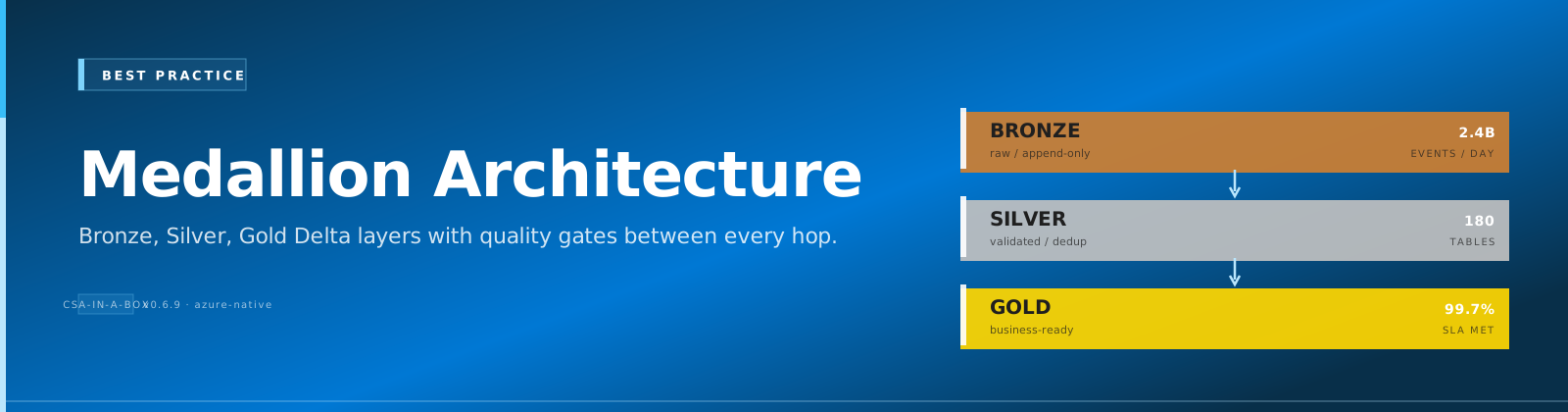
Medallion Architecture Best Practices
Comparative positioning note
This document is written from the perspective of Microsoft Azure, Cloud Scale Analytics, and CSA Loom. Any description of third-party or competing products, services, pricing, or capabilities is derived from publicly available documentation and sources believed accurate at the time of writing, and is provided for general comparison only. We do not claim expertise in, or authority over, any non-Microsoft product or service; the respective vendor's official documentation is the authoritative source for their offerings, which may change over time. Nothing here is intended to disparage any vendor — where a competing product has genuine advantages, we aim to note them honestly. Verify all third-party details against the vendor's current official documentation before making decisions.
Overview
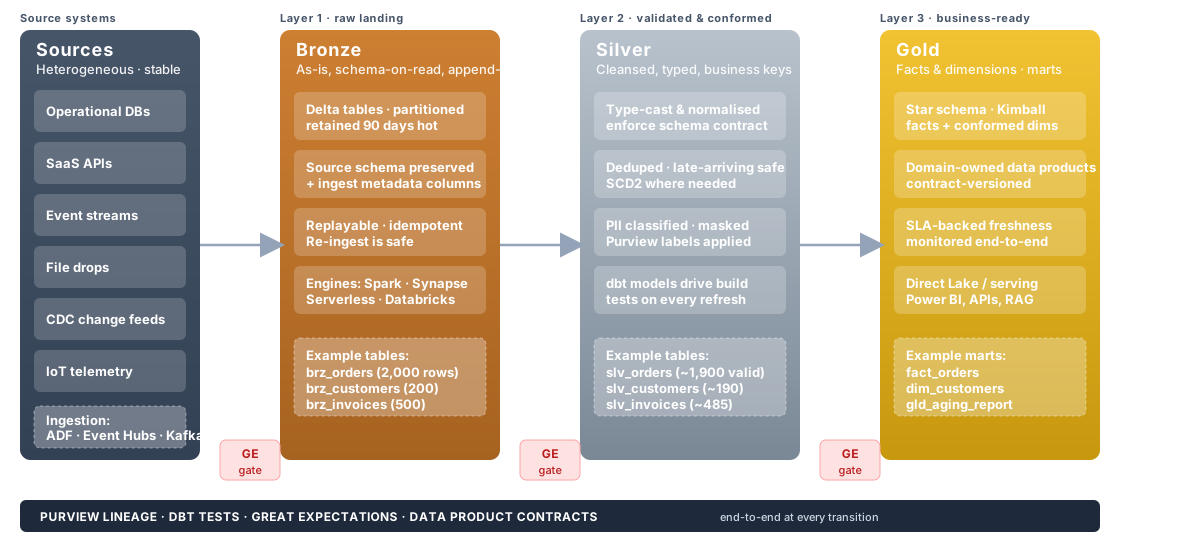
The medallion architecture (also called multi-hop architecture) organizes a lakehouse into three progressive layers of data quality: Bronze (raw), Silver (cleansed), and Gold (analytics-ready). Each layer serves a distinct purpose in transforming raw source data into trusted, governed data products.
Why it matters for CSA-in-a-Box:
- Data quality — errors are caught and corrected at well-defined boundaries
- Governance — lineage is traceable from source to consumption
- Reusability — Silver assets serve multiple Gold use cases
- Auditability — raw records are preserved for compliance and replay
Architecture Diagram
flowchart LR
    subgraph Sources
        S1[ERP / SAP]
        S2[CRM / Dynamics]
        S3[APIs / Events]
        S4[Files / SFTP]
    end

    subgraph Bronze["Bronze — Raw"]
        B1[Append-only ingestion]
        B2[Schema-on-read]
        B3[Full fidelity]
    end

    subgraph Silver["Silver — Cleansed"]
        SV1[Deduplication]
        SV2[Type casting & conforming]
        SV3[SCD Type 2]
    end

    subgraph Gold["Gold — Analytics-Ready"]
        G1[Star schemas]
        G2[Aggregated metrics]
        G3[Data products]
    end

    subgraph Consumers
        C1[Power BI]
        C2[ML Models]
        C3[APIs / Apps]
    end

    S1 & S2 & S3 & S4 --> B1 & B2 & B3
    B1 & B2 & B3 -->|Quality Gates| SV1 & SV2 & SV3
    SV1 & SV2 & SV3 -->|Quality Gates| G1 & G2 & G3
    G1 & G2 & G3 --> C1 & C2 & C3
What this looks like in Azure
Bronze Layer Best Practices
The Bronze layer is the landing zone — an exact, append-only copy of source data with added ingestion metadata. It preserves full fidelity so upstream issues can always be replayed.
Naming Convention
Core Principles
- Append-only ingestion — never update or delete rows in Bronze.
- No transformations — store data exactly as received.
- Schema-on-read — use flexible types (
STRING,VARIANT,JSON) when source schemas are unstable. - Metadata columns — every Bronze table includes
_metadatacolumns for lineage.
Required Metadata Columns
| Column | Type | Description |
|---|---|---|
_ingested_at | TIMESTAMP | UTC timestamp when the record was ingested |
_source_file | STRING | Source file path, API endpoint, or topic name |
_batch_id | STRING | Unique identifier for the ingestion batch/run |
_ingested_date | DATE | Partition key derived from _ingested_at |
Partitioning
Partition Bronze tables by _ingested_date. This enables efficient time-travel queries and simplifies retention management.
Retention Policy
Compliance Requirement
Retain raw Bronze data for a minimum of 7 years to satisfy audit and regulatory obligations. Use lifecycle policies to move older partitions to cold/archive storage tiers.
Do / Don't
| ✅ Do | ❌ Don't |
|---|---|
| Store data exactly as received from source | Apply business logic or filtering |
Add _metadata columns for lineage | Modify source column names or types |
Partition by _ingested_date | Partition by business keys |
| Use append-only writes | Overwrite or upsert rows |
| Keep raw data for 7+ years | Delete raw data after Silver processing |
| Use schema-on-read for volatile sources | Enforce strict schemas on unstable sources |
Example: dbt Bronze Model
-- models/bronze/brz_sap_sales_orders.sql

{{ config(
    materialized='incremental',
    incremental_strategy='append',
    partition_by={
        "field": "_ingested_date",
        "data_type": "date",
        "granularity": "day"
    },
    tags=['bronze', 'sap']
) }}

SELECT
    -- Preserve all source columns as-is
    *,

    -- Metadata columns
    CURRENT_TIMESTAMP()                       AS _ingested_at,
    '{{ var("source_file", "unknown") }}'     AS _source_file,
    '{{ invocation_id }}'                     AS _batch_id,
    CURRENT_DATE()                            AS _ingested_date

FROM {{ source('sap_raw', 'sales_orders') }}

{% if is_incremental() %}
WHERE _loaded_at > (SELECT MAX(_ingested_at) FROM {{ this }})
{% endif %}
Silver Layer Best Practices
The Silver layer cleanses, conforms, and deduplicates Bronze data into an enterprise-aligned model. Silver tables are the single source of truth for a given entity.
Naming Convention
Core Principles
- Data cleansing — handle nulls, trim strings, cast types, standardize formats.
- Deduplication — resolve duplicates using deterministic keys and ordering.
- SCD Type 2 — track historical changes for slowly-changing dimensions.
- Conform to enterprise model — align column names, data types, and reference data to organization-wide standards.
- Quality gates — validate data between Bronze → Silver with automated tests.
Data Cleansing Patterns
| Pattern | Technique |
|---|---|
| Null handling | COALESCE(field, default_value) or reject with test |
| Deduplication | ROW_NUMBER() OVER (PARTITION BY pk ORDER BY _ingested_at DESC) |
| Type casting | Explicit CAST() / SAFE_CAST() |
| String normalization | TRIM(UPPER(field)) |
| Date standardization | Convert all dates to UTC / ISO 8601 |
SCD Type 2 Pattern
slv_{domain}_{entity}_scd

Columns:
  {natural_key}        -- business key
  {attributes}         -- tracked columns
  _valid_from          -- effective start (inclusive)
  _valid_to            -- effective end (exclusive), NULL = current
  _is_current          -- BOOLEAN flag for convenience
  _hash_diff           -- hash of tracked columns for change detection
Quality Gates (Bronze → Silver)
Use dbt tests or Great Expectations to enforce quality before data enters Silver:
not_nullon primary keysuniqueon primary keysaccepted_valueson enumerationsrelationshipsfor referential integrity- Custom row-count variance checks (alert if delta > 20%)
Do / Don't
| ✅ Do | ❌ Don't |
|---|---|
| Deduplicate using deterministic logic | Randomly pick one of N duplicates |
| Apply SCD Type 2 for dimensions that change | Overwrite dimension history |
| Enforce data types explicitly | Rely on implicit type coercion |
| Align to enterprise naming standards | Invent new naming per project |
| Run quality tests before writing Silver | Skip validation and "fix later" |
| Document cleansing rules in dbt YAML | Bury logic in undocumented SQL |
Example: dbt Silver Incremental Model with Dedup and SCD2
-- models/silver/slv_sales_orders.sql

{{ config(
    materialized='incremental',
    unique_key='order_id',
    incremental_strategy='merge',
    partition_by={
        "field": "order_date",
        "data_type": "date",
        "granularity": "month"
    },
    tags=['silver', 'sales']
) }}

WITH source AS (
    SELECT * FROM {{ ref('brz_sap_sales_orders') }}
    {% if is_incremental() %}
    WHERE _ingested_at > (SELECT MAX(_ingested_at) FROM {{ this }})
    {% endif %}
),

deduplicated AS (
    SELECT
        *,
        ROW_NUMBER() OVER (
            PARTITION BY order_id
            ORDER BY _ingested_at DESC
        ) AS _rn
    FROM source
)

SELECT
    -- Business keys
    CAST(order_id AS INT64)                         AS order_id,
    CAST(customer_id AS INT64)                      AS customer_id,

    -- Cleansed attributes
    TRIM(UPPER(order_status))                       AS order_status,
    CAST(order_date AS DATE)                        AS order_date,
    COALESCE(CAST(order_total AS NUMERIC), 0)       AS order_total,
    COALESCE(CAST(currency_code AS STRING), 'USD')  AS currency_code,

    -- Lineage
    _ingested_at,
    _batch_id,
    CURRENT_TIMESTAMP()                             AS _transformed_at

FROM deduplicated
WHERE _rn = 1
-- models/silver/slv_customers_scd.sql

{{ config(
    materialized='incremental',
    unique_key='_surrogate_key',
    incremental_strategy='merge',
    tags=['silver', 'scd2', 'customers']
) }}

WITH incoming AS (
    SELECT
        customer_id,
        customer_name,
        customer_segment,
        region,
        {{ dbt_utils.generate_surrogate_key([
            'customer_id', 'customer_name', 'customer_segment', 'region'
        ]) }}                                           AS _hash_diff,
        _ingested_at
    FROM {{ ref('brz_dynamics_contacts') }}
    {% if is_incremental() %}
    WHERE _ingested_at > (SELECT MAX(_ingested_at) FROM {{ this }} WHERE _is_current)
    {% endif %}
),

{% if is_incremental() %}
existing AS (
    SELECT * FROM {{ this }} WHERE _is_current = TRUE
),

changes AS (
    SELECT i.*
    FROM incoming i
    LEFT JOIN existing e ON i.customer_id = e.customer_id
    WHERE e.customer_id IS NULL       -- new record
       OR e._hash_diff != i._hash_diff -- changed record
)
{% else %}
changes AS (
    SELECT * FROM incoming
)
{% endif %}

SELECT
    {{ dbt_utils.generate_surrogate_key([
        'customer_id', '_ingested_at'
    ]) }}                                               AS _surrogate_key,
    customer_id,
    customer_name,
    customer_segment,
    region,
    _hash_diff,
    _ingested_at                                        AS _valid_from,
    CAST(NULL AS TIMESTAMP)                             AS _valid_to,
    TRUE                                                AS _is_current
FROM changes
Gold Layer Best Practices
The Gold layer delivers analytics-ready data products — star schemas, pre-aggregated metrics, and curated datasets designed for specific business domains.
Naming Convention
gld_{domain}_{metric_or_entity}

Examples:
  gld_sales_revenue_daily
  gld_finance_gl_summary
  gld_customers_dim
  gld_sales_fact
Core Principles
- Star schema / dimensional modeling — follow Kimball methodology with fact and dimension tables.
- Pre-aggregated — compute metrics at the grain consumers need; don't force BI tools to aggregate billions of rows.
- Data product contracts — define schema, SLA, ownership, and freshness guarantees.
- Materialization decisions — choose based on query patterns and freshness requirements.
Data Product Contract
Every Gold table should have a documented contract:
# models/gold/gld_sales_revenue_daily.yml
models:
    - name: gld_sales_revenue_daily
      description: "Daily aggregated sales revenue by region and product category"
      meta:
          owner: "data-engineering@company.com"
          sla_freshness: "< 4 hours"
          grain: "date × region × product_category"
          consumers: ["Power BI Sales Dashboard", "Finance Reporting"]
          classification: "internal"
      columns:
          - name: revenue_date
            description: "Calendar date of the revenue"
            tests: [not_null]
          - name: region
            tests:
                [
                    not_null,
                    accepted_values:
                        { values: ["NA", "EMEA", "APAC", "LATAM"] },
                ]
          - name: total_revenue
            description: "Sum of order_total in USD"
            tests: [not_null]
Materialization Decision Guide
| Scenario | Materialization | Rationale |
|---|---|---|
| Large fact tables refreshed daily | table | Full rebuild is fast enough; query performance critical |
| Dimensions with SCD | incremental (merge) | Avoid full rebuild on large dimension tables |
| Real-time dashboards, small data | view / materialized view | Always-fresh, low compute for small datasets |
| Expensive aggregations, low freshness need | table with scheduled rebuild | Pre-compute once, query many times |
Do / Don't
| ✅ Do | ❌ Don't |
|---|---|
| Model as star schema (facts + dimensions) | Create wide, denormalized "mega-tables" |
| Document data contracts in YAML | Publish tables without ownership or SLA |
| Pre-aggregate at the grain consumers need | Force consumers to aggregate raw Silver data |
| Use surrogate keys for dimensions | Expose source-system natural keys to consumers |
| Version Gold schemas with contract tests | Make breaking changes without notice |
| Optimize for read performance | Optimize for write performance |
Example: dbt Gold Model
-- models/gold/gld_sales_revenue_daily.sql

{{ config(
    materialized='table',
    partition_by={
        "field": "revenue_date",
        "data_type": "date",
        "granularity": "month"
    },
    cluster_by=['region', 'product_category'],
    tags=['gold', 'sales', 'daily']
) }}

WITH orders AS (
    SELECT
        o.order_date                                AS revenue_date,
        c.region,
        p.product_category,
        o.order_total                               AS revenue_amount,
        o.currency_code
    FROM {{ ref('slv_sales_orders') }} o
    INNER JOIN {{ ref('slv_customers_scd') }} c
        ON o.customer_id = c.customer_id
        AND c._is_current = TRUE
    INNER JOIN {{ ref('slv_products') }} p
        ON o.product_id = p.product_id
)

SELECT
    revenue_date,
    region,
    product_category,
    COUNT(*)                                        AS order_count,
    SUM(revenue_amount)                             AS total_revenue,
    AVG(revenue_amount)                             AS avg_order_value,
    CURRENT_TIMESTAMP()                             AS _refreshed_at

FROM orders
GROUP BY 1, 2, 3
Schema Evolution
Schema changes are inevitable. Handle them deliberately to avoid breaking downstream consumers.
Non-Breaking Changes (Safe)
These can be applied automatically:
- Adding a new column with a default or nullable value
- Widening a type (e.g.,
INT→BIGINT,VARCHAR(50)→VARCHAR(200)) - Adding a new table
Breaking Changes (Require Coordination)
These require versioning and consumer communication:
- Removing or renaming a column
- Changing a column's data type (narrowing or incompatible)
- Changing the grain of a table
- Altering primary keys
Delta / Spark Schema Evolution
# Non-breaking: add new columns automatically
df.write.format("delta") \
    .option("mergeSchema", "true") \
    .mode("append") \
    .saveAsTable("bronze.brz_api_events")

# Breaking: overwrite schema entirely (use with caution)
df.write.format("delta") \
    .option("overwriteSchema", "true") \
    .mode("overwrite") \
    .saveAsTable("bronze.brz_api_events")
Schema Overwrite
Only use overwriteSchema in Bronze where append-only semantics allow full reloads. Never use it on Silver or Gold tables without coordinating with downstream consumers.
Schema Evolution Workflow
flowchart TD
    A[Schema change detected] --> B{Breaking?}
    B -->|No| C[Apply with mergeSchema]
    B -->|Yes| D[Create versioned migration plan]
    D --> E[Notify consumers]
    E --> F[Deploy to staging]
    F --> G[Consumer validation]
    G --> H[Deploy to production]
    H --> I[Deprecate old schema after grace period]
Partitioning Strategies
Effective partitioning accelerates queries and reduces costs. Poor partitioning does the opposite.
Recommended Partition Keys
| Layer | Partition Key | Rationale |
|---|---|---|
| Bronze | _ingested_date | Supports time-travel and retention management |
| Silver | Business date (e.g., order_date) | Aligns with how Silver is queried |
| Gold | Primary date dimension (e.g., revenue_date) | Matches dashboard date filters |
Partition Pruning Tips
- Always filter on partition columns in
WHEREclauses. - Avoid functions on partition columns —
WHERE YEAR(order_date) = 2024won't prune; useWHERE order_date BETWEEN '2024-01-01' AND '2024-12-31'. - Use clustering (BigQuery) or Z-ordering (Delta) for secondary sort columns within partitions.
Over-Partitioning Anti-Pattern
Over-Partitioning Small Tables
Partitioning a table with fewer than 1 GB of data (or fewer than ~1 million rows) usually hurts performance. Each partition creates file overhead and metadata. For small tables, use materialized='table' without partitioning.
**Rule of thumb:** Only partition when each partition contains at least **1 GB** of data.
Cross-Layer Quality Gates
Quality gates are automated checkpoints between layers that prevent bad data from propagating downstream.
flowchart LR
    subgraph Bronze
        B[Raw data]
    end

    subgraph QG1["Quality Gate 1"]
        T1[not_null on PKs]
        T2[unique on PKs]
        T3[row count variance < 20%]
        T4[schema conformance]
    end

    subgraph Silver
        S[Cleansed data]
    end

    subgraph QG2["Quality Gate 2"]
        T5[referential integrity]
        T6[accepted_values on enums]
        T7[freshness < SLA]
        T8[aggregation balance checks]
    end

    subgraph Gold
        G[Analytics-ready data]
    end

    B --> QG1 --> S --> QG2 --> G
Quality Gate Implementation
# tests/quality_gates/qg_bronze_to_silver.yml
sources:
    - name: bronze
      freshness:
          warn_after: { count: 4, period: hour }
          error_after: { count: 8, period: hour }

models:
    - name: slv_sales_orders
      tests:
          - dbt_utils.equal_rowcount:
                compare_model: ref('brz_sap_sales_orders')
                # Allow 5% variance for dedup
                # Custom macro wraps this with tolerance
      columns:
          - name: order_id
            tests: [not_null, unique]
          - name: order_status
            tests:
                - accepted_values:
                      values:
                          [
                              "OPEN",
                              "SHIPPED",
                              "DELIVERED",
                              "CANCELLED",
                              "RETURNED",
                          ]
          - name: order_total
            tests:
                - dbt_utils.expression_is_true:
                      expression: ">= 0"
Anti-Patterns
Skipping the Silver Layer
Problem: Transforming directly from Bronze to Gold (Bronze → Gold).
**Why it's harmful:**

- Cleansing logic gets duplicated across every Gold model
- No single source of truth for an entity
- Changes to cleansing rules require updating multiple Gold models
- Lineage becomes tangled and ungovernable

**Fix:** Always route through Silver. Even if Silver and Gold logic seem simple today, the Silver layer provides a stable, reusable foundation as complexity grows.
Transforming Data in Bronze
Problem: Applying business rules, filtering rows, or renaming columns in the Bronze layer.
**Why it's harmful:**

- Destroys the ability to replay from raw data
- Makes debugging source issues impossible
- Violates the "full fidelity" principle

**Fix:** Bronze is append-only, no transformations. All cleansing and business logic belongs in Silver.
Gold Tables Without Data Contracts
Problem: Publishing Gold tables without documented ownership, SLA, schema, or consumers.
**Why it's harmful:**

- No accountability when data is late or wrong
- Breaking changes surprise consumers
- "Shadow" Gold tables proliferate because nobody trusts the originals

**Fix:** Every Gold table must have a YAML contract specifying `owner`, `sla_freshness`, `grain`, and `consumers`. Use `dbt model contracts` to enforce column types and constraints at build time.
Over-Partitioning Small Tables
Problem: Partitioning dimension tables or low-volume tables by date.
**Why it's harmful:**

- Creates thousands of tiny files (small-file problem)
- Increases metadata overhead and query planning time
- Actually **slows down** queries instead of speeding them up

**Fix:** Only partition tables where each partition contains ≥ 1 GB. For small tables, use clustering or no partitioning.
Cross-References
- Architecture Decision Records — see
docs/adr/for decisions on lakehouse platform, partitioning strategy, and SCD approach - Data Governance Best Practices — see
docs/best-practices/data-governance.mdfor classification, access control, and lineage requirements - Data Engineering Guide — see
docs/best-practices/data-engineering.mdfor pipeline orchestration, idempotency, and monitoring patterns - dbt Style Guide — see
docs/best-practices/dbt-style-guide.md(planned) for SQL formatting, naming conventions, and project structure