
Comprehensive Serverless SQL Guide for Azure Synapse Analytics
Comparative positioning note
This document is written from the perspective of Microsoft Azure, Cloud Scale Analytics, and CSA Loom. Any description of third-party or competing products, services, pricing, or capabilities is derived from publicly available documentation and sources believed accurate at the time of writing, and is provided for general comparison only. We do not claim expertise in, or authority over, any non-Microsoft product or service; the respective vendor's official documentation is the authoritative source for their offerings, which may change over time. Nothing here is intended to disparage any vendor — where a competing product has genuine advantages, we aim to note them honestly. Verify all third-party details against the vendor's current official documentation before making decisions.
Home > Code Examples > Serverless SQL Guide
Guide Overview
This comprehensive guide provides detailed examples for working with Serverless SQL pools in Azure Synapse Analytics, covering query optimization, external tables, security, and best practices.
- 🔍 Query Optimization
Advanced techniques to improve query performance and reduce costs
- 🔗 External Tables
Creating and managing external tables with optimal settings
- 🛡️ Security
Implementing row-level and column-level security controls
- 📊 Performance Patterns
Common architectural patterns for optimal serverless SQL usage
Table of Contents
- Introduction to Serverless SQL
- Column Pruning
- Predicate Pushdown
- Partition Elimination
- External Tables Management
- Creating External Tables
- Maintaining Statistics
- Security and Access Control
- Row-Level Security
- Column-Level Security
- Common Use Cases and Patterns
Introduction to Serverless SQL

Key Benefits
Azure Synapse Serverless SQL pools provide on-demand query processing for data in data lakes with these advantages:
- Pay-per-Query: Only pay for the data processed during query execution
- No Infrastructure Management: Eliminates the need to provision or scale resources
- Built-in Security: Seamless integration with Azure AD and role-based access control
- Data Exploration: Efficiently query and analyze data in various formats
- Integration with BI Tools: Connect with PowerBI and other visualization tools
Architecture Patterns
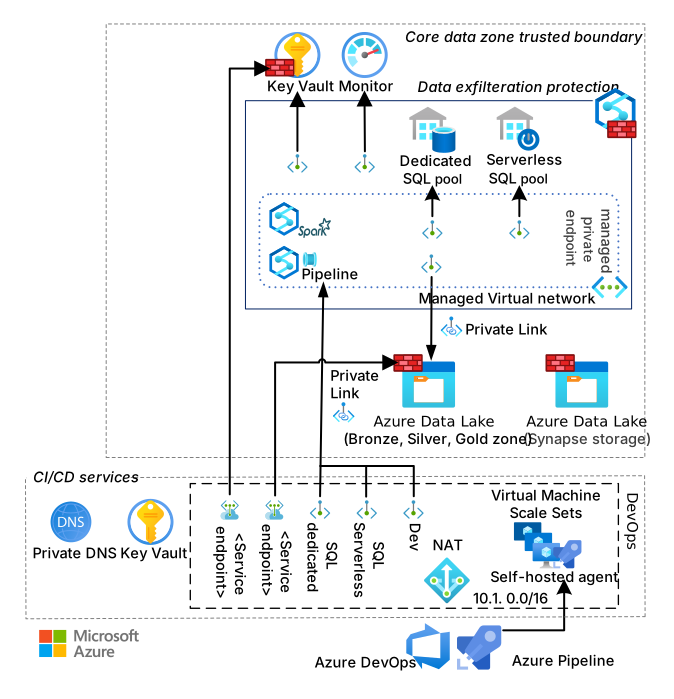
-- Query against Parquet (recommended) - most efficient
SELECT TOP 100 *
FROM OPENROWSET(
    BULK '<https://synapseexampledata.blob.core.windows.net/data/parquet/sales_data/*.parquet>',
    FORMAT = 'PARQUET'
) AS [sales];

-- Query against CSV - less efficient
SELECT TOP 100 *
FROM OPENROWSET(
    BULK '<https://synapseexampledata.blob.core.windows.net/data/csv/sales_data/*.csv>',
    FORMAT = 'CSV',
    PARSER_VERSION = '2.0',
    HEADER_ROW = TRUE
) AS [sales];

-- Query against JSON - least efficient for large datasets
SELECT TOP 100 *
FROM OPENROWSET(
    BULK '<https://synapseexampledata.blob.core.windows.net/data/json/sales_data/*.json>',
    FORMAT = 'CSV',
    FIELDTERMINATOR = '0x0b',
    FIELDQUOTE = '0x0b',
    ROWTERMINATOR = '0x0b'
) WITH (jsonDoc NVARCHAR(MAX)) AS [sales]
CROSS APPLY OPENJSON(jsonDoc)
WITH (
    order_id INT,
    customer_id INT,
    product_id INT,
    quantity INT,
    price DECIMAL(10,2),
    order_date DATE
);
Performance Comparison:
| File Format | Query Time | Data Processed | Cost |
|---|---|---|---|
| Parquet | Fastest | Least | Lowest |
| CSV | Moderate | Moderate | Moderate |
| JSON | Slowest | Most | Highest |
Column Pruning
Only select the columns you need to reduce data scanning:
-- Inefficient - scans all columns
SELECT *
FROM OPENROWSET(
    BULK 'https://synapseexampledata.blob.core.windows.net/data/parquet/sales_data/*.parquet',
    FORMAT = 'PARQUET'
) AS [sales];

-- Optimized - only scans necessary columns
SELECT customer_id, SUM(price * quantity) AS total_spent
FROM OPENROWSET(
    BULK 'https://synapseexampledata.blob.core.windows.net/data/parquet/sales_data/*.parquet',
    FORMAT = 'PARQUET'
) AS [sales]
GROUP BY customer_id
ORDER BY total_spent DESC;
Predicate Pushdown
Utilize filter conditions that can be pushed down to storage:
-- Inefficient - filters after loading all data
SELECT *
FROM OPENROWSET(
    BULK 'https://synapseexampledata.blob.core.windows.net/data/parquet/sales_data/*.parquet',
    FORMAT = 'PARQUET'
) AS [sales]
WHERE YEAR(order_date) = 2023 AND MONTH(order_date) = 6;

-- Optimized - uses predicate pushdown
SELECT *
FROM OPENROWSET(
    BULK 'https://synapseexampledata.blob.core.windows.net/data/parquet/sales_data/*.parquet',
    FORMAT = 'PARQUET'
) AS [sales]
WHERE order_date BETWEEN '2023-06-01' AND '2023-06-30';
Partition Elimination
Leverage partitioned data for efficient queries:
-- Query against partitioned data
-- Data is stored in a folder structure like: /year=2023/month=06/day=15/data.parquet
SELECT *
FROM OPENROWSET(
    BULK 'https://synapseexampledata.blob.core.windows.net/data/parquet/sales_data/year=*/month=*/day=*/*.parquet',
    FORMAT = 'PARQUET'
) WITH (
    order_id INT,
    customer_id INT,
    product_id INT,
    quantity INT,
    price DECIMAL(10,2),
    order_date DATE,
    year INT,
    month INT,
    day INT
) AS [sales]
WHERE year = 2023 AND month = 6;
External Tables Management
Creating External Tables
Create external tables for better performance and reusability:
-- Create database for external tables
CREATE DATABASE SalesData;
GO
USE SalesData;
GO

-- Create external data source
CREATE EXTERNAL DATA SOURCE ExampleDataSource
WITH (
    LOCATION = 'https://synapseexampledata.blob.core.windows.net/data/'
);
GO

-- Create file format
CREATE EXTERNAL FILE FORMAT ParquetFormat
WITH (
    FORMAT_TYPE = PARQUET,
    DATA_COMPRESSION = 'org.apache.hadoop.io.compress.SnappyCodec'
);
GO

-- Create external table
CREATE EXTERNAL TABLE SalesTable (
    order_id INT,
    customer_id INT,
    product_id INT,
    quantity INT,
    price DECIMAL(10,2),
    order_date DATE
)
WITH (
    LOCATION = 'parquet/sales_data/',
    DATA_SOURCE = ExampleDataSource,
    FILE_FORMAT = ParquetFormat
);
GO

-- Query the external table
SELECT TOP 100 *
FROM SalesTable
WHERE order_date BETWEEN '2023-06-01' AND '2023-06-30';
Maintaining Statistics
Create statistics on external tables to improve query optimization:
-- Create statistics on frequently filtered columns
CREATE STATISTICS sales_date_stats
ON SalesTable (order_date)
WITH FULLSCAN;
GO

-- Create statistics on join columns
CREATE STATISTICS sales_customer_stats
ON SalesTable (customer_id)
WITH FULLSCAN;
GO

-- Update statistics when data changes significantly
UPDATE STATISTICS SalesTable;
GO
Security and Access Control
Row-Level Security
Implement row-level security to restrict access to specific rows:
-- Create security predicate function
CREATE SCHEMA Security;
GO

CREATE FUNCTION Security.fn_securitypredicate(@Region NVARCHAR(100))
RETURNS TABLE
WITH SCHEMABINDING
AS
RETURN SELECT 1 AS fn_securitypredicate_result
WHERE @Region IN (SELECT RegionName FROM Security.UserRegions WHERE UserName = USER_NAME());
GO

-- Create security policy
CREATE SECURITY POLICY RegionalDataPolicy
ADD FILTER PREDICATE Security.fn_securitypredicate(Region) ON SalesTable;
GO

-- Enable the policy
ALTER SECURITY POLICY RegionalDataPolicy
WITH (STATE = ON);
GO
Column-Level Security
Implement column-level security to restrict access to sensitive columns:
-- Create users and roles
CREATE USER AnalystUser WITHOUT LOGIN;
CREATE USER AdminUser WITHOUT LOGIN;

CREATE ROLE AnalystRole;
CREATE ROLE AdminRole;

ALTER ROLE AnalystRole ADD MEMBER AnalystUser;
ALTER ROLE AdminRole ADD MEMBER AdminUser;
GO

-- Grant appropriate permissions
GRANT SELECT ON SalesTable(order_id, product_id, quantity, order_date) TO AnalystRole;
GRANT SELECT ON SalesTable TO AdminRole;
GO
Common Use Cases and Patterns
Complex Aggregations with Window Functions
-- Sales trend analysis with moving averages
SELECT
    order_date,
    SUM(price * quantity) AS daily_sales,
    AVG(SUM(price * quantity)) OVER (
        ORDER BY order_date
        ROWS BETWEEN 6 PRECEDING AND CURRENT ROW
    ) AS seven_day_moving_avg
FROM SalesTable
GROUP BY order_date
ORDER BY order_date;
Working with Semi-Structured Data
-- Extract nested JSON data
SELECT
    JSON_VALUE(metadata, '$.event_type') AS event_type,
    JSON_VALUE(metadata, '$.device.type') AS device_type,
    JSON_VALUE(metadata, '$.device.os') AS device_os,
    COUNT(*) AS event_count
FROM OPENROWSET(
    BULK 'https://synapseexampledata.blob.core.windows.net/data/json/events/*.json',
    FORMAT = 'CSV',
    FIELDTERMINATOR = '0x0b',
    FIELDQUOTE = '0x0b'
) WITH (
    event_id VARCHAR(50),
    user_id VARCHAR(50),
    timestamp DATETIME2,
    metadata NVARCHAR(MAX)
) AS events
GROUP BY
    JSON_VALUE(metadata, '$.event_type'),
    JSON_VALUE(metadata, '$.device.type'),
    JSON_VALUE(metadata, '$.device.os')
ORDER BY event_count DESC;
Data Virtualization with Views
-- Create views to abstract data sources
CREATE VIEW Sales.CurrentYearSales AS
SELECT *
FROM SalesTable
WHERE YEAR(order_date) = YEAR(GETDATE());
GO

CREATE VIEW Sales.RegionalSummary AS
SELECT
    region,
    YEAR(order_date) AS sales_year,
    MONTH(order_date) AS sales_month,
    SUM(price * quantity) AS total_sales,
    COUNT(DISTINCT customer_id) AS unique_customers
FROM SalesTable
GROUP BY
    region,
    YEAR(order_date),
    MONTH(order_date);
GO
Performance Best Practices
- Use Parquet Format: Whenever possible, convert data to Parquet format for optimal query performance.
- Partition Data Appropriately: Partition by commonly filtered columns but avoid over-partitioning.
- Limit Data Scanning: Always specify only the columns and rows you need.
- Create Statistics: Maintain up-to-date statistics on external tables.
- Monitor Query Performance: Use Azure Monitor and DMVs to track query performance.
Related Topics
- Delta Lake with Serverless SQL
- Integration with Azure ML
- Serverless SQL Architecture