
Azure Synapse Analytics Security and Compliance Guide
Home > Security > Compliance Guide
This comprehensive guide covers security best practices, compliance mappings, and implementation guidance for Azure Synapse Analytics, helping you meet organizational and regulatory requirements while protecting your data assets.
Introduction to Security and Compliance in Synapse Analytics
Azure Synapse Analytics provides a comprehensive set of security and compliance features to help organizations protect their data and meet regulatory requirements. This guide covers:
- Security architecture and defense-in-depth approach
- Regulatory compliance frameworks and mappings
- Implementation guidance for key security controls
- Monitoring and auditing for compliance
- Security best practices by component
Security Architecture Overview
Azure Synapse Analytics employs a defense-in-depth security architecture with multiple layers of protection:
- Network Security
- Private Endpoints
- Managed Virtual Networks
- IP Firewall Rules
-
Service Endpoints
-
Identity and Access Management
- Azure Active Directory Integration
- Role-Based Access Control (RBAC)
- Microsoft Entra ID Privileged Identity Management
-
Conditional Access
-
Data Protection
- Transparent Data Encryption (TDE)
- Customer-Managed Keys (CMK)
- Dynamic Data Masking
-
Column-Level Encryption
-
Threat Protection
- Advanced Threat Protection
- Microsoft Defender for Cloud Integration
- Vulnerability Assessment
-
SQL Audit
-
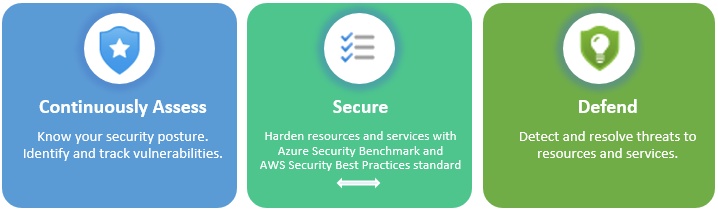
Posture Management
- Security Baselines
- Compliance Dashboards
- Security Monitoring
- Continuous Assessment
Regulatory Compliance Frameworks
GDPR Compliance
The General Data Protection Regulation (GDPR) is a European regulation for data protection and privacy. Here's how Synapse Analytics helps with GDPR compliance:
| GDPR Requirement | Synapse Analytics Capability | Implementation Guidance |
|---|---|---|
| Right to Access | SQL Audit, Advanced Data Security | Enable SQL auditing with 90+ day retention |
| Right to be Forgotten | Row-level security, Dynamic data masking | Implement deletion procedures with audit trails |
| Data Protection by Design | Network isolation, TDE, CMK | Use private endpoints and enable CMK for all storage |
| Records of Processing | Activity logs, diagnostic settings | Configure diagnostic settings to log all operations |
| Data Protection Impact Assessment | Microsoft Defender for Cloud | Use threat intelligence and vulnerability assessments |
| Data Protection Officer | RBAC, PIM | Implement specific roles for security personnel |
HIPAA/HITRUST Compliance
For organizations handling healthcare information, HIPAA compliance is essential:
| HIPAA Safeguard | Synapse Analytics Capability | Implementation Guidance |
|---|---|---|
| Access Controls | Azure AD integration, RBAC | Implement least-privilege access model |
| Audit Controls | SQL Audit, diagnostic logs | Configure comprehensive audit logging |
| Integrity Controls | TDE, Row-level security | Enable encryption at rest and in transit |
| Transmission Security | Private endpoints, TLS/SSL | Use private connectivity for all components |
| Business Associate Agreement | Microsoft BAA | Ensure Microsoft BAA covers Synapse Analytics |
| Risk Assessment | Security Baselines, Microsoft Defender for Cloud | Perform regular vulnerability assessments |
PCI DSS Compliance
For payment card processing environments:
| PCI DSS Requirement | Synapse Analytics Capability | Implementation Guidance |
|---|---|---|
| Network Security | Managed VNet, Private endpoints | Isolate cardholder data environment |
| Data Protection | TDE, CMK, Data masking | Encrypt all stored cardholder data |
| Access Control | Azure AD, RBAC, PIM | Implement role separation and least privilege |
| Monitoring and Testing | Microsoft Defender, SQL Audit | Enable real-time security monitoring |
| Vulnerability Management | Microsoft Defender for Cloud | Schedule regular vulnerability scans |
| Security Policy | Azure Policy, Regulatory Compliance dashboard | Implement and enforce security policies |
SOC 1, SOC 2 Compliance
For service organizations:
| SOC Control | Synapse Analytics Capability | Implementation Guidance |
|---|---|---|
| Security | Network isolation, encryption | Enable all available encryption options |
| Availability | SLA, redundancy | Configure appropriate service tiers for workloads |
| Processing Integrity | Data validation, integrity controls | Implement proper data validation |
| Confidentiality | Data classification, masking | Apply sensitivity labels and masking |
| Privacy | Access controls, audit logs | Monitor and restrict access to sensitive data |
FedRAMP Compliance
For federal government workloads:
| FedRAMP Control | Synapse Analytics Capability | Implementation Guidance |
|---|---|---|
| Access Control | Azure AD Government, RBAC | Use dedicated government cloud offerings |
| Audit and Accountability | Enhanced monitoring, logging | Configure comprehensive audit policies |
| Configuration Management | Azure Policy | Implement FedRAMP-aligned policies |
| Identification and Authentication | Multi-factor authentication | Enable MFA for all administrator accounts |
| System and Communications Protection | TLS 1.2+, encryption | Enable FIPS-compliant encryption algorithms |
Implementation Guidance for Key Security Controls
Network Security Implementation
Private Link and Private Endpoints
Configure private endpoints for secure connectivity:
# PowerShell: Create private endpoint for Synapse workspace
$workspace = Get-AzSynapseWorkspace -Name "mysynapseworkspace" -ResourceGroupName "myresourcegroup"

New-AzPrivateEndpoint `
  -ResourceGroupName "myresourcegroup" `
  -Name "synapse-sql-endpoint" `
  -Location "eastus" `
  -Subnet $subnet `
  -PrivateLinkServiceConnection @{
    Name = "synapse-sql-connection"
    PrivateLinkServiceId = $workspace.Id
    GroupId = "Sql"
  }
Managed Virtual Network
Enable managed virtual network during workspace creation:
# PowerShell: Create Synapse workspace with managed VNet
New-AzSynapseWorkspace `
  -ResourceGroupName "myresourcegroup" `
  -Name "mysynapseworkspace" `
  -Location "eastus" `
  -DefaultDataLakeStorageAccountName "mystorageaccount" `
  -DefaultDataLakeStorageFilesystem "myfilesystem" `
  -SqlAdministratorLoginCredential (Get-Credential) `
  -ManagedVirtualNetwork "default" `
  -AllowAllConnections $false
IP Firewall Rules
Configure IP firewall rules:
# PowerShell: Add IP firewall rule to Synapse workspace
$synapse = Get-AzSynapseWorkspace -Name "mysynapseworkspace" -ResourceGroupName "myresourcegroup"

$firewallRuleName = "AllowedIpRange"
$startIpAddress = "192.168.0.0"
$endIpAddress = "192.168.0.255"

Update-AzSynapseFirewallRule `
  -WorkspaceName $synapse.Name `
  -Name $firewallRuleName `
  -StartIpAddress $startIpAddress `
  -EndIpAddress $endIpAddress
Identity and Access Control Implementation
RBAC Role Assignment
Implement least-privilege access with RBAC:
# PowerShell: Assign Synapse RBAC roles
$userObjectId = "00000000-0000-0000-0000-000000000000" # Replace with actual Object ID
$workspaceName = "mysynapseworkspace"
$roleId = "6e4bf58a-b8e1-4cc3-bbf9-d73143322b78" # Synapse Sql Administrator role

New-AzSynapseManagedIdentitySqlControlSettings `
  -WorkspaceName $workspaceName `
  -ResourceGroupName "myresourcegroup" `
  -GrantSqlControlToManagedIdentity "Enabled"

New-AzSynapseRoleAssignment `
  -WorkspaceName $workspaceName `
  -RoleId $roleId `
  -ObjectId $userObjectId
SQL Active Directory Admin
Configure Azure AD authentication for SQL:
# PowerShell: Set Azure AD admin for SQL pool
$username = "username@domain.com" # Replace with actual admin username
$objectId = "00000000-0000-0000-0000-000000000000" # Replace with actual Object ID

Set-AzSynapseSqlActiveDirectoryAdministrator `
  -WorkspaceName "mysynapseworkspace" `
  -ResourceGroupName "myresourcegroup" `
  -DisplayName $username `
  -ObjectId $objectId
Privileged Identity Management
Implement just-in-time access with PIM:
- Navigate to the Azure portal > Microsoft Entra ID > Privileged Identity Management
- Select Azure resources > Synapse workspace
- Configure role settings:
- Assignment type: Eligible
- Activation maximum duration: 8 hours
- Require justification: Yes
- Require approval: Yes
- Approver: Security Administrator
Data Protection Implementation
Transparent Data Encryption
Enable TDE for SQL pools:
Customer-Managed Keys
Configure CMK for encryption:
# PowerShell: Configure CMK for Synapse workspace
$keyVault = Get-AzKeyVault -VaultName "mykeyvault" -ResourceGroupName "myresourcegroup"
$key = Get-AzKeyVaultKey -VaultName $keyVault.VaultName -Name "mykey"

Update-AzSynapseWorkspace `
  -Name "mysynapseworkspace" `
  -ResourceGroupName "myresourcegroup" `
  -KeyName $key.Name `
  -KeyVaultName $keyVault.VaultName `
  -EncryptionActivation "Enabled"
Data Masking
Implement dynamic data masking:
-- SQL: Apply dynamic data masking
CREATE TABLE Customers (
    CustomerId INT IDENTITY(1,1) NOT NULL,
    FirstName NVARCHAR(100) MASKED WITH (FUNCTION = 'partial(1, "XXXXXXX", 1)') NULL,
    LastName NVARCHAR(100) NOT NULL,
    Email NVARCHAR(100) MASKED WITH (FUNCTION = 'email()') NULL,
    PhoneNumber NVARCHAR(20) MASKED WITH (FUNCTION = 'default()') NULL,
    CreditCardNumber NVARCHAR(19) MASKED WITH (FUNCTION = 'partial(0, "XXXX-XXXX-XXXX-", 4)') NULL
);
Security Monitoring Implementation
Diagnostic Settings
Configure comprehensive logging:
# PowerShell: Set up diagnostic settings
$workspace = Get-AzSynapseWorkspace -Name "mysynapseworkspace" -ResourceGroupName "myresourcegroup"
$logAnalytics = Get-AzOperationalInsightsWorkspace -Name "mylogworkspace" -ResourceGroupName "myresourcegroup"

Set-AzDiagnosticSetting `
  -Name "SynapseAudit" `
  -ResourceId $workspace.Id `
  -WorkspaceId $logAnalytics.ResourceId `
  -Enabled $true `
  -Category @("SynapseRbacOperations", "SQLSecurityAuditEvents", "SynapseSqlPoolExecRequests", "SynapseSqlPoolRequestSteps", "IntegrationPipelineRuns", "IntegrationActivityRuns")
Microsoft Defender for Cloud
Enable advanced threat protection:
- Navigate to Microsoft Defender for Cloud in Azure Portal
- Go to Environment Settings > Your subscription
- Select Azure Synapse Analytics under the resource types
- Set the status to "On" and configure:
- Data collection: All events
- Vulnerability assessments: On
- Advanced threat protection: On
SQL Auditing
Configure SQL auditing:
# PowerShell: Set up SQL auditing
$storageAccount = Get-AzStorageAccount -ResourceGroupName "myresourcegroup" -Name "mystorageaccount"

Set-AzSynapseSqlPoolAudit `
  -ResourceGroupName "myresourcegroup" `
  -WorkspaceName "mysynapseworkspace" `
  -Name "SQLPool01" `
  -AuditActionGroup @("SUCCESSFUL_DATABASE_AUTHENTICATION_GROUP", "FAILED_DATABASE_AUTHENTICATION_GROUP", "DATABASE_OPERATION_GROUP") `
  -BlobStorageTargetState "Enabled" `
  -StorageAccountResourceId $storageAccount.Id `
  -StorageKeyType "Primary" `
  -RetentionInDays 90
Compliance Implementation by Component
Dedicated SQL Pools
Dedicated SQL Pools require specific security configurations:
- Authentication:
- Enable Azure AD integration
- Disable SQL authentication when possible
-
Implement MFA for all admin accounts
-
Authorization:
- Use row-level security for multi-tenant data
- Implement column-level security for sensitive data
-
Create security roles aligned with job functions
-
Encryption:
- Enable TDE with customer-managed keys
- Use Always Encrypted for sensitive columns
-
Ensure secure TLS configuration
-
Auditing:
- Enable server and database-level auditing
- Send audit logs to Log Analytics
- Create alerts for suspicious activities
Spark Pools
Secure Spark pools with these configurations:
- Authentication:
- Use Azure AD passthrough authentication
- Store credentials securely in Key Vault
-
Implement notebook-level access controls
-
Data Access:
- Implement ACLs on ADLS Gen2
- Use credential passthrough for data access
-
Configure service principals with least privilege
-
Code Security:
- Scan notebooks for security issues
- Implement secure coding practices
-
Validate all inputs and parameters
-
Monitoring:
- Enable Spark application insights
- Monitor job submissions and access patterns
- Create alerts for abnormal resource usage
Pipelines and Integration
Secure data integration pipelines:
- Authentication:
- Use managed identities for all connections
- Store credentials in Key Vault
-
Rotate integration runtime credentials regularly
-
Data Movement:
- Enable encryption in transit
- Implement data validation at boundaries
-
Use private endpoints for all connections
-
Activity Monitoring:
- Log all pipeline executions
- Monitor for unauthorized data access
- Track data lineage for compliance reporting
Continuous Compliance Monitoring
Azure Security Center Integration
Configure continuous compliance monitoring:
- Navigate to Microsoft Defender for Cloud
- Select Regulatory Compliance
- Choose the appropriate compliance standard (HIPAA, PCI-DSS, etc.)
- Review compliance status and recommendations
- Create custom initiatives for organization-specific requirements
Compliance Dashboard
Create a custom compliance dashboard in Azure:
# PowerShell: Deploy Azure Dashboard via ARM template
New-AzResourceGroupDeployment `
  -ResourceGroupName "myresourcegroup" `
  -TemplateFile "SynapseComplianceDashboard.json"
Automated Compliance Checks
Implement automated compliance checks with Azure Policy:
# PowerShell: Assign built-in policies for Synapse compliance
$policyDefinition = Get-AzPolicyDefinition -Name "Deploy Advanced Data Security on SQL servers"

New-AzPolicyAssignment `
  -Name "DeployAdvancedDataSecurityOnSQLServers" `
  -PolicyDefinition $policyDefinition `
  -Scope "/subscriptions/$subscriptionId/resourceGroups/myresourcegroup" `
  -AssignIdentity `
  -Location "eastus"
Industry-Specific Compliance Guidance
Financial Services Compliance
For financial institutions, additional controls may be necessary:
- Data Residency:
- Configure geo-replication within compliant regions
- Implement Azure Policy for regional restrictions
-
Document data flows for regulatory review
-
Transaction Monitoring:
- Implement comprehensive logging for all financial data access
- Create anomaly detection with Azure Stream Analytics
-
Establish retention policies aligned with regulatory requirements
-
Segregation of Duties:
- Implement strict RBAC with separate roles for data entry, approval, and audit
- Use Privileged Identity Management for just-in-time access
- Configure approval workflows for sensitive operations
Healthcare Compliance
For healthcare organizations:
- PHI Protection:
- Implement data classification for PHI identification
- Configure dynamic data masking for all PHI fields
-
Use column-level encryption for sensitive health data
-
Audit Trails:
- Create comprehensive audit logs for all PHI access
- Set up alerts for unusual access patterns
-
Maintain logs for the required retention period (typically 7+ years)
-
Business Associate Agreements:
- Ensure Microsoft BAA covers Synapse Analytics
- Document all data flows involving PHI
- Implement backup and disaster recovery aligned with continuity requirements
Government and Public Sector
For government workloads:
- Sovereign Cloud Deployment:
- Use Azure Government for regulated workloads
- Implement FedRAMP High controls
-
Ensure all personnel have appropriate clearance
-
Data Classification:
- Implement classification for controlled unclassified information (CUI)
- Apply appropriate controls based on classification level
-
Ensure proper handling of sensitive government data
-
Supply Chain Risk Management:
- Document all components and dependencies
- Implement continuous monitoring for vulnerabilities
- Maintain approval documentation for all system components
Security Compliance Checklist
Use this checklist to ensure comprehensive security compliance:
Network Security
- Implement managed virtual network
- Configure private endpoints for all services
- Restrict IP access with firewall rules
- Implement NSGs with restrictive inbound/outbound rules
- Enable service endpoints for Azure services
Identity and Access
- Configure Azure AD integration
- Implement RBAC with least privilege
- Enable conditional access policies
- Configure PIM for just-in-time access
- Implement MFA for all administrative accounts
Data Protection
- Enable TDE for all SQL pools
- Configure CMK for storage and workspace
- Implement data masking for sensitive fields
- Configure row-level security policies
- Enable column-level encryption where appropriate
Monitoring and Audit
- Configure diagnostic settings for all components
- Set up Microsoft Defender for Cloud
- Enable SQL auditing with 90+ day retention
- Create custom alerts for security events
- Implement automated compliance reporting
Operational Security
- Document security baseline configurations
- Implement regular security reviews
- Create incident response procedures
- Configure backup and disaster recovery
- Implement change management processes
Related Topics
- Security Best Practices
- Data Governance Implementation
- Network Security Configuration
- Monitoring and Logging Guide