
Comprehensive Azure Integration Guide for Synapse Analytics
Home > Code Examples > Integration Guide
Guide Overview
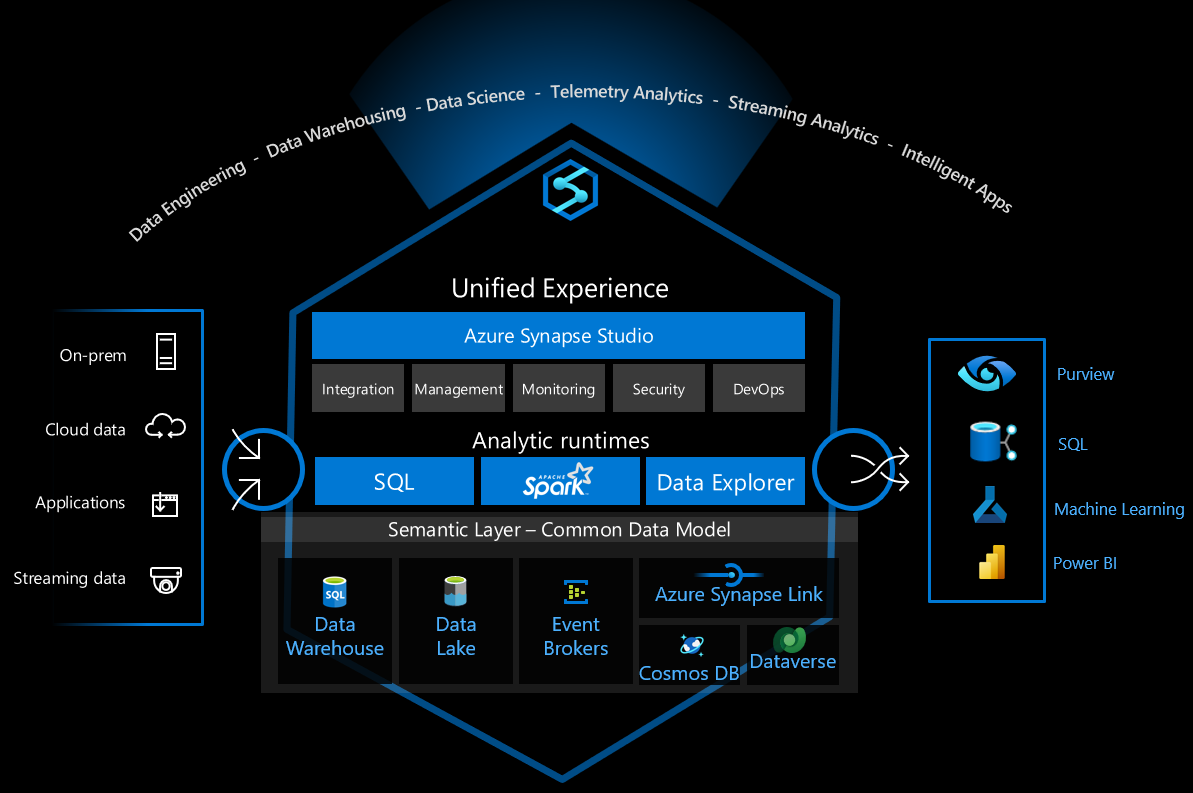
This comprehensive guide provides code examples and patterns for integrating Azure Synapse Analytics with other Azure services including Azure Machine Learning, Microsoft Purview, and Azure Data Factory.
- 🧠 Azure Machine Learning
Integrate ML models with Synapse data and pipelines
- 🔍 Microsoft Purview
Data governance, cataloging, and lineage tracking
- 🔧 Azure Data Factory
Orchestration, pipeline management, and monitoring
Table of Contents
- Common Integration Patterns
- Training ML Models with Synapse Data
- Model Deployment and Scoring
- Microsoft Purview Integration
- Purview Prerequisites
- Setting Up Purview with Synapse
- Automated Metadata Scanning
- Data Lineage Tracking
- Azure Data Factory Integration
- Data Factory Prerequisites
- Azure Data Factory Linked Service Setup
- Orchestration Patterns
- Monitoring and Alerting
Common Integration Patterns

Integration Best Practices
When integrating Azure Synapse Analytics with other Azure services, consider the following common patterns:
- Linked Services: Creating and managing linked services between Azure Synapse and other Azure services
- Service Principal Authentication: Using service principals for secure, non-interactive authentication
- Data Movement Optimization: Optimizing data movement between services for performance
- Metadata Synchronization: Keeping metadata in sync across services
- Monitoring and Alerting: Setting up comprehensive monitoring across integrated services
# PySpark code to configure Azure ML integration in Synapse

from notebookutils import mssparkutils

# Set up Azure ML workspace connection

synapse_workspace_name = "your-synapse-workspace"
ml_workspace_name = "your-ml-workspace"
resource_group = "your-resource-group"
subscription_id = "your-subscription-id"

# Create linked service connection

linked_service_name = "AzureMLService"
mssparkutils.notebook.run("./setup_linked_service.py",
                         {"workspace_name": ml_workspace_name,
                          "resource_group": resource_group,
                          "subscription_id": subscription_id})
Training ML Models with Synapse Data
Example of training an ML model using data from Synapse:
# Import necessary libraries
from azureml.core import Workspace, Experiment, Dataset
from azureml.core.compute import ComputeTarget, SynapseCompute
from azureml.pipeline.core import Pipeline, PipelineData
from azureml.pipeline.steps import SynapseSparkStep, PythonScriptStep
from azureml.core.runconfig import RunConfiguration

# Connect to Azure ML workspace
ws = Workspace.get(name=ml_workspace_name,
                  subscription_id=subscription_id,
                  resource_group=resource_group)

# Define compute target (use Synapse Spark pool)
synapse_compute = SynapseCompute(
    workspace=ws,
    compute_name="synapse-spark-compute",
    synapse_pool_name="SparkPool01",
    tenant_id="your-tenant-id",
    resource_group=resource_group,
    synapse_workspace_name=synapse_workspace_name
)

# Register dataset from Synapse
dataset = Dataset.Tabular.from_sql_query(
    query="SELECT * FROM Sales.CustomerData WHERE Region = 'Europe'",
    compute_target=synapse_compute,
    data_source_name="SynapseSQLPool"
)
dataset = dataset.register(ws, "customer_data_europe")

# Define pipeline steps
data_prep = SynapseSparkStep(
    name="data_preparation",
    synapse_compute=synapse_compute,
    spark_pool_name="SparkPool01",
    entry_script="data_prep.py",
    inputs=[dataset.as_named_input('raw_data')],
    outputs=[PipelineData("prepared_data", datastore=ws.get_default_datastore())]
)

model_train = PythonScriptStep(
    name="model_training",
    script_name="train_model.py",
    arguments=["--input-data", data_prep.outputs[0]],
    inputs=[data_prep.outputs[0]],
    compute_target=ws.compute_targets["cpu-cluster"],
    runconfig=RunConfiguration()
)

# Create and submit pipeline
pipeline = Pipeline(workspace=ws, steps=[data_prep, model_train])
pipeline_run = pipeline.submit("customer_churn_training")
Model Deployment and Scoring
Deploy a trained model for batch scoring in Synapse:
# Import necessary libraries
from azureml.core import Workspace, Model
from azureml.core.model import InferenceConfig
from azureml.core.environment import Environment
from azureml.core.conda_dependencies import CondaDependencies

# Load the registered model
ws = Workspace.get(name=ml_workspace_name,
                  subscription_id=subscription_id,
                  resource_group=resource_group)
model = Model(ws, "customer_churn_model")

# Define environment
env = Environment(name="scoring-env")
cd = CondaDependencies.create(
    conda_packages=['scikit-learn', 'pandas', 'numpy'],
    pip_packages=['azureml-defaults']
)
env.python.conda_dependencies = cd

# Define inference configuration
inference_config = InferenceConfig(
    entry_script="score.py",
    environment=env
)

# Download model to local Synapse workspace
model.download(target_dir="./models", exist_ok=True)

# The score.py script can then be used in a Synapse notebook
# with the following code:

# Sample PySpark code in Synapse notebook
import pandas as pd
import numpy as np
import pickle
from notebookutils import mssparkutils

# Load the model
model_path = "./models/customer_churn_model.pkl"
with open(model_path, "rb") as f:
    model = pickle.load(f)

# Load data from Delta table
customer_data = spark.read.format("delta").load("abfss://container@storage.dfs.core.windows.net/delta/customers")
customer_df = customer_data.toPandas()

# Prepare features
features = customer_df[['usage_months', 'monthly_charges', 'total_charges', 'contract_type']]

# Make predictions
predictions = model.predict(features)
customer_df['churn_prediction'] = predictions

# Write results back to Delta table
result_df = spark.createDataFrame(customer_df)
result_df.write.format("delta").mode("overwrite").save("abfss://container@storage.dfs.core.windows.net/delta/predictions")
Microsoft Purview Integration
Purview Prerequisites
- Azure Synapse Analytics workspace
- Microsoft Purview account
- Appropriate permissions on both services
- Azure Key Vault for secret management
Setting Up Purview with Synapse
Register Synapse as a data source in Microsoft Purview:
# Python code using Purview SDK to register Synapse as a data source
from azure.identity import DefaultAzureCredential
from purviewclient import PurviewClient

# Set up authentication and connect to Purview
credential = DefaultAzureCredential()
purview_account_name = "your-purview-account"
purview_client = PurviewClient(
    account_name=purview_account_name,
    credential=credential
)

# Register Synapse workspace as a data source
synapse_source = {
    "name": "synapse-workspace",
    "kind": "Azure Synapse Analytics",
    "properties": {
        "endpoint": "https://your-synapse-workspace.dev.azuresynapse.net",
        "subscriptionId": "your-subscription-id",
        "resourceGroup": "your-resource-group",
        "resourceName": "your-synapse-workspace",
        "collection": {
            "referenceName": "your-collection",
            "type": "CollectionReference"
        }
    }
}

purview_client.sources.create_or_update(synapse_source)
Automated Metadata Scanning
Configure scheduled scans of your Synapse workspace:
# Configure automated scanning for Synapse
scan_config = {
    "name": "synapse-weekly-scan",
    "kind": "AzureSynapseAnalyticsScan",
    "properties": {
        "scanRulesetName": "System_Default",
        "scanRulesetType": "System",
        "recurrence": {
            "startTime": "2023-06-01T00:00:00",
            "interval": 1,
            "intervalUnit": "Week",
            "schedule": {
                "hours": [3],
                "minutes": [0],
                "weekDays": ["Sunday"]
            }
        },
        "scanLevelType": "Full"
    }
}

purview_client.scans.create_or_update(
    data_source_name="synapse-workspace",
    scan_name="synapse-weekly-scan",
    scan_config=scan_config
)
Data Lineage Tracking
Set up custom lineage tracking between Synapse and other sources:
# Create custom lineage between Synapse and a data lake
lineage_data = {
    "entities": [
        {
            "guid": "synapse-table-guid",
            "typeName": "azure_sql_table",
            "attributes": {
                "qualifiedName": "mssql://your-synapse.sql.azuresynapse.net/SQLPool1/dbo/ProcessedData",
                "name": "ProcessedData"
            }
        },
        {
            "guid": "data-lake-file-guid",
            "typeName": "azure_datalake_gen2_path",
            "attributes": {
                "qualifiedName": "https://yourstorage.dfs.core.windows.net/container/raw-data/source.parquet",
                "name": "source.parquet"
            }
        }
    ],
    "relations": [
        {
            "fromEntityGuid": "data-lake-file-guid",
            "toEntityGuid": "synapse-table-guid",
            "relationshipType": "ProcessedVia"
        }
    ]
}

purview_client.lineage.create_custom_lineage(lineage_data)
Viewing Lineage in Synapse Studio
Access and view data lineage from within Synapse Studio:
-- SQL script to add lineage metadata to Synapse operations
-- This can be included in stored procedures that process data
EXEC sp_addextendedproperty
@name = N'DATA_LINEAGE',
@value = N'{"sourceTable": "raw.CustomerData", "processingSteps": ["cleaned", "transformed"], "dataMovementType": "Copy"}',
@level0type = N'SCHEMA', @level0name = N'dbo',
@level1type = N'TABLE', @level1name = N'ProcessedCustomerData';
Azure Data Factory Integration
Data Factory Prerequisites
- Azure Synapse Analytics workspace
- Azure Data Factory instance
- Appropriate permissions on both services
- Azure Key Vault for secret management
Azure Data Factory Linked Service Setup
Creating a Linked Service from ADF to Synapse
{
  "name": "SynapseWorkspaceLinkedService",
  "type": "Microsoft.DataFactory/factories/linkedservices",
  "properties": {
    "annotations": [],
    "type": "AzureSynapseAnalytics",
    "typeProperties": {
      "connectionString": "Integrated Security=False;Encrypt=True;Connection Timeout=30;Data Source=your-synapse-workspace.sql.azuresynapse.net;Initial Catalog=SQLPool1",
      "password": {
        "type": "AzureKeyVaultSecret",
        "store": {
          "referenceName": "AzureKeyVaultLinkedService",
          "type": "LinkedServiceReference"
        },
        "secretName": "synapse-sql-password"
      },
      "userName": "sqladminuser"
    },
    "connectVia": {
      "referenceName": "AutoResolveIntegrationRuntime",
      "type": "IntegrationRuntimeReference"
    }
  }
}
Creating a Linked Service from Synapse to ADF
In your Synapse workspace, create a linked service to Azure Data Factory:
{
  "name": "AzureDataFactoryLinkedService",
  "properties": {
    "type": "AzureDataFactory",
    "typeProperties": {
      "dataFactoryName": "your-data-factory-name",
      "subscriptionId": "your-subscription-id",
      "resourceGroup": "your-resource-group"
    }
  }
}
Orchestration Patterns
Pattern 1: ADF Pipeline Triggering Synapse Pipeline
This pattern uses ADF to orchestrate the execution of a Synapse pipeline:
{
  "name": "TriggerSynapsePipeline",
  "type": "Microsoft.DataFactory/factories/pipelines",
  "properties": {
    "activities": [
      {
        "name": "ExecuteSynapsePipeline",
        "type": "SynapseNotebook",
        "dependsOn": [],
        "policy": {
          "timeout": "7.00:00:00",
          "retry": 0,
          "retryIntervalInSeconds": 30,
          "secureOutput": false,
          "secureInput": false
        },
        "userProperties": [],
        "typeProperties": {
          "notebookPath": "/notebooks/DataProcessing",
          "sparkPool": {
            "referenceName": "SparkPool01",
            "type": "BigDataPoolReference"
          },
          "executorSize": "Small",
          "conf": {
            "spark.dynamicAllocation.enabled": true,
            "spark.dynamicAllocation.minExecutors": 1,
            "spark.dynamicAllocation.maxExecutors": 5
          },
          "driverSize": "Small",
          "numExecutors": 1
        },
        "linkedServiceName": {
          "referenceName": "SynapseWorkspaceLinkedService",
          "type": "LinkedServiceReference"
        }
      }
    ]
  }
}
Pattern 2: Synapse-Orchestrated Processing with ADF Data Movement
This pattern uses Synapse to orchestrate processing, with ADF handling data movement:
# PySpark code in Synapse to trigger ADF pipeline
from notebookutils import mssparkutils
import json

# Parameters for ADF pipeline
pipeline_params = {
    "source_container": "raw-data",
    "destination_container": "processed-data",
    "data_date": "2023-06-01"
}

# Execute ADF pipeline
adf_linked_service = "AzureDataFactoryLinkedService"
adf_pipeline_name = "CopyDataPipeline"
response = mssparkutils.notebook.run("./trigger_adf_pipeline.py",
                                    {"linked_service": adf_linked_service,
                                     "pipeline_name": adf_pipeline_name,
                                     "parameters": json.dumps(pipeline_params)})

# Parse response and wait for pipeline completion
run_id = json.loads(response)["run_id"]
pipeline_status = "InProgress"

while pipeline_status == "InProgress" or pipeline_status == "Queued":
    status_response = mssparkutils.notebook.run("./check_adf_status.py",
                                               {"linked_service": adf_linked_service,
                                                "run_id": run_id})
    status_json = json.loads(status_response)
    pipeline_status = status_json["status"]
    print(f"Pipeline status: {pipeline_status}")

    if pipeline_status == "InProgress" or pipeline_status == "Queued":
        # Wait for 30 seconds before checking again
        import time
        time.sleep(30)

# Process the data after ADF pipeline completes
if pipeline_status == "Succeeded":
    # Continue with data processing in Synapse
    processed_data_path = f"abfss://processed-data@yourstorage.dfs.core.windows.net/{pipeline_params['data_date']}"
    df = spark.read.format("parquet").load(processed_data_path)
    # Perform additional transformations
else:
    raise Exception(f"ADF pipeline failed with status: {pipeline_status}")
Monitoring and Alerting
Setting up comprehensive monitoring across integrated services:
# Python code to set up alerts for Synapse-ADF integration
from azure.identity import DefaultAzureCredential
from azure.mgmt.monitor import MonitorManagementClient
from azure.mgmt.monitor.models import ActivityLogAlertResource, ActivityLogAlertAllOfCondition

# Set up authentication
credential = DefaultAzureCredential()
subscription_id = "your-subscription-id"
monitor_client = MonitorManagementClient(credential, subscription_id)

# Define alert for failed ADF pipeline that affects Synapse workloads
alert_name = "SynapseAdfIntegrationFailure"
resource_group = "your-resource-group"

alert_condition = {
    "field": "category",
    "equals": "ActivityLogs",
    "anyOf": [
        {
            "field": "resourceProvider",
            "equals": "Microsoft.DataFactory"
        },
        {
            "field": "resourceProvider",
            "equals": "Microsoft.Synapse"
        }
    ],
    "containsAny": [
        {
            "field": "status",
            "equals": "Failed"
        }
    ]
}

action_groups = [
    {
        "actionGroupId": "/subscriptions/your-subscription-id/resourceGroups/your-resource-group/providers/microsoft.insights/actionGroups/DataOpsTeam"
    }
]

alert = ActivityLogAlertResource(
    location="Global",
    action_groups=action_groups,
    condition=ActivityLogAlertAllOfCondition(
        all_of=[alert_condition]
    ),
    enabled=True,
    description="Alert for failures in integrated Synapse-ADF pipelines",
    scopes=[
        f"/subscriptions/{subscription_id}/resourceGroups/{resource_group}"
    ]
)

monitor_client.activity_log_alerts.create_or_update(
    resource_group_name=resource_group,
    activity_log_alert_name=alert_name,
    activity_log_alert=alert
)
Best Practices for Service Integration
-
Use Service Principals: Create dedicated service principals with minimum required permissions for service-to-service authentication.
-
Implement Comprehensive Logging: Log all cross-service operations for troubleshooting and auditing.
-
Handle Failures Gracefully: Implement proper error handling and retry logic for cross-service operations.
-
Monitor End-to-End Performance: Set up monitoring for the entire data pipeline spanning multiple services.
-
Secure Secrets and Credentials: Use Azure Key Vault to store and manage all credentials used in service integration.
-
Implement Circuit Breakers: Prevent cascading failures across services by implementing circuit breaker patterns.
-
Document Integration Points: Maintain documentation of all integration points and dependencies between services.
Related Topics
- Delta Lake with Azure ML
- Serverless SQL Security
- Enterprise Integration Architecture