
Deployment Monitoring
Home > Monitoring > Deployment Monitoring
Overview
This guide covers monitoring strategies for Azure Synapse Analytics deployments, including pipeline executions, resource utilization, and performance metrics.
📊 Monitoring Deployment Process
Azure Synapse Analytics deployments can be monitored through various mechanisms to ensure successful resource provisioning and configuration.
- 🚨 Pipeline Deployment Monitoring
Monitor pipeline deployments using Azure DevOps or GitHub Actions logs
- 📊 Resource Deployment Tracking
Track Azure Resource Manager (ARM) template deployments
- ⚠️ Deployment Alerts
Configure alerts for deployment failures and threshold breaches
- 📜 Deployment History
View historical deployment metrics and success rates
Pipeline Monitoring
Best Practice
Configure pipeline runs to capture detailed logs in Log Analytics for deeper troubleshooting capabilities.
Azure Synapse Analytics pipeline deployments can be monitored through:
- Azure DevOps deployment pipeline logs
- GitHub Actions workflow run logs
- Azure Activity Log for resource deployment events
- Custom telemetry through Application Insights
# Example Azure DevOps pipeline with enhanced logging
steps:
- task: AzureCLI@2
  displayName: 'Deploy Synapse workspace'
  inputs:
azureSubscription: $(azureServiceConnection)
scriptType: bash
scriptLocation: inlineScript
inlineScript: |
  az synapse workspace create --name $(synapseWorkspaceName) \
--resource-group $(resourceGroupName) \
--storage-account $(storageAccountName) \
--file-system $(fileSystemName) \
--sql-admin-login-user $(sqlAdminUsername) \
--sql-admin-login-password $(sqlAdminPassword) \
--verbose
Resource Monitoring
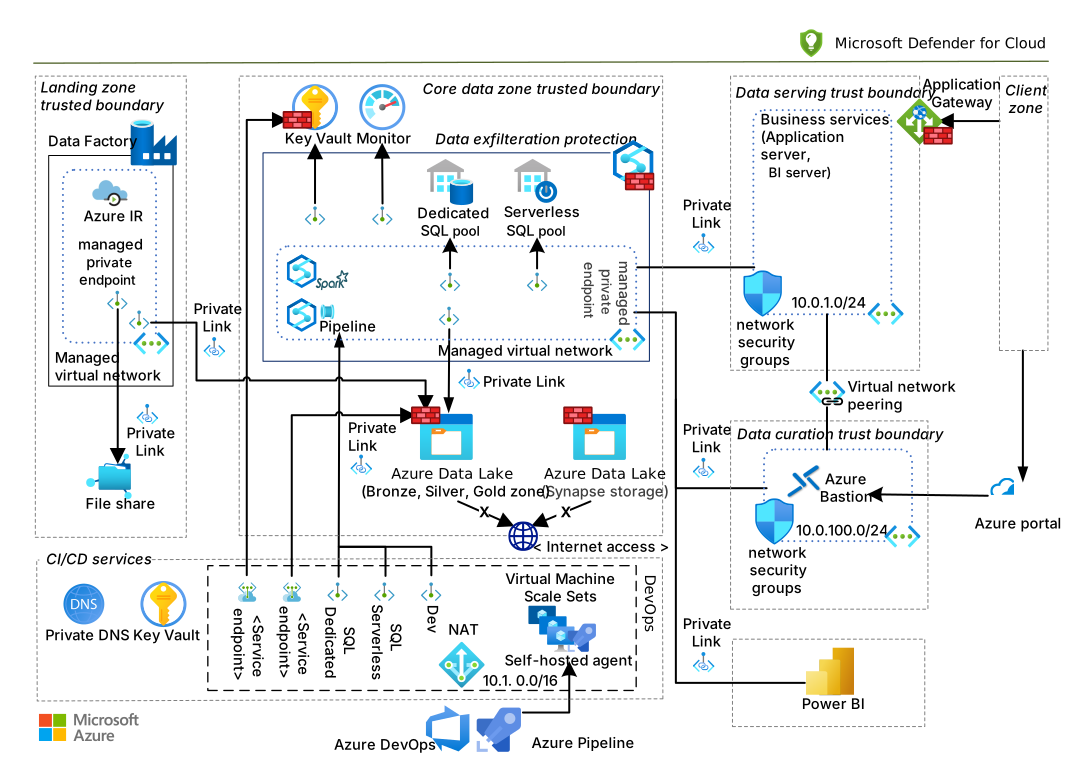
Use Azure Monitor to track the deployment and health of your Synapse Analytics resources:
| Resource Type | Key Metrics | Alert Thresholds |
|---|---|---|
| Spark Pools | Node count, memory utilization | 80% sustained memory utilization |
| SQL Pools | DWU utilization, query duration | 90% DWU utilization, >60s query duration |
| Integration Runtime | CPU usage, queue length | >85% CPU for 15 minutes |
| Data Lake Storage | Throughput, latency | >1s latency, <50% expected throughput |
Alert Configuration
Configure alerts to notify your team about deployment issues:
{
  "location": "Global",
  "tags": {},
  "properties": {
"description": "Alert when Synapse workspace deployment fails",
"severity": 1,
"enabled": true,
"scopes": [
  "/subscriptions/{subscription-id}/resourceGroups/{resource-group}/providers/Microsoft.Synapse/workspaces/{workspace-name}"
],
"evaluationFrequency": "PT5M",
"windowSize": "PT5M",
"criteria": {
  "allOf": [
{
  "query": "AzureActivity | where CategoryValue == 'Administrative' and Level == 'Error'",
  "timeAggregation": "Count",
  "operator": "GreaterThan",
  "threshold": 0
}
  ]
},
"actions": {
  "actionGroups": [
"/subscriptions/{subscription-id}/resourceGroups/{resource-group}/providers/microsoft.insights/actionGroups/{action-group-name}"
  ]
}
  }
}
History and Analytics
Integration Point
Deployment monitoring data can be integrated with Azure DevOps Analytics or Power BI for trend analysis.
Track your deployment history to identify patterns and improvement areas:
- Create a Power BI dashboard for deployment success rates
- Set up automated deployment health reports
- Analyze correlation between deployment failures and code changes
- Use Azure Monitor workbooks for visual deployment tracking