Home > Tutorials > GeoAnalytics & ArcGIS
🌍 Tutorial 21: GeoAnalytics and ArcGIS for Microsoft Fabric
Last Updated: 2026-04-15 | Version: 2.0 Status: ✅ Final | Maintainer: Documentation Team




🎯 Overview
This comprehensive tutorial covers geospatial analytics in Microsoft Fabric, including both native Fabric capabilities and ArcGIS integration. You'll analyze casino location data, player demographics, and regional gaming patterns using spatial analytics.
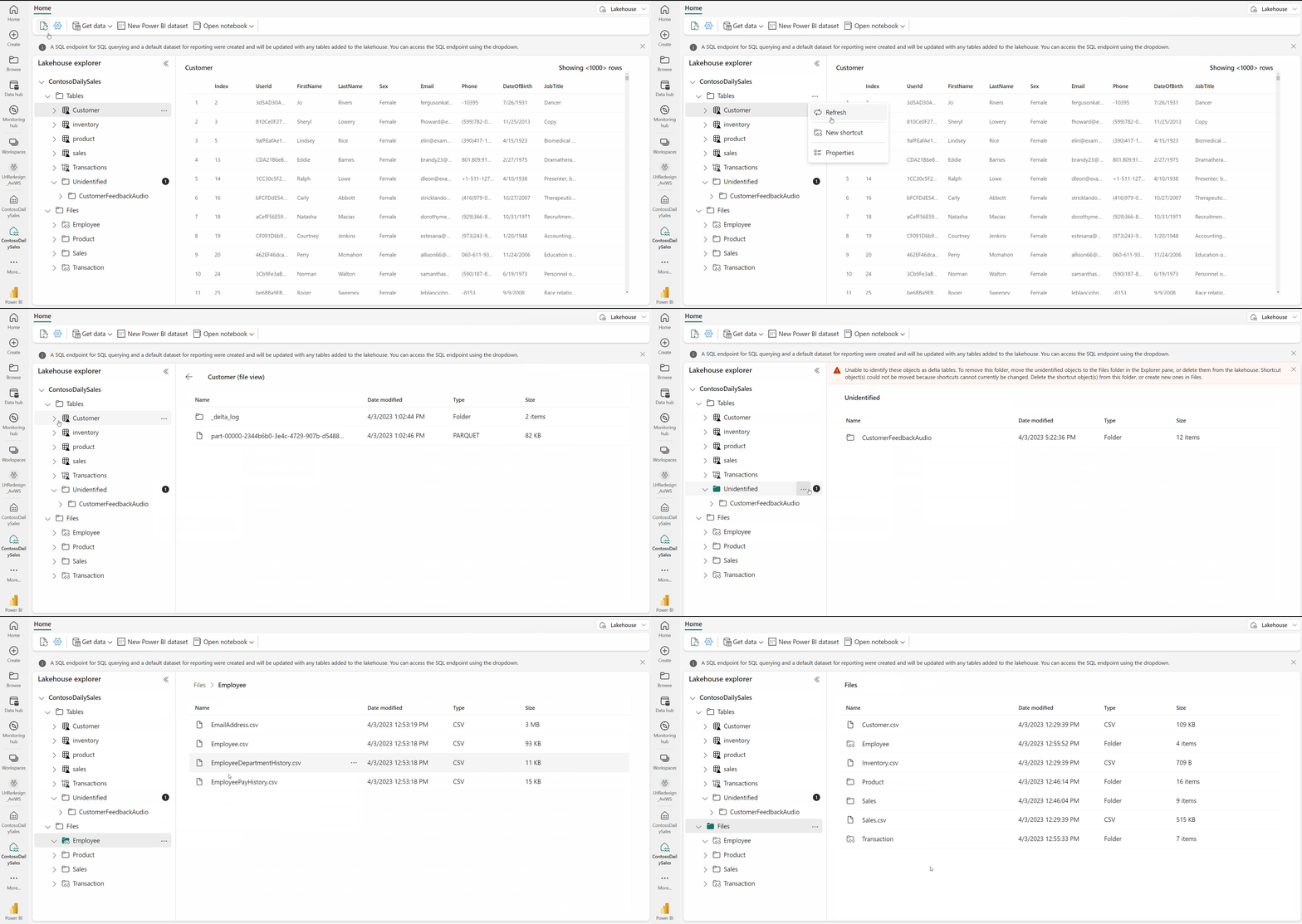
Source: Lakehouse Overview
Duration: 3-4 hours Level: Intermediate to Advanced Prerequisites: - Completed tutorials 00-05 - Fabric workspace with contributor access - ArcGIS Online account (for ArcGIS labs) - Basic understanding of GeoJSON
📚 Learning Objectives
By the end of this tutorial, you will be able to:
- Generate synthetic casino location and player demographic data
- Perform native geospatial analytics in PySpark
- Integrate ArcGIS GeoAnalytics with Fabric
- Create location-based dashboards in Power BI
- Analyze regional gaming patterns and player density
🗺️ Part 1: Demo Data Generation
Step 1.1: Casino Location Data Generator
First, let's create synthetic casino location data across the US:
# Casino Location Data Generator
# Save as: data_generation/generators/geo/casino_locations.py

import random
from dataclasses import dataclass
from datetime import datetime
from typing import List, Optional
import json

@dataclass
class CasinoLocation:
    """Casino location with geospatial attributes."""
    casino_id: str
    name: str
    brand: str
    latitude: float
    longitude: float
    address: str
    city: str
    state: str
    zip_code: str
    country: str
    region: str
    property_type: str  # Resort, Local, Riverboat, Tribal
    gaming_sqft: int
    hotel_rooms: int
    slot_machines: int
    table_games: int
    opened_date: str
    last_renovation: Optional[str]
    annual_revenue_tier: str
    employee_count: int

# Major US gaming markets with coordinates
GAMING_MARKETS = [
    # Las Vegas area
    {"city": "Las Vegas", "state": "NV", "region": "West", "lat": 36.1699, "lon": -115.1398, "zip_prefix": "891"},
    {"city": "Henderson", "state": "NV", "region": "West", "lat": 36.0395, "lon": -114.9817, "zip_prefix": "890"},
    {"city": "North Las Vegas", "state": "NV", "region": "West", "lat": 36.1989, "lon": -115.1175, "zip_prefix": "890"},

    # Atlantic City
    {"city": "Atlantic City", "state": "NJ", "region": "Northeast", "lat": 39.3643, "lon": -74.4229, "zip_prefix": "084"},

    # Gulf Coast
    {"city": "Biloxi", "state": "MS", "region": "South", "lat": 30.3960, "lon": -88.8853, "zip_prefix": "395"},
    {"city": "Gulfport", "state": "MS", "region": "South", "lat": 30.3674, "lon": -89.0928, "zip_prefix": "395"},

    # Midwest Gaming
    {"city": "Detroit", "state": "MI", "region": "Midwest", "lat": 42.3314, "lon": -83.0458, "zip_prefix": "482"},
    {"city": "Chicago", "state": "IL", "region": "Midwest", "lat": 41.8781, "lon": -87.6298, "zip_prefix": "606"},
    {"city": "St. Louis", "state": "MO", "region": "Midwest", "lat": 38.6270, "lon": -90.1994, "zip_prefix": "631"},

    # Connecticut Tribal
    {"city": "Mashantucket", "state": "CT", "region": "Northeast", "lat": 41.4778, "lon": -71.9696, "zip_prefix": "063"},
    {"city": "Uncasville", "state": "CT", "region": "Northeast", "lat": 41.4345, "lon": -72.1081, "zip_prefix": "063"},

    # Pennsylvania
    {"city": "Philadelphia", "state": "PA", "region": "Northeast", "lat": 39.9526, "lon": -75.1652, "zip_prefix": "191"},
    {"city": "Pittsburgh", "state": "PA", "region": "Northeast", "lat": 40.4406, "lon": -79.9959, "zip_prefix": "152"},

    # California Tribal
    {"city": "Temecula", "state": "CA", "region": "West", "lat": 33.4936, "lon": -117.1484, "zip_prefix": "925"},
    {"city": "San Diego", "state": "CA", "region": "West", "lat": 32.7157, "lon": -117.1611, "zip_prefix": "921"},
    {"city": "Palm Springs", "state": "CA", "region": "West", "lat": 33.8303, "lon": -116.5453, "zip_prefix": "922"},

    # Oklahoma Tribal
    {"city": "Durant", "state": "OK", "region": "South", "lat": 33.9940, "lon": -96.3708, "zip_prefix": "747"},
    {"city": "Tulsa", "state": "OK", "region": "South", "lat": 36.1540, "lon": -95.9928, "zip_prefix": "741"},

    # Arizona Tribal
    {"city": "Scottsdale", "state": "AZ", "region": "West", "lat": 33.4942, "lon": -111.9261, "zip_prefix": "852"},
    {"city": "Phoenix", "state": "AZ", "region": "West", "lat": 33.4484, "lon": -112.0740, "zip_prefix": "850"},
]

CASINO_BRANDS = [
    "Golden Sands", "Silver Creek", "Desert Star", "River Palace",
    "Mountain View", "Sunset", "Grand Vista", "Royal Oak",
    "Diamond", "Emerald", "Sapphire", "Ruby",
    "Lucky", "Fortune", "Jackpot", "Winners"
]

PROPERTY_TYPES = ["Resort", "Local", "Riverboat", "Tribal"]
REVENUE_TIERS = ["Tier 1 ($500M+)", "Tier 2 ($250-500M)", "Tier 3 ($100-250M)", "Tier 4 (<$100M)"]

def generate_casino_locations(count: int = 100) -> List[dict]:
    """Generate synthetic casino locations."""
    casinos = []

    for i in range(count):
        market = random.choice(GAMING_MARKETS)

        # Add some randomness to coordinates (within ~5 miles)
        lat_offset = random.uniform(-0.05, 0.05)
        lon_offset = random.uniform(-0.05, 0.05)

        property_type = random.choice(PROPERTY_TYPES)

        # Scale properties based on property type
        if property_type == "Resort":
            gaming_sqft = random.randint(80000, 200000)
            hotel_rooms = random.randint(1000, 5000)
            slot_machines = random.randint(1500, 4000)
            table_games = random.randint(100, 300)
            revenue_tier = random.choice(REVENUE_TIERS[:2])
            employees = random.randint(3000, 10000)
        elif property_type == "Tribal":
            gaming_sqft = random.randint(40000, 150000)
            hotel_rooms = random.randint(200, 1500)
            slot_machines = random.randint(1000, 3000)
            table_games = random.randint(30, 150)
            revenue_tier = random.choice(REVENUE_TIERS[1:3])
            employees = random.randint(1000, 5000)
        else:  # Local or Riverboat
            gaming_sqft = random.randint(20000, 80000)
            hotel_rooms = random.randint(0, 500)
            slot_machines = random.randint(500, 2000)
            table_games = random.randint(20, 80)
            revenue_tier = random.choice(REVENUE_TIERS[2:])
            employees = random.randint(500, 2500)

        brand = random.choice(CASINO_BRANDS)
        name = f"{brand} {market['city']}"

        opened_year = random.randint(1990, 2020)

        casino = {
            "casino_id": f"CAS{i:05d}",
            "name": name,
            "brand": brand,
            "latitude": round(market["lat"] + lat_offset, 6),
            "longitude": round(market["lon"] + lon_offset, 6),
            "address": f"{random.randint(100, 9999)} Gaming Blvd",
            "city": market["city"],
            "state": market["state"],
            "zip_code": f"{market['zip_prefix']}{random.randint(10, 99)}",
            "country": "USA",
            "region": market["region"],
            "property_type": property_type,
            "gaming_sqft": gaming_sqft,
            "hotel_rooms": hotel_rooms,
            "slot_machines": slot_machines,
            "table_games": table_games,
            "opened_date": f"{opened_year}-{random.randint(1,12):02d}-{random.randint(1,28):02d}",
            "last_renovation": f"{random.randint(opened_year+1, 2024)}-{random.randint(1,12):02d}-01" if random.random() > 0.3 else None,
            "annual_revenue_tier": revenue_tier,
            "employee_count": employees
        }

        casinos.append(casino)

    return casinos

if __name__ == "__main__":
    casinos = generate_casino_locations(100)
    print(f"Generated {len(casinos)} casino locations")
    print(json.dumps(casinos[0], indent=2))
Step 1.2: Player Demographics Data Generator
# Player Demographics with Location Data
# Save as: data_generation/generators/geo/player_demographics.py

import random
from dataclasses import dataclass
from typing import List, Optional
from datetime import datetime, timedelta
import json

@dataclass
class PlayerDemographic:
    """Player with demographic and location attributes."""
    player_id: str
    home_casino_id: str
    home_latitude: float
    home_longitude: float
    home_city: str
    home_state: str
    home_zip: str
    distance_to_casino_miles: float
    age_group: str
    gender: str
    income_bracket: str
    visit_frequency: str
    preferred_gaming: str
    loyalty_tier: str
    lifetime_value: float
    active_since: str

# US population centers with demographics
POPULATION_CENTERS = [
    {"city": "Los Angeles", "state": "CA", "lat": 34.0522, "lon": -118.2437, "zip_prefix": "900", "pop_weight": 10},
    {"city": "Phoenix", "state": "AZ", "lat": 33.4484, "lon": -112.0740, "zip_prefix": "850", "pop_weight": 5},
    {"city": "San Diego", "state": "CA", "lat": 32.7157, "lon": -117.1611, "zip_prefix": "921", "pop_weight": 4},
    {"city": "Denver", "state": "CO", "lat": 39.7392, "lon": -104.9903, "zip_prefix": "802", "pop_weight": 3},
    {"city": "Salt Lake City", "state": "UT", "lat": 40.7608, "lon": -111.8910, "zip_prefix": "841", "pop_weight": 2},
    {"city": "Albuquerque", "state": "NM", "lat": 35.0844, "lon": -106.6504, "zip_prefix": "871", "pop_weight": 2},
    {"city": "Tucson", "state": "AZ", "lat": 32.2226, "lon": -110.9747, "zip_prefix": "857", "pop_weight": 2},
    {"city": "Las Vegas", "state": "NV", "lat": 36.1699, "lon": -115.1398, "zip_prefix": "891", "pop_weight": 3},
    {"city": "Reno", "state": "NV", "lat": 39.5296, "lon": -119.8138, "zip_prefix": "895", "pop_weight": 1},
    {"city": "Sacramento", "state": "CA", "lat": 38.5816, "lon": -121.4944, "zip_prefix": "958", "pop_weight": 3},
    {"city": "San Francisco", "state": "CA", "lat": 37.7749, "lon": -122.4194, "zip_prefix": "941", "pop_weight": 4},
    {"city": "Portland", "state": "OR", "lat": 45.5051, "lon": -122.6750, "zip_prefix": "972", "pop_weight": 2},
    {"city": "Seattle", "state": "WA", "lat": 47.6062, "lon": -122.3321, "zip_prefix": "981", "pop_weight": 3},

    # East Coast feeders for Atlantic City
    {"city": "New York", "state": "NY", "lat": 40.7128, "lon": -74.0060, "zip_prefix": "100", "pop_weight": 10},
    {"city": "Philadelphia", "state": "PA", "lat": 39.9526, "lon": -75.1652, "zip_prefix": "191", "pop_weight": 5},
    {"city": "Baltimore", "state": "MD", "lat": 39.2904, "lon": -76.6122, "zip_prefix": "212", "pop_weight": 3},
    {"city": "Washington", "state": "DC", "lat": 38.9072, "lon": -77.0369, "zip_prefix": "200", "pop_weight": 4},
    {"city": "Boston", "state": "MA", "lat": 42.3601, "lon": -71.0589, "zip_prefix": "021", "pop_weight": 4},

    # Gulf Coast and South
    {"city": "New Orleans", "state": "LA", "lat": 29.9511, "lon": -90.0715, "zip_prefix": "701", "pop_weight": 2},
    {"city": "Houston", "state": "TX", "lat": 29.7604, "lon": -95.3698, "zip_prefix": "770", "pop_weight": 5},
    {"city": "Dallas", "state": "TX", "lat": 32.7767, "lon": -96.7970, "zip_prefix": "752", "pop_weight": 4},
    {"city": "Atlanta", "state": "GA", "lat": 33.7490, "lon": -84.3880, "zip_prefix": "303", "pop_weight": 4},
    {"city": "Miami", "state": "FL", "lat": 25.7617, "lon": -80.1918, "zip_prefix": "331", "pop_weight": 4},

    # Midwest
    {"city": "Chicago", "state": "IL", "lat": 41.8781, "lon": -87.6298, "zip_prefix": "606", "pop_weight": 6},
    {"city": "Detroit", "state": "MI", "lat": 42.3314, "lon": -83.0458, "zip_prefix": "482", "pop_weight": 3},
    {"city": "Cleveland", "state": "OH", "lat": 41.4993, "lon": -81.6944, "zip_prefix": "441", "pop_weight": 2},
    {"city": "Minneapolis", "state": "MN", "lat": 44.9778, "lon": -93.2650, "zip_prefix": "554", "pop_weight": 2},
    {"city": "St. Louis", "state": "MO", "lat": 38.6270, "lon": -90.1994, "zip_prefix": "631", "pop_weight": 2},
]

AGE_GROUPS = ["21-30", "31-40", "41-50", "51-60", "61-70", "70+"]
GENDERS = ["Male", "Female", "Non-binary"]
INCOME_BRACKETS = ["Under $50K", "$50K-$100K", "$100K-$150K", "$150K-$250K", "$250K+"]
VISIT_FREQUENCIES = ["Weekly", "Monthly", "Quarterly", "Annually", "Occasional"]
PREFERRED_GAMING = ["Slots", "Table Games", "Poker", "Sports Betting", "Mixed"]
LOYALTY_TIERS = ["Bronze", "Silver", "Gold", "Platinum", "Diamond"]

def haversine_distance(lat1: float, lon1: float, lat2: float, lon2: float) -> float:
    """Calculate distance between two points in miles."""
    from math import radians, sin, cos, sqrt, atan2

    R = 3959  # Earth's radius in miles

    lat1, lon1, lat2, lon2 = map(radians, [lat1, lon1, lat2, lon2])
    dlat = lat2 - lat1
    dlon = lon2 - lon1

    a = sin(dlat/2)**2 + cos(lat1) * cos(lat2) * sin(dlon/2)**2
    c = 2 * atan2(sqrt(a), sqrt(1-a))

    return round(R * c, 2)

def generate_player_demographics(
    count: int = 10000,
    casino_locations: List[dict] = None
) -> List[dict]:
    """Generate synthetic player demographic data."""

    if casino_locations is None:
        # Use a default casino for demo
        casino_locations = [{"casino_id": "CAS00001", "latitude": 36.1699, "longitude": -115.1398}]

    # Weight population centers for selection
    weighted_centers = []
    for center in POPULATION_CENTERS:
        weighted_centers.extend([center] * center["pop_weight"])

    players = []

    for i in range(count):
        # Select home location
        home_center = random.choice(weighted_centers)

        # Add randomness to home coordinates (within ~20 miles)
        lat_offset = random.uniform(-0.3, 0.3)
        lon_offset = random.uniform(-0.3, 0.3)
        home_lat = home_center["lat"] + lat_offset
        home_lon = home_center["lon"] + lon_offset

        # Find nearest casino
        nearest_casino = min(
            casino_locations,
            key=lambda c: haversine_distance(home_lat, home_lon, c["latitude"], c["longitude"])
        )

        distance = haversine_distance(
            home_lat, home_lon,
            nearest_casino["latitude"], nearest_casino["longitude"]
        )

        # Demographics influenced by distance and location
        if distance < 50:
            visit_weights = [0.2, 0.4, 0.2, 0.1, 0.1]
        elif distance < 200:
            visit_weights = [0.05, 0.2, 0.35, 0.25, 0.15]
        else:
            visit_weights = [0.01, 0.05, 0.14, 0.30, 0.50]

        visit_frequency = random.choices(VISIT_FREQUENCIES, weights=visit_weights)[0]

        # LTV based on visit frequency and income
        income_bracket = random.choice(INCOME_BRACKETS)
        income_idx = INCOME_BRACKETS.index(income_bracket)

        visit_idx = VISIT_FREQUENCIES.index(visit_frequency)
        base_ltv = (5 - visit_idx) * (income_idx + 1) * random.uniform(500, 2000)

        # Loyalty tier correlates with LTV
        if base_ltv > 50000:
            loyalty_tier = "Diamond"
        elif base_ltv > 25000:
            loyalty_tier = "Platinum"
        elif base_ltv > 10000:
            loyalty_tier = "Gold"
        elif base_ltv > 5000:
            loyalty_tier = "Silver"
        else:
            loyalty_tier = "Bronze"

        player = {
            "player_id": f"PLY{i:08d}",
            "home_casino_id": nearest_casino["casino_id"],
            "home_latitude": round(home_lat, 6),
            "home_longitude": round(home_lon, 6),
            "home_city": home_center["city"],
            "home_state": home_center["state"],
            "home_zip": f"{home_center['zip_prefix']}{random.randint(10, 99)}",
            "distance_to_casino_miles": distance,
            "age_group": random.choice(AGE_GROUPS),
            "gender": random.choices(GENDERS, weights=[0.48, 0.48, 0.04])[0],
            "income_bracket": income_bracket,
            "visit_frequency": visit_frequency,
            "preferred_gaming": random.choice(PREFERRED_GAMING),
            "loyalty_tier": loyalty_tier,
            "lifetime_value": round(base_ltv, 2),
            "active_since": f"{random.randint(2010, 2023)}-{random.randint(1,12):02d}-{random.randint(1,28):02d}"
        }

        players.append(player)

    return players

if __name__ == "__main__":
    # Generate casinos first
    from casino_locations import generate_casino_locations
    casinos = generate_casino_locations(100)

    # Generate players
    players = generate_player_demographics(10000, casinos)
    print(f"Generated {len(players)} player demographics")
    print(json.dumps(players[0], indent=2))
Step 1.3: Load Data into Fabric
Create a notebook to load the generated data:
# Notebook: nb_geo_data_load
# Load geospatial demo data into Bronze lakehouse

import json
from pyspark.sql.types import *
from pyspark.sql.functions import *

# Generate casino data
exec(open('/lakehouse/default/Files/generators/casino_locations.py').read())
casinos = generate_casino_locations(100)

# Define schema
casino_schema = StructType([
    StructField("casino_id", StringType(), False),
    StructField("name", StringType(), True),
    StructField("brand", StringType(), True),
    StructField("latitude", DoubleType(), False),
    StructField("longitude", DoubleType(), False),
    StructField("address", StringType(), True),
    StructField("city", StringType(), True),
    StructField("state", StringType(), True),
    StructField("zip_code", StringType(), True),
    StructField("country", StringType(), True),
    StructField("region", StringType(), True),
    StructField("property_type", StringType(), True),
    StructField("gaming_sqft", IntegerType(), True),
    StructField("hotel_rooms", IntegerType(), True),
    StructField("slot_machines", IntegerType(), True),
    StructField("table_games", IntegerType(), True),
    StructField("opened_date", StringType(), True),
    StructField("last_renovation", StringType(), True),
    StructField("annual_revenue_tier", StringType(), True),
    StructField("employee_count", IntegerType(), True)
])

# Create DataFrame
casino_df = spark.createDataFrame(casinos, schema=casino_schema)

# Add geospatial point column (WKT format)
casino_df = casino_df.withColumn(
    "geo_point",
    concat(lit("POINT("), col("longitude"), lit(" "), col("latitude"), lit(")"))
)

# Write to Bronze layer
casino_df.write.format("delta") \
    .mode("overwrite") \
    .saveAsTable("bronze_casino_locations")

print(f"Loaded {casino_df.count()} casino locations")
casino_df.show(5)
📊 Part 2: Native Fabric GeoSpatial Analytics
Step 2.1: GeoSpatial Functions in PySpark
# Notebook: nb_geo_analysis
# Native PySpark geospatial analysis

from pyspark.sql.functions import *
from pyspark.sql.types import *
from math import radians, sin, cos, sqrt, atan2

# Load data
casinos = spark.table("bronze_casino_locations")
players = spark.table("bronze_player_demographics")

# Create UDF for distance calculation
@udf(returnType=DoubleType())
def haversine_udf(lat1, lon1, lat2, lon2):
    """Calculate distance between two points in miles."""
    if any(v is None for v in [lat1, lon1, lat2, lon2]):
        return None

    R = 3959  # Earth's radius in miles
    lat1, lon1, lat2, lon2 = map(radians, [lat1, lon1, lat2, lon2])
    dlat = lat2 - lat1
    dlon = lon2 - lon1
    a = sin(dlat/2)**2 + cos(lat1) * cos(lat2) * sin(dlon/2)**2
    c = 2 * atan2(sqrt(a), sqrt(1-a))
    return R * c

# Calculate distances from players to all casinos
player_distances = players.crossJoin(
    casinos.select(
        col("casino_id").alias("target_casino_id"),
        col("latitude").alias("casino_lat"),
        col("longitude").alias("casino_lon"),
        col("name").alias("casino_name")
    )
).withColumn(
    "distance_miles",
    haversine_udf(
        col("home_latitude"), col("home_longitude"),
        col("casino_lat"), col("casino_lon")
    )
)

# Find nearest casino for each player
from pyspark.sql.window import Window

window = Window.partitionBy("player_id").orderBy("distance_miles")
nearest_casino = player_distances.withColumn(
    "rank", row_number().over(window)
).filter(col("rank") == 1).drop("rank")

display(nearest_casino.limit(10))
Step 2.2: Regional Analysis
# Regional casino density analysis

# Group casinos by region
regional_stats = casinos.groupBy("region", "state").agg(
    count("casino_id").alias("casino_count"),
    sum("slot_machines").alias("total_slots"),
    sum("table_games").alias("total_tables"),
    sum("hotel_rooms").alias("total_rooms"),
    avg("gaming_sqft").alias("avg_gaming_sqft")
).orderBy(desc("casino_count"))

display(regional_stats)

# Player density by region
player_by_region = players.groupBy("home_state").agg(
    count("player_id").alias("player_count"),
    avg("lifetime_value").alias("avg_ltv"),
    avg("distance_to_casino_miles").alias("avg_distance")
).orderBy(desc("player_count"))

display(player_by_region)
Step 2.3: Create GeoJSON for Visualization
# Convert to GeoJSON for Power BI/ArcGIS

def create_geojson_features(df, lat_col, lon_col, properties):
    """Convert DataFrame to GeoJSON FeatureCollection."""
    features = []

    for row in df.collect():
        feature = {
            "type": "Feature",
            "geometry": {
                "type": "Point",
                "coordinates": [row[lon_col], row[lat_col]]
            },
            "properties": {prop: row[prop] for prop in properties}
        }
        features.append(feature)

    return {
        "type": "FeatureCollection",
        "features": features
    }

# Create casino GeoJSON
casino_properties = ["casino_id", "name", "city", "state", "property_type",
                     "slot_machines", "table_games", "annual_revenue_tier"]
casino_geojson = create_geojson_features(casinos, "latitude", "longitude", casino_properties)

# Save to Files
import json
geojson_path = "/lakehouse/default/Files/geo/casino_locations.geojson"
mssparkutils.fs.mkdirs("/lakehouse/default/Files/geo")

with open("/lakehouse/default/Files/geo/casino_locations.geojson", "w") as f:
    json.dump(casino_geojson, f)

print(f"Saved GeoJSON with {len(casino_geojson['features'])} features")
🌐 Part 3: ArcGIS Integration
Step 3.1: ArcGIS Online Setup
Prerequisites: 1. ArcGIS Online account (organizational or developer) 2. ArcGIS API key
Configure ArcGIS connection:
# Install ArcGIS Python SDK
# %pip install arcgis

from arcgis.gis import GIS
from arcgis.features import FeatureLayerCollection

# Connect to ArcGIS Online
# Option 1: Interactive login
gis = GIS("https://www.arcgis.com", username="your_username")

# Option 2: API Key (recommended for automation)
# gis = GIS(api_key="your_api_key")

print(f"Connected as: {gis.properties.user.username}")
Step 3.2: Publish Data to ArcGIS
from arcgis.features import GeoAccessor

# Convert PySpark DataFrame to Pandas
casino_pdf = casinos.toPandas()

# Create spatial dataframe
from arcgis.features import GeoAccessor
casino_sdf = GeoAccessor.from_xy(casino_pdf, "longitude", "latitude")

# Publish as Feature Layer
casino_layer = casino_sdf.spatial.to_featurelayer(
    title="Casino Locations - Fabric POC",
    gis=gis,
    folder="Fabric Analytics"
)

print(f"Published: {casino_layer.url}")
Step 3.3: ArcGIS GeoAnalytics
# Perform geospatial analysis using ArcGIS GeoAnalytics

from arcgis.geoanalytics import summarize_data
from arcgis.geoanalytics.find_locations import find_similar_locations

# Create player density heat map
player_pdf = players.toPandas()
player_sdf = GeoAccessor.from_xy(player_pdf, "home_longitude", "home_latitude")

# Aggregate points to hexbins
from arcgis.geoanalytics.summarize_data import aggregate_points

hexbin_result = aggregate_points(
    point_layer=player_sdf,
    polygon_type="Hexagon",
    bin_size=10,
    bin_unit="Miles",
    summary_fields=[
        {"field": "lifetime_value", "statistic": "Mean"},
        {"field": "lifetime_value", "statistic": "Sum"},
        {"field": "player_id", "statistic": "Count"}
    ],
    output_name="Player_Density_Hexbins"
)

print("Created hexbin density layer")
Step 3.4: Drive Time Analysis
# Calculate drive time catchment areas for casinos

from arcgis.network.analysis import create_drive_time_areas

# Select top 10 casinos by slot count
top_casinos = casinos.orderBy(desc("slot_machines")).limit(10).toPandas()
top_casino_sdf = GeoAccessor.from_xy(top_casinos, "longitude", "latitude")

# Create 30, 60, 90 minute drive time areas
drive_times = create_drive_time_areas(
    facilities=top_casino_sdf,
    break_values=[30, 60, 90],
    break_units="Minutes",
    travel_mode="Driving Time",
    output_name="Casino_Drive_Time_Areas"
)

print("Created drive time catchment areas")
📈 Part 4: Power BI Integration
Step 4.1: ArcGIS Maps for Power BI
- Open Power BI Desktop
- Add ArcGIS Maps visual:
-
Click Insert > ArcGIS Maps for Power BI
-
Configure the map:
- Add
latitudeandlongitudeto Location - Add
slot_machinesto Size - Add
property_typeto Color - Add
nameto Tooltips
Step 4.2: Azure Maps Visual
// Create calculated columns for Azure Maps
Casino Coordinates =
CONCATENATE(
    [latitude],
    CONCATENATE(", ", [longitude])
)

// Heat map weight
Heat Weight =
SWITCH(
    [annual_revenue_tier],
    "Tier 1 ($500M+)", 100,
    "Tier 2 ($250-500M)", 75,
    "Tier 3 ($100-250M)", 50,
    "Tier 4 (<$100M)", 25
)
Step 4.3: Create Geospatial Dashboard
Page 1: Casino Distribution - Map visual showing all casino locations - Size by revenue tier - Color by property type - Filter by region
Page 2: Player Demographics - Heat map of player density - Drive time overlay - Demographic breakdown by region
Page 3: Market Analysis - Catchment area overlap analysis - Competitive density - Market potential scores
🌏 Part 5: Global Casino Analysis
Step 5.1: International Markets Generator
# Global casino markets data
GLOBAL_GAMING_MARKETS = [
    # Asia Pacific
    {"city": "Macau", "country": "China", "region": "APAC", "lat": 22.1987, "lon": 113.5439},
    {"city": "Singapore", "country": "Singapore", "region": "APAC", "lat": 1.2655, "lon": 103.8194},
    {"city": "Manila", "country": "Philippines", "region": "APAC", "lat": 14.5995, "lon": 120.9842},
    {"city": "Melbourne", "country": "Australia", "region": "APAC", "lat": -37.8136, "lon": 144.9631},
    {"city": "Sydney", "country": "Australia", "region": "APAC", "lat": -33.8688, "lon": 151.2093},
    {"city": "Seoul", "country": "South Korea", "region": "APAC", "lat": 37.5665, "lon": 126.9780},

    # Europe
    {"city": "Monte Carlo", "country": "Monaco", "region": "EMEA", "lat": 43.7384, "lon": 7.4246},
    {"city": "London", "country": "UK", "region": "EMEA", "lat": 51.5074, "lon": -0.1278},
    {"city": "Baden-Baden", "country": "Germany", "region": "EMEA", "lat": 48.7628, "lon": 8.2408},

    # Americas (non-US)
    {"city": "Toronto", "country": "Canada", "region": "Americas", "lat": 43.6532, "lon": -79.3832},
    {"city": "Vancouver", "country": "Canada", "region": "Americas", "lat": 49.2827, "lon": -123.1207},
    {"city": "Mexico City", "country": "Mexico", "region": "Americas", "lat": 19.4326, "lon": -99.1332},
]

def generate_global_casinos(count: int = 50) -> List[dict]:
    """Generate international casino locations."""
    casinos = []

    for i in range(count):
        market = random.choice(GLOBAL_GAMING_MARKETS)

        lat_offset = random.uniform(-0.02, 0.02)
        lon_offset = random.uniform(-0.02, 0.02)

        casino = {
            "casino_id": f"INT{i:05d}",
            "name": f"Grand {market['city']} Casino {i+1}",
            "latitude": round(market["lat"] + lat_offset, 6),
            "longitude": round(market["lon"] + lon_offset, 6),
            "city": market["city"],
            "country": market["country"],
            "region": market["region"],
            "currency": get_currency(market["country"]),
            "timezone": get_timezone(market["city"]),
            "regulatory_body": get_regulator(market["country"])
        }

        casinos.append(casino)

    return casinos
✅ Summary Checklist
Data Generation
- Created casino location generator
- Created player demographics generator
- Loaded data into Bronze lakehouse
- Verified GeoJSON export
Native Fabric Analytics
- Implemented haversine distance UDF
- Performed regional analysis
- Created nearest casino calculation
- Generated GeoJSON for visualization
ArcGIS Integration
- Connected to ArcGIS Online
- Published Feature Layers
- Created hexbin density analysis
- Generated drive time catchment areas
Power BI
- Created ArcGIS Maps visual
- Built geospatial dashboard
- Implemented demographic overlays
📖 Additional Resources
🧭 Navigation
| Previous | Up | Next |
|---|---|---|
| ⬅️ 20-Workspace Best Practices | 📖 Tutorials Index | 22-Networking & Connectivity ➡️ |
💬 Questions or issues? Open an issue in the GitHub repository.