📋 Tutorial 13: Enterprise Migration Planning & Delivery
Last Updated: 2026-04-15 | Version: 2.0 Status: ✅ Final | Maintainer: Documentation Team



Third-party references — publicly sourced, good-faith comparison
This page references non-Microsoft products and services. That information is drawn from each vendor's publicly available documentation and is offered for honest, good-faith comparison only. This is a personal project written from a Microsoft Fabric and Azure perspective; it does not claim expertise in, or authority over, any third-party product, and nothing here is an official statement by, or endorsed by, those vendors. Capabilities, pricing, and features change often — always verify against the vendor's current official documentation. Where a third-party offering is the stronger choice, we say so plainly.
📋 Tutorial 13: Enterprise Migration Planning & Delivery
| Difficulty | ⭐⭐⭐⭐ Expert |
| Scope | Full Migration Guide |
| Focus | Planning, Execution, Production |
📊 Progress Tracker
┌────────┬────────┬────────┬────────┬────────┬────────┬────────┬────────┬────────┬────────┬────────┬────────┬────────┬────────┐
│   00   │   01   │   02   │   03   │   04   │   05   │   06   │   07   │   08   │   09   │   10   │   11   │   12   │   13   │
│ SETUP  │ BRONZE │ SILVER │  GOLD  │  RT    │  PBI   │ PIPES  │  GOV   │ MIRROR │  AI/ML │TERADATA│  SAS   │ CI/CD  │PLANNING│
├────────┼────────┼────────┼────────┼────────┼────────┼────────┼────────┼────────┼────────┼────────┼────────┼────────┼────────┤
│   ✅   │   ✅   │   ✅   │   ✅   │   ✅   │   ✅   │   ✅   │   ✅   │   ✅   │   ✅   │   ✅   │   ✅   │   ✅   │  🔵   │
└────────┴────────┴────────┴────────┴────────┴────────┴────────┴────────┴────────┴────────┴────────┴────────┴────────┴────────┘
                                                                                                                        ▲
                                                                                                                   YOU ARE HERE
                                                                                                               FINAL TUTORIAL
| Navigation | |
|---|---|
| ⬅️ Previous | 12-CI/CD DevOps |
| ➡️ Next | 14-Security & Networking |
📖 Overview
This comprehensive guide provides everything needed to plan, execute, and deliver a full enterprise migration from existing data platforms (Teradata, Informatica, Oracle, etc.) to Microsoft Fabric. These are mature, capable platforms; references to them here are based on each vendor's publicly available documentation and are not an authoritative assessment of those products. A migration is the right call only when Fabric is a better fit for your specific needs — where the incumbent platform remains the stronger choice, staying put is a valid outcome. The guide includes:
- 6-month migration timeline with 3-week sprint cadence
- POC to Production complete journey
- Enterprise considerations: VPN, ExpressRoute, access control, security
- Center of Excellence establishment
- Organizational change management
- Best practices and lessons learned
This guide is designed for Data Platform Architects, Program Managers, and Technical Leads responsible for large-scale data modernization initiatives.
🎯 Migration Objectives
Business Objectives
These are example program targets to set and then validate empirically for your estate — not guaranteed outcomes and not a claim about any specific source platform's performance or cost. Actual results depend heavily on your current contracts, workloads, and tuning; set your own baselines.
| Objective | Example target (validate) | Measurement |
|---|---|---|
| Cost Reduction | Set a TCO-reduction goal from your own baseline | Annual infrastructure spend |
| Time to Insight | Faster analytics vs. your measured baseline | Query response time, report refresh |
| Operational Efficiency | Less maintenance vs. your baseline | Support tickets, manual interventions |
| Data Democratization | More active users vs. your baseline | Active analytics users |
| Innovation Enablement | New AI/ML capabilities | Use cases enabled |
Technical Objectives
| Objective | Target | Measurement |
|---|---|---|
| Data Migration | 100% data accuracy | Row counts, checksums |
| Workload Migration | 95% queries functional | Query success rate |
| Performance | ≤120% of source | Benchmark query times |
| Availability | 99.9% uptime | SLA compliance |
| Security | Zero breaches | Security incidents |
🏗️ Migration Architecture
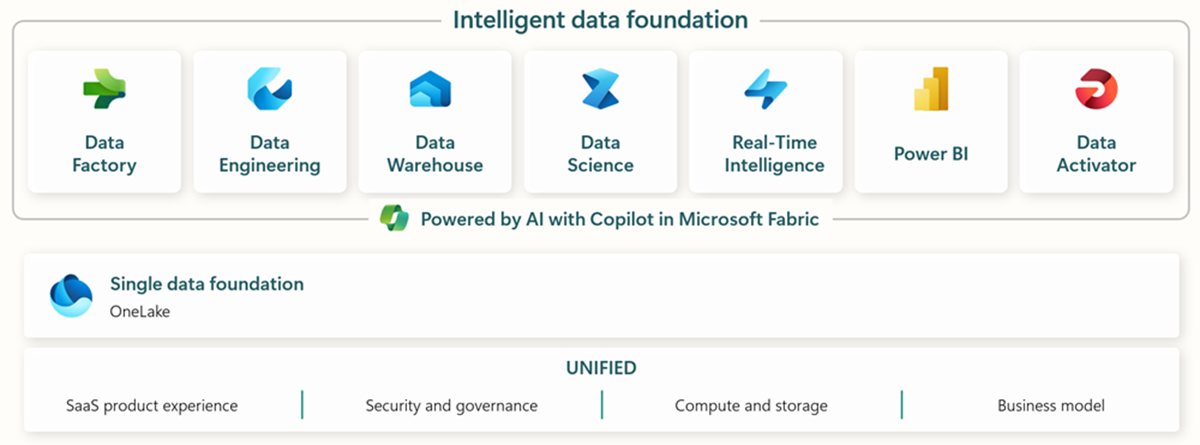
Source: What is Microsoft Fabric?
flowchart TB
    subgraph Source["🏢 Source Environment"]
        TD[(Teradata<br/>Data Warehouse)]
        INFA[Informatica<br/>ETL Platform]
        ORACLE[(Oracle<br/>Database)]
        LEGACY_BI[Existing<br/>BI Tools]
    end

    subgraph Network["🔒 Secure Connectivity"]
        EXPROUTE[ExpressRoute /<br/>VPN Gateway]
        FIREWALL[Azure<br/>Firewall]
        PLINK[Private<br/>Link]
    end

    subgraph Azure["☁️ Azure Foundation"]
        AAD[Microsoft<br/>Entra ID]
        KEYVAULT[Azure<br/>Key Vault]
        MONITOR[Azure<br/>Monitor]
        PURVIEW[Microsoft<br/>Purview]
    end

    subgraph Fabric["⚡ Microsoft Fabric"]
        subgraph Ingestion["Data Ingestion"]
            ADF[Data Factory<br/>Pipelines]
            MIRROR[Database<br/>Mirroring]
            STREAM[Eventstream]
        end

        subgraph Storage["Data Storage"]
            ONELAKE[(OneLake<br/>Delta Lake)]
            LH[Lakehouses]
            WH[Warehouses]
        end

        subgraph Analytics["Analytics"]
            NB[Notebooks]
            SM[Semantic<br/>Models]
            PBI[Power BI<br/>Reports]
        end
    end

    TD --> EXPROUTE
    INFA --> EXPROUTE
    ORACLE --> EXPROUTE

    EXPROUTE --> FIREWALL
    FIREWALL --> PLINK
    PLINK --> ADF
    PLINK --> MIRROR

    ADF --> ONELAKE
    MIRROR --> ONELAKE
    STREAM --> ONELAKE

    ONELAKE --> LH
    ONELAKE --> WH

    LH --> NB
    WH --> SM
    SM --> PBI

    AAD --> Fabric
    KEYVAULT --> ADF
    MONITOR --> Fabric
    PURVIEW --> ONELAKE

    style Source fill:#e74c3c,color:#fff
    style Network fill:#f39c12,color:#fff
    style Azure fill:#3498db,color:#fff
    style Fabric fill:#9b59b6,color:#fff
📅 6-Month Migration Timeline
Sprint Cadence
| Sprint | Duration | Focus |
|---|---|---|
| Each Sprint | 3 weeks | Deliverable-focused |
| Total Sprints | 8 sprints | 24 weeks |
| Buffer | 2 weeks | Contingency |
| Total | 26 weeks | 6 months |
Timeline Overview
gantt
    title 6-Month Migration Timeline
    dateFormat YYYY-MM-DD
    axisFormat %b %d

    section Phase 1: Foundation
    Sprint 1 - Discovery & Planning     :s1, 2024-01-01, 21d
    Sprint 2 - Infrastructure Setup     :s2, after s1, 21d

    section Phase 2: POC
    Sprint 3 - POC Development          :s3, after s2, 21d
    Sprint 4 - POC Validation           :s4, after s3, 21d

    section Phase 3: Core Migration
    Sprint 5 - Dimensions & Reference   :s5, after s4, 21d
    Sprint 6 - Fact Tables & ETL        :s6, after s5, 21d

    section Phase 4: Advanced
    Sprint 7 - BI & Analytics           :s7, after s6, 21d
    Sprint 8 - Real-time & AI/ML        :s8, after s7, 21d

    section Phase 5: Production
    Cutover Preparation                 :co1, after s8, 7d
    Production Cutover                  :milestone, m1, after co1, 0d
    Hypercare                          :hc, after m1, 14d
📊 Sprint-by-Sprint Breakdown
Sprint 1: Discovery & Planning (Weeks 1-3)
Objectives: - Complete inventory assessment - Establish project governance - Define migration scope and priorities - Set up project infrastructure
Deliverables:
| Deliverable | Owner | Status |
|---|---|---|
| Current state assessment report | Data Architect | ☐ |
| Migration scope document | Project Manager | ☐ |
| Risk register | Project Manager | ☐ |
| Resource plan | Project Manager | ☐ |
| Communication plan | Change Manager | ☐ |
| Project charter signed | Executive Sponsor | ☐ |
Key Activities:
Week 1:
├── Kickoff meeting with stakeholders
├── Inventory Teradata databases and sizes
├── Catalog Informatica workflows
├── Document current BI landscape
└── Identify data owners and SMEs

Week 2:
├── Complexity scoring of all objects
├── Dependency mapping
├── Performance baseline capture
├── Security and compliance review
└── Infrastructure requirements gathering

Week 3:
├── Prioritization workshop
├── Migration wave planning
├── Risk assessment workshop
├── Project plan finalization
└── Governance model approval
Sprint 1 Checklist:
- Teradata inventory complete (databases, tables, sizes)
- Informatica workflow catalog created
- Dependency matrix documented
- Complexity scores assigned
- Migration waves defined
- Project plan approved
- Governance structure established
- Communication plan distributed
Sprint 2: Infrastructure Setup (Weeks 4-6)

Source: Workspaces in Microsoft Fabric
Objectives: - Provision Azure and Fabric infrastructure - Establish secure connectivity - Configure identity and access - Set up development environments
Deliverables:
| Deliverable | Owner | Status |
|---|---|---|
| Azure subscription configured | Cloud Architect | ☐ |
| Fabric capacity provisioned | Fabric Admin | ☐ |
| ExpressRoute/VPN established | Network Engineer | ☐ |
| Entra ID groups created | Identity Admin | ☐ |
| Key Vault configured | Security Engineer | ☐ |
| Dev/Test/Prod workspaces created | Fabric Admin | ☐ |
Infrastructure Components:
flowchart LR
    subgraph OnPrem["On-Premises"]
        DC[Data Center]
        TD[(Teradata)]
        INFA[Informatica]
    end

    subgraph Connectivity["Connectivity"]
        EXPROUTE[ExpressRoute<br/>Circuit]
        VPN[VPN<br/>Gateway]
    end

    subgraph Azure["Azure"]
        VNET[Virtual<br/>Network]
        FW[Azure<br/>Firewall]
        PLINK[Private<br/>Endpoint]
    end

    subgraph Fabric["Fabric"]
        CAP[F64<br/>Capacity]
        WS_DEV[Dev<br/>Workspace]
        WS_TEST[Test<br/>Workspace]
        WS_PROD[Prod<br/>Workspace]
    end

    DC --> EXPROUTE
    DC -.-> VPN

    EXPROUTE --> VNET
    VPN --> VNET
    VNET --> FW
    FW --> PLINK
    PLINK --> CAP

    CAP --> WS_DEV
    CAP --> WS_TEST
    CAP --> WS_PROD
Connectivity Requirements:
| Requirement | Specification | Notes |
|---|---|---|
| Bandwidth | 1 Gbps minimum | 10 Gbps for large migrations |
| Latency | < 50ms | Round-trip to Azure region |
| Availability | 99.9% SLA | Redundant circuits recommended |
| Security | Encrypted | IPsec or ExpressRoute private peering |
| Ports | 1433, 443 | SQL and HTTPS |
ExpressRoute Setup:
# Create ExpressRoute circuit (Azure CLI)
az network express-route create \
  --name "ER-Fabric-Migration" \
  --resource-group "rg-fabric-connectivity" \
  --location "eastus2" \
  --bandwidth 1000 \
  --peering-location "Washington DC" \
  --sku-family MeteredData \
  --sku-tier Standard

# Create private peering
az network express-route peering create \
  --circuit-name "ER-Fabric-Migration" \
  --resource-group "rg-fabric-connectivity" \
  --peering-type AzurePrivatePeering \
  --peer-asn 65001 \
  --primary-peer-subnet "10.0.0.0/30" \
  --secondary-peer-subnet "10.0.0.4/30" \
  --vlan-id 100
Access Control Matrix:
| Role | Dev | Test | Prod |
|---|---|---|---|
| Fabric Admin | Admin | Admin | Admin |
| Data Engineers | Contributor | Contributor | Viewer |
| Data Analysts | Contributor | Viewer | Viewer |
| BI Developers | Member | Member | Viewer |
| Business Users | - | - | Viewer |
Sprint 2 Checklist:
- Azure subscription active with Fabric enabled
- Fabric F64 capacity provisioned
- ExpressRoute circuit active OR VPN gateway connected
- Firewall rules configured
- Entra ID groups created and assigned
- Key Vault provisioned with secrets
- Dev workspace created with Git integration
- Test workspace created
- Prod workspace created (empty)
- Self-Hosted Integration Runtime installed (if needed)
- Connectivity tested end-to-end
Sprint 3: POC Development (Weeks 7-9)
Objectives: - Migrate 3-5 representative tables - Convert sample ETL workflows - Build initial semantic model - Validate technical approach
POC Scope:
| Category | Items | Complexity |
|---|---|---|
| Dimension Tables | 2 | Low-Medium |
| Fact Tables | 2 | Medium-High |
| ETL Workflows | 3 | Medium |
| Reports | 2 | Low |
POC Data Selection Criteria:
mindmap
  root((POC Data<br/>Selection))
    Representative
      Various data types
      Different sizes
      Multiple sources
    Complexity Range
      Simple dimension
      Complex fact
      Incremental load
    Business Value
      High visibility
      Active users
      Clear success metrics
    Risk Management
      Non-critical data
      Recoverable
      Parallel available
POC Technical Activities:
Week 7:
├── Create Bronze Lakehouse
├── Configure Teradata connector
├── Migrate DIM_PLAYER table
├── Migrate DIM_MACHINE table
├── Set up initial Data Pipeline
└── Document data mapping

Week 8:
├── Create Silver Lakehouse
├── Develop cleansing notebook
├── Migrate FACT_SLOT_TRANSACTIONS (sample)
├── Convert first Informatica workflow
├── Implement incremental load pattern
└── Performance benchmarking

Week 9:
├── Create Gold Lakehouse
├── Build aggregation notebook
├── Create semantic model
├── Build 2 sample reports
├── End-to-end testing
└── POC documentation
Sprint 3 Checklist:
- Bronze Lakehouse created
- Silver Lakehouse created
- Gold Lakehouse created
- 2+ dimension tables migrated
- 1+ fact table migrated (sample data)
- 2+ ETL workflows converted
- Semantic model created
- 2+ reports functional
- Data validation passed
- Performance baseline captured
Sprint 4: POC Validation & Planning (Weeks 10-12)
Objectives: - Validate POC results with stakeholders - Capture lessons learned - Refine migration approach - Plan core migration waves
Validation Activities:
| Activity | Participants | Outcome |
|---|---|---|
| Technical Review | Data Engineers, Architects | Technical sign-off |
| Data Quality Review | Data Stewards | Accuracy validation |
| Performance Review | DBAs, Analysts | Performance acceptance |
| Business Review | Business Owners | Business sign-off |
| Security Review | Security Team | Security approval |
| Executive Review | Sponsors | Go/No-Go decision |
POC Success Criteria:
| Metric | Target | Actual | Status |
|---|---|---|---|
| Data Accuracy | 100% match | ☐ | |
| Query Performance | ≤120% of source | ☐ | |
| ETL Duration | ≤100% of source | ☐ | |
| Report Refresh | <30 seconds | ☐ | |
| User Acceptance | 80% approval | ☐ |
Sprint 4 Deliverables:
- POC Results Report
- Lessons Learned Document
- Refined Migration Plan
- Updated Timeline and Estimates
- Resource Requirements (refined)
- Go/No-Go Decision
- Core Migration Wave Plan
Sprint 5: Dimensions & Reference Data (Weeks 13-15)
Objectives: - Migrate all dimension tables - Migrate reference data - Establish master data patterns - Implement data quality framework
Migration Scope:
| Table Type | Count | Priority | Approach |
|---|---|---|---|
| Type 1 Dimensions | 15 | High | Full refresh |
| Type 2 Dimensions | 8 | High | SCD pattern |
| Reference Tables | 25 | High | Full refresh |
| Lookup Tables | 12 | Medium | Full refresh |
Dimension Migration Pattern:
# Fabric Notebook: Dimension Migration Pattern
from pyspark.sql.functions import *
from delta.tables import DeltaTable

def migrate_dimension(
    source_table: str,
    target_table: str,
    key_columns: list,
    scd_type: int = 1
):
    """
    Migrate dimension table with SCD handling.

    Args:
        source_table: Source Teradata table
        target_table: Target Fabric table
        key_columns: Business key columns
        scd_type: 1 for overwrite, 2 for history
    """
    # Read from source
    df_source = spark.read \
        .format("jdbc") \
        .option("url", teradata_url) \
        .option("dbtable", source_table) \
        .load()

    # Add metadata
    df_source = df_source \
        .withColumn("_load_timestamp", current_timestamp()) \
        .withColumn("_source_system", lit("Teradata"))

    if scd_type == 1:
        # Type 1: Full overwrite
        df_source.write \
            .mode("overwrite") \
            .format("delta") \
            .saveAsTable(target_table)

    elif scd_type == 2:
        # Type 2: Merge with history
        df_source = df_source \
            .withColumn("_valid_from", current_timestamp()) \
            .withColumn("_valid_to", lit(None).cast("timestamp")) \
            .withColumn("_is_current", lit(True))

        if spark.catalog.tableExists(target_table):
            delta_table = DeltaTable.forName(spark, target_table)

            # Close old records
            delta_table.alias("target").merge(
                df_source.alias("source"),
                " AND ".join([f"target.{k} = source.{k}" for k in key_columns]) +
                " AND target._is_current = true"
            ).whenMatchedUpdate(set={
                "_valid_to": "source._valid_from",
                "_is_current": "false"
            }).execute()

            # Insert new records
            df_source.write.mode("append").saveAsTable(target_table)
        else:
            df_source.write \
                .mode("overwrite") \
                .format("delta") \
                .saveAsTable(target_table)

    # Optimize
    spark.sql(f"OPTIMIZE {target_table}")

    return spark.table(target_table).count()
Sprint 5 Checklist:
- All dimension tables migrated
- Reference data migrated
- Data quality checks implemented
- Row counts validated
- Business key integrity verified
- SCD patterns working correctly
- Documentation updated
Sprint 6: Fact Tables & ETL (Weeks 16-18)
Objectives: - Migrate all fact tables - Convert Informatica workflows to Data Factory - Implement incremental load patterns - Establish scheduling and monitoring
Fact Table Migration Strategy:
| Table Size | Approach | Parallelism |
|---|---|---|
| < 10 GB | Full load | 4 partitions |
| 10-100 GB | Partitioned load | 8 partitions |
| 100 GB - 1 TB | Incremental with backfill | 16 partitions |
| > 1 TB | Chunked incremental | 32+ partitions |
Informatica to Data Factory Mapping:
| Informatica Component | Data Factory Equivalent |
|---|---|
| Mapping | Data Flow |
| Workflow | Pipeline |
| Session | Activity |
| Worklet | Sub-pipeline |
| Source/Target | Linked Service + Dataset |
| Transformation | Transformation in Data Flow |
| Expression | Derived Column |
| Filter | Filter Transformation |
| Joiner | Join Transformation |
| Aggregator | Aggregate Transformation |
| Router | Conditional Split |
| Lookup | Lookup Transformation |
| Sequence Generator | Surrogate Key |
ETL Conversion Example:
{
  "name": "pl_daily_slot_transactions",
  "properties": {
    "description": "Converted from Informatica wf_daily_slot_load",
    "activities": [
      {
        "name": "Extract from Teradata",
        "type": "Copy",
        "inputs": [{"name": "ds_teradata_slot_trans"}],
        "outputs": [{"name": "ds_bronze_slot_trans"}],
        "typeProperties": {
          "source": {
            "type": "TeradataSource",
            "query": {
              "value": "SELECT * FROM CASINO_DW.FACT_SLOT_TRANSACTIONS WHERE transaction_date = '@{formatDateTime(pipeline().parameters.RunDate, 'yyyy-MM-dd')}'",
              "type": "Expression"
            }
          },
          "sink": {
            "type": "ParquetSink",
            "storeSettings": {
              "type": "AzureBlobFSWriteSettings"
            }
          }
        }
      },
      {
        "name": "Transform to Silver",
        "type": "SynapseNotebook",
        "dependsOn": [{"activity": "Extract from Teradata", "dependencyConditions": ["Succeeded"]}],
        "typeProperties": {
          "notebook": {"name": "nb_transform_slot_transactions"},
          "parameters": {
            "run_date": {"value": "@pipeline().parameters.RunDate", "type": "string"}
          }
        }
      },
      {
        "name": "Load to Gold",
        "type": "SynapseNotebook",
        "dependsOn": [{"activity": "Transform to Silver", "dependencyConditions": ["Succeeded"]}],
        "typeProperties": {
          "notebook": {"name": "nb_aggregate_slot_metrics"}
        }
      }
    ],
    "parameters": {
      "RunDate": {"type": "string", "defaultValue": "@utcNow('yyyy-MM-dd')"}
    }
  }
}
Sprint 6 Checklist:
- All fact tables migrated
- Historical data backfill complete
- Incremental patterns working
- Informatica workflows converted (80%+)
- Pipelines scheduled
- Monitoring alerts configured
- Data quality gates implemented
- Performance optimized (OPTIMIZE, Z-ORDER)
Sprint 7: BI & Analytics (Weeks 19-21)

Source: Semantic models in Microsoft Fabric
Objectives: - Build production semantic models - Migrate all reports and dashboards - Establish self-service analytics - Train business users
Semantic Model Design:
erDiagram
    DIM_DATE ||--o{ FACT_SLOT : "date_key"
    DIM_PLAYER ||--o{ FACT_SLOT : "player_id"
    DIM_MACHINE ||--o{ FACT_SLOT : "machine_id"
    DIM_PLAYER ||--o{ FACT_SESSION : "player_id"
    DIM_DATE ||--o{ FACT_SESSION : "date_key"
    DIM_PLAYER ||--o{ FACT_CAGE : "player_id"
    DIM_DATE ||--o{ FACT_CAGE : "date_key"

    DIM_DATE {
        int date_key PK
        date calendar_date
        int year
        int quarter
        int month
    }

    DIM_PLAYER {
        string player_id PK
        string name
        string loyalty_tier
        date registration_date
    }

    DIM_MACHINE {
        string machine_id PK
        string name
        string game_type
        decimal denomination
    }

    FACT_SLOT {
        bigint transaction_id PK
        int date_key FK
        string player_id FK
        string machine_id FK
        decimal coin_in
        decimal coin_out
    }

    FACT_SESSION {
        bigint session_id PK
        int date_key FK
        string player_id FK
        int duration_minutes
        decimal total_spend
    }

    FACT_CAGE {
        bigint transaction_id PK
        int date_key FK
        string player_id FK
        decimal amount
        string type
    }
Report Migration Approach:
| Report Type | Approach | Tool |
|---|---|---|
| Operational Dashboards | Rebuild | Power BI |
| Executive Scorecards | Rebuild | Power BI |
| Ad-hoc Analysis | Self-service | Power BI Desktop |
| Paginated Reports | Migrate | Power BI Paginated |
| Embedded Analytics | Rebuild | Power BI Embedded |
Sprint 7 Checklist:
- Semantic models created
- All reports migrated
- Dashboards rebuilt
- Row-level security configured
- Report schedules configured
- User training completed
- Self-service enabled
- Documentation updated
Sprint 8: Real-time & AI/ML (Weeks 22-24)
Objectives: - Implement real-time streaming - Deploy ML models - Enable advanced analytics - Final integration testing
Real-time Architecture:
flowchart LR
    subgraph Sources["Event Sources"]
        SLOT[Slot Machines]
        POS[POS Systems]
        SENSOR[IoT Sensors]
    end

    subgraph Ingest["Ingestion"]
        EH[Event Hub]
        ES[Eventstream]
    end

    subgraph Process["Processing"]
        KQL[KQL Database]
        RT[Real-time<br/>Analytics]
    end

    subgraph Consume["Consumption"]
        DASH[Live<br/>Dashboard]
        ALERT[Alerts]
        ML[ML Scoring]
    end

    SLOT --> EH
    POS --> EH
    SENSOR --> EH

    EH --> ES
    ES --> KQL
    ES --> RT

    KQL --> DASH
    RT --> ALERT
    KQL --> ML
ML Model Deployment:
| Model | Purpose | Deployment |
|---|---|---|
| Churn Prediction | Identify at-risk players | Batch scoring |
| Fraud Detection | Real-time fraud alerts | Streaming |
| Jackpot Forecasting | Capacity planning | Scheduled |
| Player Segmentation | Marketing | Weekly refresh |
Sprint 8 Checklist:
- Eventstream configured
- KQL database created
- Real-time dashboards working
- ML models deployed
- Alerting configured
- Integration testing complete
- Performance testing complete
- Security testing complete
🚀 Production Cutover
Cutover Timeline
gantt
    title Production Cutover - 7 Day Plan
    dateFormat YYYY-MM-DD
    axisFormat %a %d

    section Preparation
    Final sync from source       :prep1, 2024-06-24, 1d
    Freeze source changes        :prep2, after prep1, 1d
    Pre-cutover validation       :prep3, after prep2, 1d

    section Cutover
    Stop source ETL              :cut1, after prep3, 4h
    Final data sync              :cut2, after cut1, 8h
    Switch connections           :cut3, after cut2, 2h
    Validation testing           :cut4, after cut3, 4h
    Go-Live                      :milestone, m1, after cut4, 0d

    section Hypercare
    Intensive monitoring         :hyp1, after m1, 3d
    Issue resolution             :hyp2, after hyp1, 4d
    Knowledge transfer           :hyp3, after hyp2, 3d
    Steady state                 :milestone, m2, after hyp3, 0d
Cutover Checklist
T-7 Days: Preparation
- Final UAT sign-off obtained
- Cutover runbook reviewed and approved
- Rollback plan documented and tested
- Communication sent to all stakeholders
- Support team briefed
- Monitoring dashboards ready
- War room scheduled
T-3 Days: Final Preparation
- Source system change freeze confirmed
- Full backup of source completed
- Full backup of target completed
- All team members confirmed available
- Escalation contacts verified
- Test cutover completed (dry run)
T-0: Cutover Day
| Time | Activity | Owner | Status |
|---|---|---|---|
| 00:00 | Stop all source ETL jobs | ETL Lead | ☐ |
| 00:30 | Verify no active transactions | DBA | ☐ |
| 01:00 | Execute final data sync | Data Engineer | ☐ |
| 05:00 | Final sync complete | Data Engineer | ☐ |
| 05:30 | Row count validation | QA Lead | ☐ |
| 06:00 | Checksum validation | QA Lead | ☐ |
| 06:30 | Switch application connections | App Lead | ☐ |
| 07:00 | Start Fabric ETL jobs | ETL Lead | ☐ |
| 07:30 | Validate ETL execution | ETL Lead | ☐ |
| 08:00 | Report validation | BI Lead | ☐ |
| 08:30 | Business validation | Business SME | ☐ |
| 09:00 | GO-LIVE DECISION | Project Manager | ☐ |
| 09:30 | Announce go-live | Communications | ☐ |
T+1 to T+14: Hypercare
- 24/7 monitoring active
- Daily health check meetings
- Issue triage and resolution
- Performance monitoring
- User feedback collection
- Documentation updates
- Knowledge transfer sessions
- Transition to BAU support
🏢 Center of Excellence
CoE Structure
flowchart TB
    subgraph CoE["Center of Excellence"]
        LEAD[CoE Lead]

        subgraph Pillars["Pillars"]
            ARCH[Architecture<br/>& Standards]
            ENABLE[Enablement<br/>& Training]
            GOV[Governance<br/>& Security]
            OPS[Operations<br/>& Support]
        end

        LEAD --> ARCH
        LEAD --> ENABLE
        LEAD --> GOV
        LEAD --> OPS
    end

    subgraph Teams["Delivery Teams"]
        T1[Team 1<br/>Core Analytics]
        T2[Team 2<br/>Real-time]
        T3[Team 3<br/>Self-service]
    end

    ARCH --> T1
    ARCH --> T2
    ARCH --> T3

    style CoE fill:#9b59b6,color:#fff
CoE Responsibilities
| Pillar | Responsibilities |
|---|---|
| Architecture & Standards | Design patterns, naming conventions, code reviews, technology decisions |
| Enablement & Training | Training programs, documentation, office hours, onboarding |
| Governance & Security | Access policies, data classification, compliance, auditing |
| Operations & Support | Monitoring, incident response, capacity planning, optimization |
CoE Artifacts
| Artifact | Purpose | Owner |
|---|---|---|
| Architecture Decision Records | Document key decisions | Architecture |
| Coding Standards Guide | Consistency in development | Architecture |
| Onboarding Playbook | New team member ramp-up | Enablement |
| Training Curriculum | Skill development | Enablement |
| Data Classification Policy | Security compliance | Governance |
| Access Request Process | Access control | Governance |
| Monitoring Runbook | Operational procedures | Operations |
| Incident Response Plan | Issue resolution | Operations |
🔒 Security & Compliance

Source: Microsoft Fabric security overview
Security Architecture
flowchart TB
    subgraph Identity["Identity & Access"]
        ENTRA[Microsoft<br/>Entra ID]
        COND[Conditional<br/>Access]
        PIM[Privileged<br/>Identity Mgmt]
    end

    subgraph Network["Network Security"]
        PLINK[Private<br/>Link]
        FW[Firewall]
        NSG[Network<br/>Security Groups]
    end

    subgraph Data["Data Security"]
        ENCRYPT[Encryption<br/>at Rest]
        TLS[Encryption<br/>in Transit]
        RLS[Row-Level<br/>Security]
        DDM[Dynamic Data<br/>Masking]
    end

    subgraph Compliance["Compliance"]
        PURVIEW[Microsoft<br/>Purview]
        AUDIT[Audit<br/>Logging]
        DLP[Data Loss<br/>Prevention]
    end

    ENTRA --> COND --> PIM
    PLINK --> FW --> NSG
    ENCRYPT --> TLS --> RLS --> DDM
    PURVIEW --> AUDIT --> DLP

    style Identity fill:#3498db,color:#fff
    style Network fill:#e74c3c,color:#fff
    style Data fill:#27ae60,color:#fff
    style Compliance fill:#f39c12,color:#fff
Access Control Matrix
| Role | Workspace | Lakehouse | Warehouse | Semantic Model | Reports |
|---|---|---|---|---|---|
| Platform Admin | Admin | Admin | Admin | Admin | Admin |
| Data Engineer | Member | ReadWrite | ReadWrite | Read | Read |
| Data Analyst | Member | Read | Read | ReadWrite | ReadWrite |
| BI Developer | Member | Read | Read | ReadWrite | ReadWrite |
| Business User | Viewer | - | - | Read | Read |
| Executive | Viewer | - | - | Read | Read |
Compliance Requirements
| Regulation | Requirement | Implementation |
|---|---|---|
| GDPR | Data privacy | Purview data classification, DLP policies |
| SOX | Financial controls | Audit logging, access reviews |
| PCI-DSS | Payment data | Encryption, network segmentation |
| Gaming (NIGC MICS) | Gaming compliance | CTR/SAR reporting, audit trails |
📊 Success Metrics
KPIs Dashboard
| Category | Metric | Target | Current |
|---|---|---|---|
| Data Migration | Tables migrated | 100% | |
| Row count accuracy | 100% | ||
| Checksum validation | 100% | ||
| ETL Migration | Workflows converted | 100% | |
| Job success rate | 99.9% | ||
| Processing time | ≤100% of source | ||
| Performance | Query performance | ≤120% of source | |
| Report refresh | <30 seconds | ||
| Dashboard load | <5 seconds | ||
| Adoption | Active users | 100% of target | |
| Self-service reports | 50+ created | ||
| Training completion | 100% | ||
| Operations | System availability | 99.9% | |
| Incident resolution | <4 hours | ||
| User satisfaction | >80% |
🔧 Troubleshooting Guide
Common Issues
| Issue | Symptoms | Resolution |
|---|---|---|
| Connection timeout | JDBC errors, slow queries | Check ExpressRoute, increase timeout |
| Memory errors | Spark OOM exceptions | Increase cluster size, partition data |
| Data mismatch | Row count differences | Check filters, timezone handling |
| Performance degradation | Slow queries | Run OPTIMIZE, check query plans |
| Authentication failures | 401/403 errors | Verify service principal, refresh tokens |
| Pipeline failures | Activity errors | Check logs, verify connections |
Escalation Path
Level 1: Self-service (documentation, FAQ)
    ↓
Level 2: CoE Support (office hours, tickets)
    ↓
Level 3: Platform Team (urgent issues)
    ↓
Level 4: Microsoft Support (product issues)
📚 Resources
Documentation
| Document | Purpose |
|---|---|
| Migration Assessment Template | Initial assessment |
| Migration Checklist | Execution tracking |
| CI/CD Guide | Deployment automation |
| SQL Translation | SQL conversion |
Training
| Course | Audience | Duration |
|---|---|---|
| Fabric Fundamentals | All | 4 hours |
| Data Engineering | Engineers | 16 hours |
| BI Development | Analysts | 8 hours |
| Administration | Admins | 8 hours |
🎉 Summary
This comprehensive migration guide provides:
- ✅ 6-month timeline with 8 sprints
- ✅ POC to Production complete journey
- ✅ Enterprise connectivity (ExpressRoute, VPN)
- ✅ Security and compliance framework
- ✅ Center of Excellence structure
- ✅ Detailed checklists for each phase
- ✅ Production cutover runbook
- ✅ Hypercare and steady-state operations
🧭 Navigation
| ⬅️ Previous | ⬆️ Up | ➡️ Next |
|---|---|---|
| 12-CI/CD DevOps | Tutorials Index | Tutorials Home |