🔄 Tutorial 08: Database Mirroring
Last Updated: 2026-04-15 | Version: 2.0 Status: ✅ Final | Maintainer: Documentation Team



Third-party references — publicly sourced, good-faith comparison
This page references non-Microsoft products and services. That information is drawn from each vendor's publicly available documentation and is offered for honest, good-faith comparison only. This is a personal project written from a Microsoft Fabric and Azure perspective; it does not claim expertise in, or authority over, any third-party product, and nothing here is an official statement by, or endorsed by, those vendors. Capabilities, pricing, and features change often — always verify against the vendor's current official documentation. Where a third-party offering is the stronger choice, we say so plainly.
🔄 Tutorial 08: Database Mirroring - Real-Time Replication
| Difficulty | ⭐⭐⭐ Advanced |
| Time | ⏱️ 60-75 minutes |
| Focus | Data Integration |
📊 Progress Tracker
┌────────┬────────┬────────┬────────┬────────┬────────┬────────┬────────┬────────┬────────┐
│   00   │   01   │   02   │   03   │   04   │   05   │   06   │   07   │   08   │   09   │
│ SETUP  │ BRONZE │ SILVER │  GOLD  │  RT    │  PBI   │ PIPES  │  GOV   │ MIRROR │  AI/ML │
├────────┼────────┼────────┼────────┼────────┼────────┼────────┼────────┼────────┼────────┤
│   ✅   │   ✅   │   ✅   │   ✅   │   ✅   │   ✅   │   ✅   │   ✅   │  🔵   │   ⬚   │
└────────┴────────┴────────┴────────┴────────┴────────┴────────┴────────┴────────┴────────┘
                                                                           ▲
                                                                      YOU ARE HERE
| Navigation | |
|---|---|
| ⬅️ Previous | 07-Governance & Purview |
| ➡️ Next | 09-Advanced AI/ML |
📖 Overview
This tutorial covers implementing Database Mirroring to replicate data from external sources into Microsoft Fabric. You will set up near real-time replication from operational databases directly into OneLake, enabling unified analytics across your entire data estate.
Database Mirroring is a game-changer for casino operations, allowing you to bring in data from slot management systems, player tracking databases, and compliance systems without writing complex ETL code.
🎯 Learning Objectives
By the end of this tutorial, you will be able to:
- Understand Database Mirroring concepts and architecture
- Configure Azure SQL Database/SQL Server mirroring
- Set up Snowflake mirroring
- Configure Azure Cosmos DB mirroring
- Monitor replication status and latency
- Query mirrored data with Spark and SQL
- Troubleshoot common mirroring issues
🔄 Database Mirroring Overview
Database Mirroring provides near real-time replication of data into Fabric OneLake using Change Data Capture (CDC) technology.

Source: What is Mirroring in Microsoft Fabric?
flowchart LR
    subgraph Sources["Source Databases"]
        SQL[(SQL Server)]
        ASQL[(Azure SQL DB)]
        SF[(Snowflake)]
        CDB[(Cosmos DB)]
    end

    subgraph CDC["Change Data Capture"]
        CDC1[CDC Engine]
    end

    subgraph Fabric["Microsoft Fabric"]
        OL[(OneLake)]
        DT[(Delta Tables)]
        LH[Lakehouse]
    end

    SQL --> CDC1
    ASQL --> CDC1
    SF --> CDC1
    CDB --> CDC1

    CDC1 --> OL
    OL --> DT
    DT --> LH
🌟 Key Benefits
| Benefit | Description |
|---|---|
| Near Real-Time | Data available within minutes of source changes |
| No ETL Code | Automatic replication without custom development |
| Schema Sync | Automatic schema synchronization and evolution |
| Delta Format | Data stored in optimized Delta Lake format |
| Query Flexibility | Access via Spark, T-SQL, or Power BI |
🎰 Supported Data Sources
| Source | Version Requirements | CDC Method |
|---|---|---|
| SQL Server | 2016+ | Native CDC |
| Azure SQL Database | All versions | Native CDC |
| Azure Cosmos DB | All versions | Change Feed |
| Snowflake | All editions | Streams |
📋 Prerequisites
Before starting this tutorial, ensure you have:
- Completed Tutorial 00: Environment Setup
- Completed Tutorial 01-03: Medallion Architecture
- Fabric workspace with sufficient capacity (F64+ recommended)
- Source database with appropriate permissions
- Network connectivity between Fabric and source databases
💡 Tip: For testing, you can use Azure SQL Database with sample data. No on-premises infrastructure is required for this tutorial.
🛠️ Step 1: SQL Server / Azure SQL Database Mirroring
Requirements
- SQL Server 2016+ or Azure SQL Database
- CDC (Change Data Capture) enabled on source
- Network access from Fabric to source database
db_ownerorsysadminrole on source database
1.1 Enable CDC on Source Database
⚠️ Warning: Enabling CDC requires
db_ownerprivileges and may impact database performance slightly. Test in non-production environments first.
Connect to your source SQL Server database and enable CDC:
-- Enable CDC at the database level
EXEC sys.sp_cdc_enable_db;
GO

-- Verify CDC is enabled
SELECT name, is_cdc_enabled
FROM sys.databases
WHERE name = DB_NAME();
GO
1.2 Enable CDC on Tables
Enable CDC on each table you want to mirror:
-- Enable CDC on slot_transactions table
EXEC sys.sp_cdc_enable_table
    @source_schema = N'gaming',
    @source_name = N'slot_transactions',
    @role_name = NULL,
    @supports_net_changes = 1;
GO

-- Enable CDC on player_sessions table
EXEC sys.sp_cdc_enable_table
    @source_schema = N'gaming',
    @source_name = N'player_sessions',
    @role_name = NULL,
    @supports_net_changes = 1;
GO

-- Enable CDC on cage_operations table
EXEC sys.sp_cdc_enable_table
    @source_schema = N'gaming',
    @source_name = N'cage_operations',
    @role_name = NULL,
    @supports_net_changes = 1;
GO

-- Verify CDC is enabled on tables
SELECT t.name AS table_name, ct.capture_instance
FROM sys.tables t
JOIN cdc.change_tables ct ON t.object_id = ct.source_object_id;
GO
💡 Tip: The
@supports_net_changesparameter enables net change queries, which return only the final state of changed rows rather than all intermediate changes.
1.3 Create Mirrored Database in Fabric
- Open your workspace
casino-fabric-poc - Click + New > Mirrored database
- Select Azure SQL Database or SQL Server
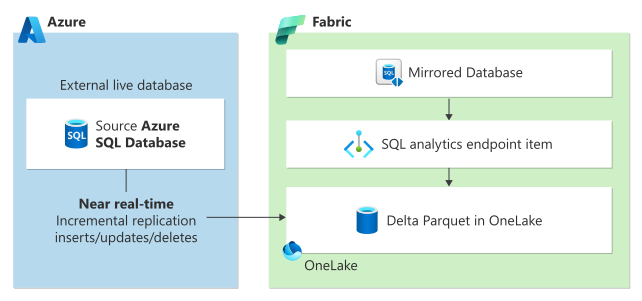
Database mirroring architecture showing Azure SQL Database connected to Fabric OneLake. Source: Mirror Azure SQL Database
1.4 Configure Connection
| Setting | Azure SQL Database | SQL Server (On-Premises) |
|---|---|---|
| Server | your-server.database.windows.net | your-server.domain.com |
| Database | CasinoOperational | CasinoOperational |
| Authentication | Microsoft Entra ID or SQL Auth | SQL Auth |
| Gateway | Not required | On-Premises Data Gateway |
- Enter connection details
- Click Test connection to verify connectivity
- Select tables to mirror:
gaming.slot_transactionsgaming.player_sessionsgaming.cage_operations- Click Mirror database
⚠️ Warning: For on-premises SQL Server, you must install and configure an On-Premises Data Gateway. Ensure the gateway service account has network access to both the SQL Server and the internet.
1.5 Monitor Initial Sync
- Open the mirrored database in your workspace
- View Replication status tab
- Monitor:
- Initial snapshot progress (percentage complete)
- Rows synchronized (per table)
- Estimated completion time
🛠️ Step 2: Snowflake Mirroring
Requirements
- Snowflake account (any edition)
ACCOUNTADMINor appropriate privileges- Network connectivity to Snowflake
2.1 Create Mirrored Database
- Click + New > Mirrored database
- Select Snowflake
2.2 Configure Connection
Account: your-account.snowflakecomputing.com
Warehouse: COMPUTE_WH
Database: CASINO_DW
Schema: ANALYTICS
Authentication: User/Password or OAuth
| Setting | Description | Example |
|---|---|---|
| Account | Full Snowflake account URL | org-account.snowflakecomputing.com |
| Warehouse | Compute warehouse for queries | COMPUTE_WH |
| Database | Source database name | CASINO_DW |
| Schema | Schema containing tables | ANALYTICS |
| Role | Role with SELECT privileges | FABRIC_READER |
2.3 Select Tables
Choose tables to mirror from your Snowflake data warehouse:
ANALYTICS.DAILY_SLOT_SUMMARYANALYTICS.PLAYER_METRICSANALYTICS.COMPLIANCE_REPORTSANALYTICS.JACKPOT_HISTORY
2.4 Start Mirroring
- Review configuration summary
- Click Start mirroring
- Monitor initial sync progress
💡 Tip: Based on Snowflake's publicly available documentation, Snowflake mirroring uses Snowflake Streams under the hood. Ensure your Snowflake account has sufficient storage for stream metadata, and verify current behavior against Snowflake's official docs.
🛠️ Step 3: Azure Cosmos DB Mirroring
Requirements
- Azure Cosmos DB account (Core/SQL API)
- Change feed enabled (default)
- Network connectivity from Fabric
3.1 Create Mirrored Database
- Click + New > Mirrored database
- Select Azure Cosmos DB
3.2 Configure Connection
Account: your-cosmos-account.documents.azure.com
Database: casino-realtime
Containers:
  - player-activity
  - security-events
  - jackpot-alerts
3.3 Cosmos DB Considerations
⚠️ Important: Cosmos DB mirroring has specific data transformation behaviors:
| Source Structure | Destination Behavior |
|---|---|
| Nested documents | Flattened to columns |
| Arrays | Expanded to separate rows |
| Polymorphic schemas | Union of all properties |
Example transformation:
// Source document in Cosmos DB
{
  "id": "evt-001",
  "player": {
    "id": "P123",
    "name": "John Doe"
  },
  "events": ["login", "play", "win"]
}

// Mirrored table structure
| id      | player_id | player_name | events  |
|---------|-----------|-------------|---------|
| evt-001 | P123      | John Doe    | login   |
| evt-001 | P123      | John Doe    | play    |
| evt-001 | P123      | John Doe    | win     |
🛠️ Step 4: Query Mirrored Data
4.1 Data Location in Lakehouse
Mirrored data automatically appears in a designated Lakehouse:
lh_mirrored/
├── Tables/
│   ├── slot_transactions/
│   ├── player_sessions/
│   ├── cage_operations/
│   └── _metadata/
└── Files/
    └── _delta_log/
4.2 Query with PySpark
# Read mirrored slot transactions
df_slots = spark.table("lh_mirrored.slot_transactions")

# Show recent transactions
from pyspark.sql.functions import col, desc

df_slots.filter(col("transaction_time") > "2024-01-01") \
    .orderBy(desc("transaction_time")) \
    .show(10)

# Calculate daily statistics
df_slots.groupBy("machine_id", "transaction_date") \
    .agg(
        count("*").alias("spin_count"),
        sum("amount").alias("total_coin_in"),
        avg("amount").alias("avg_bet")
    ) \
    .orderBy(desc("transaction_date")) \
    .show()
4.3 Query with T-SQL
Access mirrored data through the SQL Analytics Endpoint:
-- Recent transaction summary
SELECT
    CAST(transaction_timestamp AS DATE) AS transaction_date,
    COUNT(*) AS transaction_count,
    SUM(amount) AS total_amount,
    AVG(amount) AS avg_amount
FROM lh_mirrored.slot_transactions
WHERE transaction_timestamp >= DATEADD(day, -7, GETDATE())
GROUP BY CAST(transaction_timestamp AS DATE)
ORDER BY transaction_date DESC;

-- Player session analysis
SELECT
    player_id,
    COUNT(DISTINCT session_id) AS session_count,
    SUM(DATEDIFF(minute, session_start, session_end)) AS total_minutes,
    AVG(DATEDIFF(minute, session_start, session_end)) AS avg_session_length
FROM lh_mirrored.player_sessions
WHERE session_start >= DATEADD(day, -30, GETDATE())
GROUP BY player_id
ORDER BY total_minutes DESC;
4.4 Join Mirrored Data with Gold Layer
# Join mirrored operational data with Gold analytics
df_mirrored = spark.table("lh_mirrored.player_sessions")
df_gold = spark.table("lh_gold.gold_player_360")

# Enrich real-time sessions with player analytics
df_enriched = df_mirrored.join(
    df_gold,
    df_mirrored.player_id == df_gold.player_id,
    "left"
).select(
    df_mirrored["*"],
    df_gold.loyalty_tier,
    df_gold.player_value_score,
    df_gold.lifetime_value,
    df_gold.churn_risk_score
)

# Identify high-value players currently on floor
df_enriched.filter(
    (col("session_end").isNull()) &  # Active session
    (col("loyalty_tier").isin("Platinum", "Diamond"))
).show()
🛠️ Step 5: Monitor and Manage Replication
5.1 Replication Dashboard
- Open your mirrored database
- Navigate to Monitor tab
- Review key metrics
5.2 Key Metrics
| Metric | Description | Target | Alert Threshold |
|---|---|---|---|
| Replication Lag | Time behind source | < 5 minutes | > 15 minutes |
| Throughput | Rows synchronized/second | Varies | Sudden drop |
| Error Rate | Failed operations | 0% | > 1% |
| Storage Used | OneLake storage size | Monitor growth | 80% capacity |
| CDC Capture Jobs | Active capture processes | All running | Any stopped |
5.3 Handle Replication Issues
Lag Increasing
flowchart TD
    A[Lag Increasing] --> B{Check Source}
    B -->|High Load| C[Optimize source queries]
    B -->|Normal| D{Check Network}
    D -->|Latency| E[Review gateway config]
    D -->|OK| F{Check Fabric}
    F -->|Capacity| G[Scale up capacity]
    F -->|OK| H[Contact support]
Troubleshooting steps:
- Check source database load - High OLTP activity can delay CDC processing
- Verify network connectivity - Test latency between source and Fabric
- Review table sizes - Large tables may need partitioning
- Check Fabric capacity - Ensure sufficient CUs available
Schema Changes Detected
When source schema changes:
| Change Type | Mirroring Behavior |
|---|---|
| New column | Automatically added |
| Column removed | Marked as nullable |
| Data type change | May require restart |
| Table renamed | Requires reconfiguration |
-- Check for schema drift in source
SELECT
    c.name AS column_name,
    t.name AS data_type,
    c.is_nullable
FROM sys.columns c
JOIN sys.types t ON c.system_type_id = t.system_type_id
WHERE c.object_id = OBJECT_ID('gaming.slot_transactions')
ORDER BY c.column_id;
🛠️ Step 6: Integration Patterns
6.1 Hybrid Architecture
flowchart TB
    subgraph Operational["Operational Sources"]
        SQL[(SQL Server<br/>OLTP)]
        SF[(Snowflake<br/>Data Warehouse)]
        CDB[(Cosmos DB<br/>NoSQL)]
    end

    subgraph Fabric["Microsoft Fabric"]
        subgraph Mirror["Mirrored Layer"]
            LHM[lh_mirrored]
        end

        subgraph Medallion["Medallion Architecture"]
            LHB[lh_bronze]
            LHS[lh_silver]
            LHG[lh_gold]
        end

        subgraph Presentation["Presentation"]
            SM[Semantic Model]
            PBI[Power BI]
        end
    end

    SQL -->|Mirroring| LHM
    SF -->|Mirroring| LHM
    CDB -->|Mirroring| LHM

    LHM --> LHS
    LHB --> LHS
    LHS --> LHG
    LHG --> SM
    SM --> PBI
6.2 Casino Use Cases
| Use Case | Source | Mirroring Value |
|---|---|---|
| Real-time player tracking | Cosmos DB | Sub-minute latency for floor operations |
| Operational reporting | SQL Server | Live slot performance data |
| Historical analytics | Snowflake | Consolidate enterprise data in Fabric |
| Compliance monitoring | SQL Server | Near real-time transaction auditing |
| Marketing automation | SQL Server | Live player eligibility for promotions |
✅ Validation Checklist
Before moving to the next tutorial, verify:
- CDC Enabled - Source database CDC enabled and verified
- Mirrored Database Created - Database exists in Fabric workspace
- Initial Sync Complete - 100% of data synchronized successfully
- Replication Active - Ongoing sync with lag < 5 minutes
- Data Queryable via Spark - Can read tables in PySpark notebooks
- SQL Endpoint Working - Can query via SQL Analytics Endpoint
🔍 Verification Commands
### Verify CDC Enabled on Source-- Check CDC is enabled at database level
SELECT name, is_cdc_enabled
FROM sys.databases
WHERE name = DB_NAME();
-- Expected: is_cdc_enabled = 1
-- Verify CDC enabled on tables
SELECT
t.name AS table_name,
ct.capture_instance,
ct.start_lsn
FROM sys.tables t
JOIN cdc.change_tables ct ON t.object_id = ct.source_object_id
ORDER BY t.name;
-- Expected: List of mirrored tables with capture instances
# List all mirrored databases in workspace
# In Fabric UI: Navigate to workspace > Filter by "Mirrored database"
# Expected: Your mirrored database appears in the list
# In Fabric portal:
# 1. Open mirrored database
# 2. Go to "Monitor" tab
# 3. Check "Initial sync status"
# Expected: All tables show 100% complete

# Or via notebook:
tables = ["slot_transactions", "player_sessions", "cage_operations"]
for table in tables:
    try:
        count = spark.table(f"lh_mirrored.{table}").count()
        print(f"✅ {table}: {count:,} rows")
    except Exception as e:
        print(f"❌ {table}: {e}")
# Check replication lag in Fabric portal
# Monitor tab > Replication lag metric
# Expected: < 5 minutes for all tables

# Compare timestamps
from pyspark.sql.functions import max as spark_max

df_mirrored = spark.table("lh_mirrored.slot_transactions")
latest_timestamp = df_mirrored.select(spark_max("transaction_timestamp")).collect()[0][0]
print(f"Latest mirrored transaction: {latest_timestamp}")
# Compare to current time - should be within 5 minutes
# Read mirrored table
df = spark.table("lh_mirrored.slot_transactions")

# Verify data
print(f"Row count: {df.count():,}")
print(f"Columns: {len(df.columns)}")

# Show sample
df.show(5)
# Expected: Data displays successfully
-- Open SQL Analytics Endpoint in Fabric
-- Run test query
SELECT TOP 10
    transaction_id,
    machine_id,
    amount,
    transaction_timestamp
FROM lh_mirrored.slot_transactions
ORDER BY transaction_timestamp DESC;
-- Expected: Query returns recent transactions
# Join mirrored data with Gold analytics
df_mirrored = spark.table("lh_mirrored.player_sessions")
df_gold = spark.table("lh_gold.gold_player_360")

df_joined = df_mirrored.join(
    df_gold,
    df_mirrored.player_id == df_gold.player_id,
    "inner"
).select(
    df_mirrored.session_id,
    df_mirrored.player_id,
    df_gold.loyalty_tier,
    df_gold.lifetime_value
)

print(f"Joined records: {df_joined.count():,}")
df_joined.show(5)
# Expected: Successfully joined records display
🔧 Troubleshooting
Initial Sync Fails
| Symptom | Possible Cause | Resolution |
|---|---|---|
| Connection timeout | Firewall blocking | Configure firewall rules |
| Authentication failed | Wrong credentials | Verify username/password |
| Table not found | Wrong schema | Check schema.table naming |
| Unsupported type | Data type incompatibility | Review supported types |
Replication Stops
-
Check source database status
-
Review error logs in Fabric
-
Navigate to mirrored database > Monitor > Errors
-
Verify CDC is still enabled
-
Restart mirroring if needed
- Stop and restart from Fabric portal
Data Inconsistency
-- Compare row counts
-- Source
SELECT COUNT(*) FROM gaming.slot_transactions;

-- Destination (Fabric SQL endpoint)
SELECT COUNT(*) FROM lh_mirrored.slot_transactions;
💡 Tip: Small differences are normal due to replication lag. Significant differences may indicate CDC capture issues.
📚 Best Practices
- Start Small - Mirror critical tables first, expand gradually
- Monitor Lag - Set up alerts for replication latency > 15 minutes
- Plan for Growth - Consider storage costs and capacity needs
- Test Failover - Document and practice restart procedures
- Document Dependencies - Track downstream reports and notebooks
- Version Control - Keep CDC enable scripts in source control
- Staging Environment - Test schema changes in non-production first
🎉 Summary
Congratulations! You have successfully completed Tutorial 08. You have learned to:
- ✅ Configure Database Mirroring for SQL Server/Azure SQL
- ✅ Set up Snowflake and Cosmos DB replication
- ✅ Query mirrored data with Spark and SQL
- ✅ Join mirrored data with existing Gold layer analytics
- ✅ Monitor and troubleshoot replication health
- ✅ Understand hybrid architecture patterns
➡️ Next Steps
Continue to Tutorial 09: Advanced AI/ML to build predictive models for player churn and fraud detection using Fabric Data Science.
📚 Additional Resources
- Database Mirroring Overview
- Azure SQL Database Mirroring
- SQL Server Mirroring
- Snowflake Mirroring
- Cosmos DB Mirroring
- Mirroring Troubleshooting Guide
🧭 Navigation
| ⬅️ Previous | ⬆️ Up | ➡️ Next |
|---|---|---|
| 07-Governance & Purview | Tutorials Index | 09-Advanced AI/ML |
💬 Questions or issues? Open an issue in the GitHub repository.