🥉 Tutorial 01: Bronze Layer
Last Updated: 2026-04-15 | Version: 2.0 Status: ✅ Final | Maintainer: Documentation Team



🎓 Tutorial 01: Bronze Layer - Raw Data Ingestion
| Difficulty | ⭐ Beginner |
| Time | ⏱️ 45-60 minutes |
| Layer | 🥉 Bronze (Raw Data) |
| Prerequisites | Tutorial 00 completed |
📍 Progress Tracker
| Tutorial | Name | Status | Duration | Difficulty |
|---|---|---|---|---|
| 00 | ⚙️ Environment Setup |  | 45-60 min | ⭐ Beginner |
| 01 | 👉 🥉 Bronze Layer |  | 60-90 min | ⭐ Beginner |
| 02 | 🥈 Silver Layer |  | 60-90 min | ⭐⭐ Intermediate |
| 03 | 🥇 Gold Layer | | 90-120 min | ⭐⭐ Intermediate |
| 04 | ⚡ Real-Time Analytics | | 90-120 min | ⭐⭐⭐ Advanced |
| 05 | 📊 Direct Lake & Power BI | | 60-90 min | ⭐⭐ Intermediate |
| 06 | 🔄 Data Pipelines | | 60-90 min | ⭐⭐ Intermediate |
| 07 | 🛡️ Governance & Purview | | 60-90 min | ⭐⭐ Intermediate |
| 08 | 🔄 Database Mirroring | | 60-90 min | ⭐⭐ Intermediate |
| 09 | 🤖 Advanced AI/ML | | 90-120 min | ⭐⭐⭐ Advanced |
💡 Tip: Click any tutorial name to jump directly to it
| Navigation | |
|---|---|
| Previous | ⬅️ 00-Environment Setup |
| Next | 02-Silver Layer ➡️ |
📖 Overview
This tutorial covers implementing the Bronze layer of the medallion architecture - raw data ingestion with minimal transformation. The Bronze layer is the foundation that preserves all source data in its original form, ensuring data lineage and enabling reprocessing when needed.
📊 Visual Overview
The following sequence diagram illustrates the Bronze layer data ingestion flow, showing how raw data from source systems is captured with full metadata tracking for lineage and audit purposes.
%%{init: {'theme':'base', 'themeVariables': {'primaryColor':'#CD7F32','primaryTextColor':'#fff','primaryBorderColor':'#8B4513','lineColor':'#8B4513','secondaryColor':'#F5DEB3','tertiaryColor':'#fff'}}}%%
sequenceDiagram
    participant SRC as 🎰 Source System<br/>(Slot Machine)
    participant FILE as 📁 Landing Zone<br/>(Files/output)
    participant NB as 📓 Bronze Notebook<br/>(PySpark)
    participant META as 📋 Metadata Tracker
    participant DELTA as 💾 Bronze Lakehouse<br/>(Delta Table)

    Note over SRC,DELTA: Bronze Layer Ingestion Flow

    SRC->>FILE: 1. Export raw data<br/>(Parquet/CSV/JSON)
    activate FILE

    FILE->>NB: 2. Read source file<br/>(Schema-on-Read)
    activate NB

    Note over NB: Read with no schema enforcement<br/>Accept data as-is

    NB->>META: 3. Capture metadata
    activate META
    META-->>NB: - _bronze_ingested_at<br/>- _bronze_source_file<br/>- _bronze_batch_id
    deactivate META

    NB->>NB: 4. Add metadata columns<br/>(withColumn)

    NB->>DELTA: 5. Append to Delta table<br/>(mode: append)
    activate DELTA

    Note over DELTA: ACID transaction ensures<br/>atomicity & consistency

    DELTA-->>NB: ✅ Write confirmed<br/>(row count)
    deactivate DELTA

    NB->>DELTA: 6. Verify ingestion
    DELTA-->>NB: Table statistics &<br/>sample records

    deactivate NB
    deactivate FILE

    Note over SRC,DELTA: Data preserved with full lineage

    rect rgb(205, 127, 50, 0.1)
        Note right of DELTA: Bronze Layer Benefits:<br/>✓ Complete audit trail<br/>✓ Reprocessable<br/>✓ No data loss<br/>✓ Source schema changes safe
    end
Key Concepts: - Schema-on-Read: Data is accepted as-is without validation at ingestion time - Metadata Tracking: Every record includes ingestion timestamp, source file, and batch ID for complete lineage - Append-Only: Data is never updated or deleted, maintaining full history - ACID Compliance: Delta Lake guarantees atomic, consistent, isolated, and durable writes
graph LR
    subgraph "Data Sources"
        S1[🎰 Slot Machines]
        S2[👤 Player Systems]
        S3[💰 Financial Systems]
        S4[🎲 Table Games]
        S5[🔒 Security Systems]
    end

    subgraph "🥉 Bronze Layer"
        B1[bronze_slot_telemetry]
        B2[bronze_player_profile]
        B3[bronze_financial_txn]
        B4[bronze_table_games]
        B5[bronze_security_events]
    end

    S1 --> B1
    S2 --> B2
    S3 --> B3
    S4 --> B4
    S5 --> B5

    style B1 fill:#cd7f32
    style B2 fill:#cd7f32
    style B3 fill:#cd7f32
    style B4 fill:#cd7f32
    style B5 fill:#cd7f32
🎯 Learning Objectives
By the end of this tutorial, you will be able to:
- Understand Bronze layer principles and schema-on-read
- Ingest slot machine telemetry data
- Ingest player profile data
- Ingest financial transaction data
- Implement metadata tracking columns for data lineage
- Configure Delta Lake tables with proper options
🥉 Bronze Layer Principles
The Bronze layer is the foundation of the medallion architecture. Understanding these principles is critical for building a robust data platform.
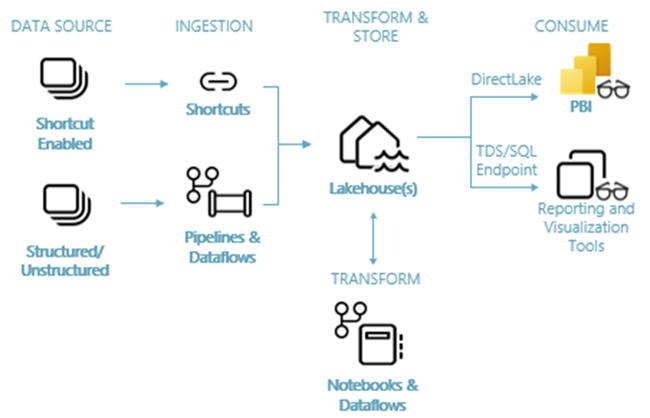
Source: Lakehouse End-to-End Scenario in Microsoft Fabric
| Principle | Description | Why It Matters |
|---|---|---|
| Raw Data | Store data as-is from source systems | Enables reprocessing if business logic changes |
| Append-Only | Never update or delete; always append | Maintains complete audit trail |
| Full Fidelity | Preserve all source fields | No data loss, even for unused fields |
| Metadata | Track ingestion time, source, batch | Enables lineage and debugging |
| Schema-on-Read | Minimal schema enforcement at ingestion | Reduces ingestion failures |
ℹ️ Note: The Bronze layer is often called the "raw" or "landing" layer. Its purpose is to capture everything exactly as received from source systems.
Schema-on-Read Explained
Unlike traditional databases that enforce schema at write time (schema-on-write), the Bronze layer uses schema-on-read:
graph TB
    subgraph "Schema-on-Write (Traditional)"
        A1[Source Data] --> V1{Validate Schema}
        V1 -->|Pass| W1[Write to DB]
        V1 -->|Fail| E1[❌ Reject Data]
    end

    subgraph "Schema-on-Read (Bronze Layer)"
        A2[Source Data] --> W2[Write to Bronze]
        W2 --> R2[Read & Transform]
        R2 --> V2{Validate in Silver}
    end
Benefits of Schema-on-Read: - No data loss from validation failures - Source schema changes don't break ingestion - Can reprocess data with new transformations - Faster ingestion (no validation overhead)
📋 Prerequisites
Before starting, ensure you have:
- Completed Tutorial 00: Environment Setup
- Generated sample data (see
data_generation/folder in repo) - Access to
lh_bronzeLakehouse
⚠️ Warning: If you haven't generated sample data yet, do so before continuing. The notebooks in this tutorial expect data files to exist.
🛠️ Step 1: Upload Sample Data
Option A: Generate and Upload via Fabric UI
-
Generate sample data locally:
-
In Fabric, open
lh_bronze - In Files section, click Upload > Upload folder
- Upload the
outputfolder
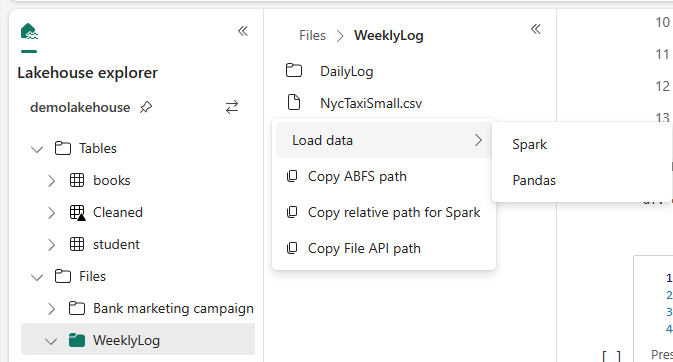
The Lakehouse explorer shows files and folders with context menu options. Source: How to use notebooks
Option B: Use Shortcut to ADLS
If you configured ADLS shortcut in Tutorial 00: 1. Copy generated files to your ADLS landing zone 2. Files will be accessible via the shortcut
Expected Files
After upload, your Files section should contain:
Files/
├── output/
│   ├── bronze_slot_telemetry.parquet
│   ├── bronze_player_profile.parquet
│   ├── bronze_financial_txn.parquet
│   ├── bronze_table_games.parquet
│   ├── bronze_security_events.parquet
│   └── bronze_compliance.parquet
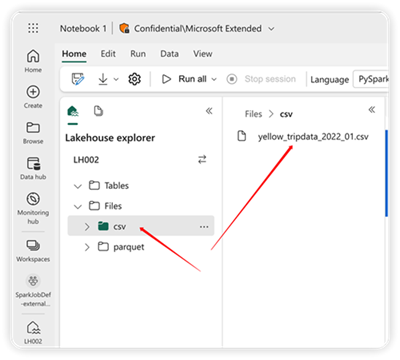
The content area displays file and folder details including size and timestamps. Source: Explore lakehouse in notebook
ℹ️ Note: File names may vary based on your data generation configuration. Adjust the notebook paths accordingly.
🛠️ Step 2: Slot Machine Telemetry Ingestion
This is our primary data source - high-volume telemetry from slot machines on the casino floor.
Create the Notebook
- In
lh_bronze, click Open notebook > New notebook - Name it:
01_bronze_slot_telemetry
Understanding the Data
Slot machine telemetry includes: - Machine events (spins, wins, errors) - Performance metrics - Player session data - Timestamps for each event
Notebook Code
# Cell 1: Configuration
# =====================
# 🥉 Bronze Layer - Slot Machine Telemetry Ingestion
# This notebook ingests raw slot machine telemetry data

from pyspark.sql import SparkSession
from pyspark.sql.functions import current_timestamp, lit, input_file_name
from pyspark.sql.types import *
from datetime import datetime

# Configuration
# Path B (Quickstart): Files/raw/slot_telemetry/bronze_slot_telemetry.parquet
# Path A (Production): Files/landing_zone/slot_telemetry/bronze_slot_telemetry.parquet
SOURCE_PATH = "Files/output/bronze_slot_telemetry.parquet"
TARGET_TABLE = "bronze_slot_telemetry"
BATCH_ID = datetime.now().strftime("%Y%m%d_%H%M%S")

print(f"🥉 Bronze Layer Ingestion")
print(f"   Source: {SOURCE_PATH}")
print(f"   Target: {TARGET_TABLE}")
print(f"   Batch:  {BATCH_ID}")
# Cell 2: Read Source Data
# ========================

# Read parquet file - schema-on-read means we accept whatever schema exists
df_raw = spark.read.parquet(SOURCE_PATH)

print(f"📊 Source Statistics:")
print(f"   Records: {df_raw.count():,}")
print(f"   Columns: {len(df_raw.columns)}")
print(f"\n📋 Source Schema:")
df_raw.printSchema()
# Cell 3: Add Metadata Columns
# ============================
# These columns enable data lineage and debugging

df_bronze = df_raw \
    .withColumn("_bronze_ingested_at", current_timestamp()) \
    .withColumn("_bronze_source_file", input_file_name()) \
    .withColumn("_bronze_batch_id", lit(BATCH_ID))

print("✅ Added metadata columns:")
print(f"   • _bronze_ingested_at  - When the data was ingested")
print(f"   • _bronze_source_file  - Source file path for lineage")
print(f"   • _bronze_batch_id     - Batch identifier: {BATCH_ID}")
ℹ️ Note: The
_bronze_prefix clearly identifies metadata columns added during Bronze layer processing. This convention helps distinguish system columns from source data.
# Cell 4: Write to Delta Table
# ============================
# Using append mode - Bronze layer is append-only

df_bronze.write \
    .format("delta") \
    .mode("append") \
    .option("mergeSchema", "true") \
    .saveAsTable(TARGET_TABLE)

print(f"✅ Successfully wrote {df_bronze.count():,} records to {TARGET_TABLE}")
# Cell 5: Verify Ingestion
# ========================

# Read back and verify
df_verify = spark.table(TARGET_TABLE)

print(f"\n📊 Table Statistics:")
print(f"   Total records: {df_verify.count():,}")
print(f"   Columns: {len(df_verify.columns)}")

# Show sample with key columns
print(f"\n📋 Sample Records:")
df_verify.select(
    "event_id", "machine_id", "event_type",
    "event_timestamp", "_bronze_ingested_at"
).show(5, truncate=False)
# Cell 6: Table Metadata & History
# ================================
# Delta Lake automatically tracks all changes

from delta.tables import DeltaTable

delta_table = DeltaTable.forName(spark, TARGET_TABLE)

print("📜 Delta Table History:")
delta_table.history(5).select(
    "version", "timestamp", "operation", "operationMetrics"
).show(truncate=False)
Run the Notebook
- Click Run all to execute all cells
- Verify the table appears in the Tables section of
lh_bronze - Check the row count matches expected
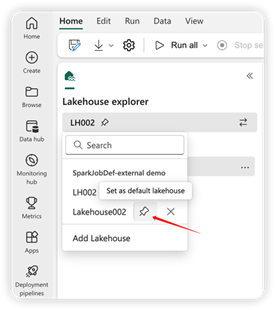
Pin a lakehouse as default to see Tables and Files in the explorer. Source: Explore lakehouse in notebook
🛠️ Step 3: Player Profile Ingestion
Player profile data contains customer information - handle with care as it may contain PII.
Create Notebook
Create notebook: 02_bronze_player_profile
# Cell 1: Configuration
# =====================
# 🥉 Bronze Layer - Player Profile Ingestion

from pyspark.sql.functions import current_timestamp, lit, input_file_name
from datetime import datetime

SOURCE_PATH = "Files/output/bronze_player_profile.parquet"
TARGET_TABLE = "bronze_player_profile"
BATCH_ID = datetime.now().strftime("%Y%m%d_%H%M%S")

print(f"🥉 Bronze Layer - Player Profile Ingestion")
print(f"   Batch ID: {BATCH_ID}")
# Cell 2: Read and Add Metadata
# =============================

df_raw = spark.read.parquet(SOURCE_PATH)
print(f"📊 Source records: {df_raw.count():,}")

# Add metadata columns
df_bronze = df_raw \
    .withColumn("_bronze_ingested_at", current_timestamp()) \
    .withColumn("_bronze_source_file", input_file_name()) \
    .withColumn("_bronze_batch_id", lit(BATCH_ID))
# Cell 3: Write to Delta Table
# ============================

df_bronze.write \
    .format("delta") \
    .mode("append") \
    .option("mergeSchema", "true") \
    .saveAsTable(TARGET_TABLE)

print(f"✅ Wrote {df_bronze.count():,} player records to {TARGET_TABLE}")
⚠️ Warning: Player profile data may contain PII (names, addresses, etc.). Ensure proper access controls are in place and data handling complies with regulations.
🛠️ Step 4: Financial Transaction Ingestion
Financial transactions require special attention for audit compliance.
Create Notebook
Create notebook: 03_bronze_financial_txn
# Cell 1: Configuration
# =====================
# 🥉 Bronze Layer - Financial Transaction Ingestion
# Note: Financial data requires strict audit trail

from pyspark.sql.functions import current_timestamp, lit, input_file_name
from datetime import datetime

SOURCE_PATH = "Files/output/bronze_financial_txn.parquet"
TARGET_TABLE = "bronze_financial_txn"
BATCH_ID = datetime.now().strftime("%Y%m%d_%H%M%S")
# Cell 2: Read Source Data
# ========================

df_raw = spark.read.parquet(SOURCE_PATH)
print(f"📊 Source records: {df_raw.count():,}")
print(f"📋 Columns: {df_raw.columns}")
# Cell 3: Add Metadata
# ====================

df_bronze = df_raw \
    .withColumn("_bronze_ingested_at", current_timestamp()) \
    .withColumn("_bronze_source_file", input_file_name()) \
    .withColumn("_bronze_batch_id", lit(BATCH_ID))
# Cell 4: Write to Table
# ======================

df_bronze.write \
    .format("delta") \
    .mode("append") \
    .saveAsTable(TARGET_TABLE)

print(f"✅ Wrote {df_bronze.count():,} financial transactions")
ℹ️ Note: Delta Lake's ACID transactions ensure financial data is never partially written. This is critical for audit compliance.
🛠️ Step 5: Ingest Remaining Data
Repeat the pattern for the remaining data sources:
| Notebook | Source File | Target Table |
|---|---|---|
04_bronze_table_games | bronze_table_games.parquet | bronze_table_games |
05_bronze_security_events | bronze_security_events.parquet | bronze_security_events |
06_bronze_compliance | bronze_compliance.parquet | bronze_compliance |
Each notebook follows the same pattern: 1. Read source file (schema-on-read) 2. Add metadata columns (_bronze_*) 3. Write to Delta table (append mode) 4. Verify counts
Template for Additional Tables
# 🥉 Bronze Layer Ingestion Template
# ==================================

from pyspark.sql.functions import current_timestamp, lit, input_file_name
from datetime import datetime

# Configuration - UPDATE THESE VALUES
SOURCE_PATH = "Files/output/bronze_TABLE_NAME.parquet"
TARGET_TABLE = "bronze_TABLE_NAME"
BATCH_ID = datetime.now().strftime("%Y%m%d_%H%M%S")

# Read source
df_raw = spark.read.parquet(SOURCE_PATH)
print(f"📊 Source records: {df_raw.count():,}")

# Add metadata
df_bronze = df_raw \
    .withColumn("_bronze_ingested_at", current_timestamp()) \
    .withColumn("_bronze_source_file", input_file_name()) \
    .withColumn("_bronze_batch_id", lit(BATCH_ID))

# Write to Delta
df_bronze.write \
    .format("delta") \
    .mode("append") \
    .option("mergeSchema", "true") \
    .saveAsTable(TARGET_TABLE)

print(f"✅ Wrote {df_bronze.count():,} records to {TARGET_TABLE}")
🛠️ Step 6: Create Bronze Layer Verification
Create Verification Notebook
Create notebook: 99_bronze_verification
# 🥉 Bronze Layer Verification
# ============================
# Run this notebook to verify all Bronze tables are populated

tables = [
    "bronze_slot_telemetry",
    "bronze_player_profile",
    "bronze_financial_txn",
    "bronze_table_games",
    "bronze_security_events",
    "bronze_compliance"
]

print("=" * 70)
print("🥉 BRONZE LAYER VERIFICATION REPORT")
print("=" * 70)

total_records = 0
results = []

for table in tables:
    try:
        count = spark.table(table).count()
        total_records += count
        status = "✅"
        message = f"{count:>12,} records"
    except Exception as e:
        status = "❌"
        message = f"Error: {str(e)[:30]}"
        count = 0

    results.append((status, table, message))
    print(f"{status} {table:35} {message}")

print("-" * 70)
print(f"   {'TOTAL':35} {total_records:>12,} records")
print("=" * 70)

# Summary
passed = sum(1 for r in results if r[0] == "✅")
failed = len(results) - passed

if failed == 0:
    print("\n🎉 All Bronze tables verified successfully!")
else:
    print(f"\n⚠️  {failed} table(s) need attention.")
Expected Output
======================================================================
🥉 BRONZE LAYER VERIFICATION REPORT
======================================================================
✅ bronze_slot_telemetry                    1,000,000 records
✅ bronze_player_profile                       50,000 records
✅ bronze_financial_txn                       250,000 records
✅ bronze_table_games                         100,000 records
✅ bronze_security_events                      75,000 records
✅ bronze_compliance                           25,000 records
----------------------------------------------------------------------
   TOTAL                                    1,500,000 records
======================================================================

🎉 All Bronze tables verified successfully!
✅ Validation Checklist
Before moving to the next tutorial, verify:
- All Bronze Tables Created - 6 tables exist in
lh_bronze - Data Loaded Successfully - Row counts match expected source data
- Metadata Columns Present - All tables have
_bronze_*columns - Delta Format Verified - Can view table history for all tables
- Schema-on-Read Working - No schema enforcement errors during ingestion
- Verification Script Passes -
99_bronze_verificationnotebook shows all green
🔍 How to verify each item
### All Bronze Tables Created# List all tables in Bronze lakehouse
tables = spark.sql("SHOW TABLES IN lh_bronze").collect()
table_names = [row.tableName for row in tables]
expected_tables = [
"bronze_slot_telemetry",
"bronze_player_profile",
"bronze_financial_txn",
"bronze_table_games",
"bronze_security_events",
"bronze_compliance"
]
for table in expected_tables:
status = "✅" if table in table_names else "❌"
print(f"{status} {table}")
# Check row counts for each table
for table in expected_tables:
    count = spark.table(f"lh_bronze.{table}").count()
    print(f"{table}: {count:,} rows")
# Verify metadata columns exist
table = "bronze_slot_telemetry"
columns = spark.table(f"lh_bronze.{table}").columns

required_metadata = ["_bronze_ingested_at", "_bronze_source_file", "_bronze_batch_id"]
for col in required_metadata:
    status = "✅" if col in columns else "❌"
    print(f"{status} {col}")
# Check Delta table history
from delta.tables import DeltaTable

table_name = "lh_bronze.bronze_slot_telemetry"
delta_table = DeltaTable.forName(spark, table_name)

print("📜 Table History (last 5 versions):")
delta_table.history(5).select("version", "timestamp", "operation", "operationMetrics").show(truncate=False)
# Ensure no NULL values in critical columns
df = spark.table("lh_bronze.bronze_slot_telemetry")

# Check metadata columns are never null
print("Checking metadata columns for nulls...")
df.select([
    sum(when(col("_bronze_ingested_at").isNull(), 1).otherwise(0)).alias("null_ingested_at"),
    sum(when(col("_bronze_batch_id").isNull(), 1).otherwise(0)).alias("null_batch_id")
]).show()
📘 Best Practices
Schema Evolution
Enable schema evolution for changing source schemas:
ℹ️ Note:
mergeSchemaallows new columns to be added automatically. This is especially useful when source systems add fields over time.
Partitioning for Large Tables
For large tables (millions of rows), consider partitioning:
When to partition: - Tables > 1 million rows - Queries frequently filter by the partition column - Data naturally partitions by date or category
Table Optimization
After ingestion, optimize tables for better query performance:
# Compact small files
spark.sql(f"OPTIMIZE {table_name}")

# Remove old files (default 7-day retention)
spark.sql(f"VACUUM {table_name}")
⚠️ Warning: VACUUM removes old files. Ensure no long-running queries are accessing old versions before running.
Data Quality Considerations
While Bronze layer doesn't enforce quality, you should still:
- Log anomalies - Record unexpected nulls, formats
- Track row counts - Compare source vs. ingested
- Monitor batch sizes - Alert on unusual volumes
- Check file timestamps - Detect late-arriving data
🔧 Troubleshooting
File Not Found
| Symptom | Cause | Solution |
|---|---|---|
Path does not exist | Wrong file path | Check Files section in Lakehouse |
No such file | Upload incomplete | Re-upload the data files |
Permission denied | Access issue | Verify Lakehouse permissions |
Schema Mismatch
| Symptom | Cause | Solution |
|---|---|---|
Schema mismatch | Source schema changed | Use mergeSchema option |
Column not found | Different column names | Check source file schema |
Type mismatch | Data type differences | Let Bronze ingest as-is, fix in Silver |
Performance Issues
| Symptom | Cause | Solution |
|---|---|---|
| Slow ingestion | Large file size | Consider partitioning |
| Out of memory | Too much data | Reduce batch size |
| Spark timeouts | Capacity issues | Check capacity CU utilization |
🎉 Summary
Congratulations! You have successfully:
- ✅ Understood Bronze layer principles and schema-on-read concepts
- ✅ Ingested raw slot machine telemetry into the Bronze layer
- ✅ Created player profile and financial transaction tables
- ✅ Implemented metadata tracking columns for data lineage
- ✅ Verified the Bronze layer is ready for transformation
The Bronze layer now contains all raw data from source systems, preserved in its original form with full lineage tracking.
➡️ Next Steps
Continue to Tutorial 02: Silver Layer to learn how to cleanse, validate, and transform Bronze data into the Silver layer.
📚 Resources
🧭 Navigation
| Previous | Up | Next |
|---|---|---|
| ⬅️ 00-Environment Setup | 📖 Tutorials Index | 02-Silver Layer ➡️ |
💬 Questions or issues? Open an issue in the GitHub repository.