Home > POC Agenda > Instructor Guide
👩🏫 Instructor Guide - Casino Fabric POC
Last Updated: 2026-04-15 | Version: 2.0 Status: ✅ Final | Maintainer: Documentation Team



🏠 Home > 📆 POC Agenda > 📘 Instructor Guide
Version: 1.0 Last Updated: 2026-01-21 Audience: Workshop Facilitators and Technical Leads
📋 Quick Reference
| Day | Icon | Focus | Key Sessions |
|---|---|---|---|
| 1 | 🏗️ | Foundation | Environment Setup, Bronze Layer |
| 2 | ⚡ | Transformation | Silver/Gold Layers, Real-Time |
| 3 | 📊 | Analytics | Power BI, Purview, Mirroring |
📅 Pre-POC Preparation
2 Weeks Before
| Task | Owner | Status |
|---|---|---|
| Verify Azure subscription has sufficient credits/budget | Lead | ⬜ |
| Confirm F64 capacity is available | Lead | ⬜ |
| Test data generator scripts work correctly | Tech Lead | ⬜ |
| Validate all notebooks execute without errors | Tech Lead | ⬜ |
| Prepare participant list and roles | Coordinator | ⬜ |
| Send pre-reading materials to participants | Coordinator | ⬜ |
1 Week Before
| Task | Owner | Status |
|---|---|---|
| Generate sample data (run all generators) | Tech Lead | ⬜ |
| Upload sample data to OneLake | Tech Lead | ⬜ |
| Create backup of working notebooks | Tech Lead | ⬜ |
| Test Purview connectivity | Tech Lead | ⬜ |
| Prepare SQL Server source for mirroring demo | Tech Lead | ⬜ |
| Set up communication channels (Teams, email) | Coordinator | ⬜ |
Day Before
| Task | Owner | Status |
|---|---|---|
| Verify workspace is accessible | Tech Lead | ⬜ |
| Test all Power BI reports render | Tech Lead | ⬜ |
| Prepare demo environment | Tech Lead | ⬜ |
| Print handouts (if needed) | Coordinator | ⬜ |
| Test projector/screen sharing | Coordinator | ⬜ |
🖥️ Environment Setup Checklist
Microsoft Fabric Overview
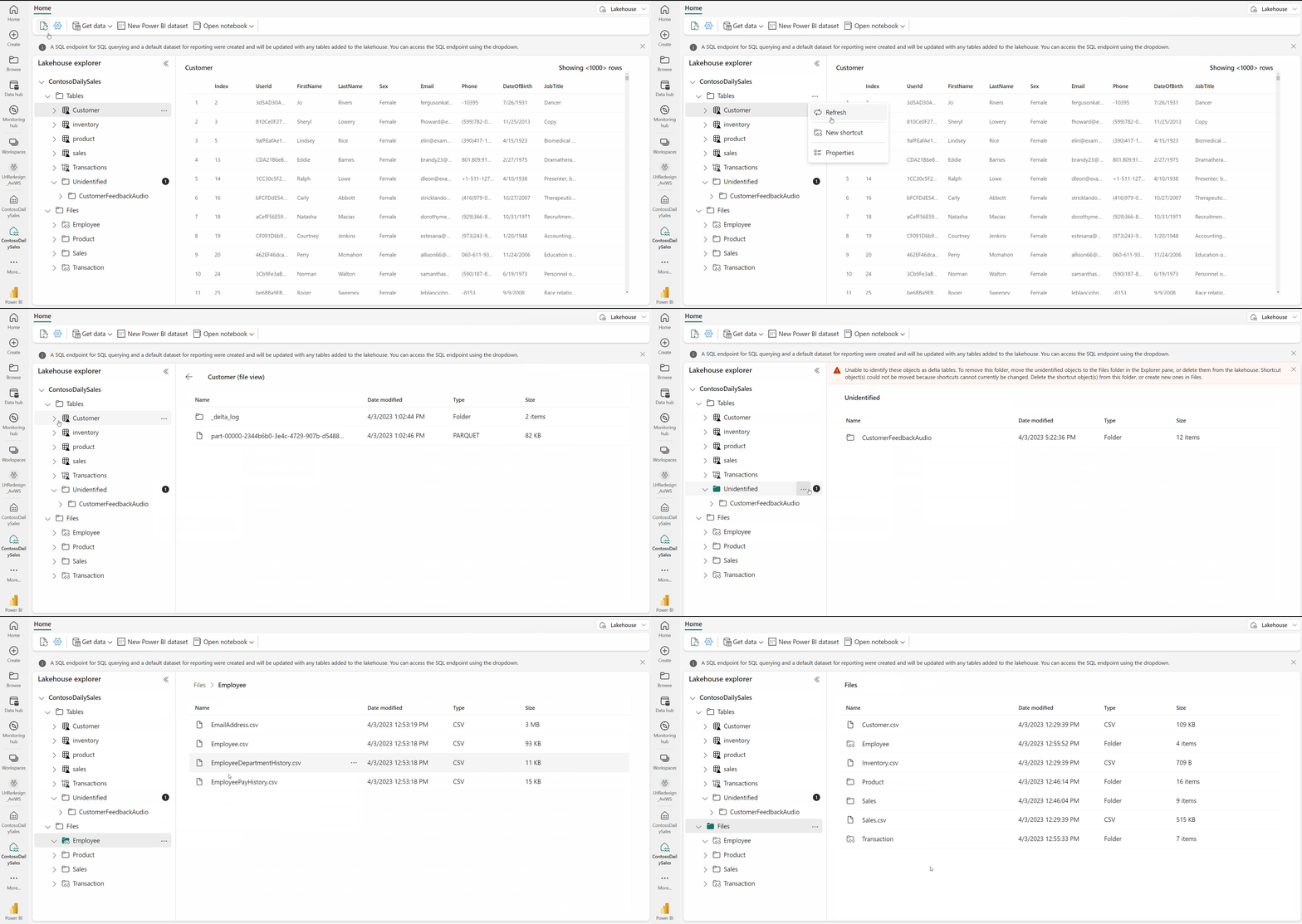
Source: Microsoft Fabric Lakehouse Overview
Azure Resources Required
| Resource | SKU | Purpose | Status |
|---|---|---|---|
| Fabric Capacity | F64 | POC workload | ⬜ |
| Purview Account | Standard | Data governance | ⬜ |
| SQL Server (optional) | Standard | Mirroring demo | ⬜ |
| Storage Account | Standard LRS | Landing zone | ⬜ |
Fabric Workspace Configuration
Workspace Name: casino-fabric-poc
Capacity: F64
Workloads:
  - Data Engineering: Enabled
  - Data Science: Enabled
  - Data Warehouse: Enabled
  - Real-Time Intelligence: Enabled
  - Power BI: Enabled
Lakehouses
| Lakehouse | Purpose | Expected Tables | Status |
|---|---|---|---|
| lh_bronze | Raw data | 6 tables | ⬜ |
| lh_silver | Cleansed | 6 tables | ⬜ |
| lh_gold | Business-ready | 3+ tables | ⬜ |
| lh_mirrored | Mirrored data | Varies | ⬜ |
📊 Data Generation Instructions
Generate All Data
cd data_generation

# Install dependencies
pip install -r requirements.txt

# Generate slot machine data (500K records, 30 days)
python generate.py slot_machine \
    --records 500000 \
    --days 30 \
    --output ../sample-data/slot_telemetry/

# Generate player profiles (10K records)
python generate.py player \
    --records 10000 \
    --output ../sample-data/player_profiles/

# Generate table games (100K records, 30 days)
python generate.py table_games \
    --records 100000 \
    --days 30 \
    --output ../sample-data/table_games/

# Generate financial transactions (50K records, 30 days)
python generate.py financial \
    --records 50000 \
    --days 30 \
    --output ../sample-data/financial/

# Generate security events (10K records, 30 days)
python generate.py security \
    --records 10000 \
    --days 30 \
    --output ../sample-data/security/

# Generate compliance data (5K records, 30 days)
python generate.py compliance \
    --records 5000 \
    --days 30 \
    --output ../sample-data/compliance/
Verify Data Quality
import pandas as pd
import os

# Check all files generated
data_dirs = ['slot_telemetry', 'player_profiles', 'table_games',
             'financial', 'security', 'compliance']

for dir_name in data_dirs:
    path = f'../sample-data/{dir_name}'
    if os.path.exists(path):
        files = os.listdir(path)
        print(f"{dir_name}: {len(files)} files")
        if files:
            df = pd.read_parquet(os.path.join(path, files[0]))
            print(f"  Sample rows: {len(df)}, columns: {df.columns.tolist()}")
    else:
        print(f"{dir_name}: MISSING")
📚 Session Facilitation Guide
🏗️ Day 1: Medallion Foundation
🌅 Morning Sessions (9:00 - 12:30)
💡 Key Teaching Points
| **1. Why Medallion Architecture?** - Separation of concerns - Data quality progression - Auditability - Reprocessing capability | **2. Bronze Layer Principles** - Immutable storage - Append-only pattern - Source fidelity - Metadata tracking |
❓ Common Participant Questions
Q: "Why not transform data immediately at ingestion?"
A: Bronze preserves the original data for auditing, debugging, and reprocessing. You can always rebuild Silver/Gold from Bronze. This is critical for compliance and troubleshooting.
Q: "How do we handle schema changes in source systems?"
A: Bronze uses schema-on-read with
mergeSchemaoption. Discuss evolution strategies and how Delta Lake handles this automatically.Q: "What about real-time data?"
A: Preview Day 2's Eventhouse content. Bronze can receive streaming data too, but Eventhouse is optimized for real-time queries.
👥 Hands-On Exercises
| Exercise | Duration | Type |
|---|---|---|
| 1. Create Bronze table for slot telemetry | 30 min | Guided |
| 2. Create Bronze table for table games | 30 min | Independent |
| 3. Add custom metadata columns | 15 min | Discussion |
☀️ Afternoon Sessions (13:30 - 17:00)
💡 Key Teaching Points
| **1. Player Profile PII Handling** - Hash SSN at Bronze layer - Never store clear-text sensitive data - Compliance requirements (GDPR, CCPA) | **2. Financial Data Patterns** - CTR threshold ($10,000) - Near-CTR flagging ($8,000-$9,999) - Structuring detection patterns |
👥 Hands-On Exercises
| Exercise | Duration | Type |
|---|---|---|
| 4. Implement PII hashing | 20 min | Guided |
| 5. Add CTR flags to financial data | 20 min | Guided |
| 6. Write first Silver transformation | 30 min | Independent |
⚡ Day 2: Transformations & Real-Time
🌅 Morning Sessions (9:00 - 12:30)
💡 Key Teaching Points
| **1. SCD Type 2 Pattern** - Why track history? - Effective dating - Current record flag - Merge operations | **2. Financial Reconciliation** - Variance detection - Risk flagging - Audit requirements | **3. Gold Layer KPIs** - Theoretical win calculation - Hold percentage - Player value scoring |
❓ Common Participant Questions
Q: "When should we use SCD Type 1 vs Type 2?"
A: Type 1 for attributes that don't need history (e.g., email preference). Type 2 for business-critical attributes (e.g., loyalty tier, address for compliance).
Q: "How often should Gold tables refresh?"
A: Depends on use case. Daily for reports, more frequently for operational dashboards. Direct Lake enables near-real-time without scheduled refresh.
👥 Hands-On Exercises
| Exercise | Duration | Type |
|---|---|---|
| 7. Implement SCD Type 2 merge | 30 min | Guided |
| 8. Create reconciliation status | 25 min | Guided |
| 9. Calculate slot KPIs | 30 min | Independent |
☀️ Afternoon Sessions (13:30 - 17:00)
💡 Key Teaching Points
| **1. Eventhouse vs Lakehouse** 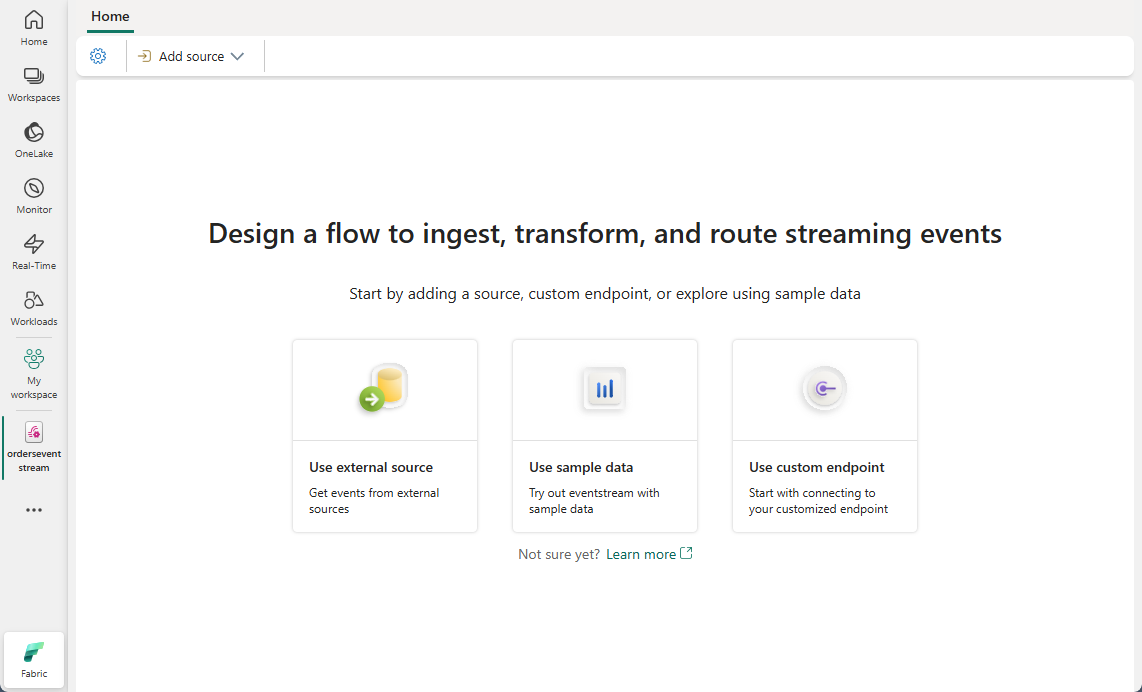 *Source: [Create an Eventstream in Microsoft Fabric](https://learn.microsoft.com/en-us/fabric/real-time-intelligence/event-streams/create-manage-an-eventstream)* - When to use each - Query performance trade-offs - Storage patterns | **2. KQL Basics** - Time-series analysis - Aggregations - Real-time alerting | **3. Real-Time Dashboards** - Auto-refresh configuration - Tile design - Alert integration |
🎬 Demo Script - Streaming Producer
Run this in a separate terminal to simulate real-time data. Show participants how data flows through Eventstream to KQL.
import json
import time
import random
from datetime import datetime

while True:
    event = {
        "machine_id": f"SLOT-{random.randint(1000, 9999)}",
        "event_type": "GAME_PLAY",
        "event_timestamp": datetime.utcnow().isoformat(),
        "coin_in": round(random.uniform(1, 100), 2),
        "coin_out": round(random.uniform(0, 80), 2),
        "zone": random.choice(["North", "South", "East", "West"])
    }
    print(json.dumps(event))
    time.sleep(0.5)
👥 Hands-On Exercises
| Exercise | Duration | Type |
|---|---|---|
| 10. Create Eventhouse and database | 20 min | Guided |
| 11. Write KQL monitoring query | 20 min | Guided |
| 12. Build real-time dashboard tile | 30 min | Independent |
📊 Day 3: BI, Governance & Mirroring
🌅 Morning Sessions (9:00 - 12:30)
👥 Audience Expansion: Day 3 morning adds BI developers (2) to the architects (4).
💡 Key Teaching Points
| **1. Direct Lake Benefits** 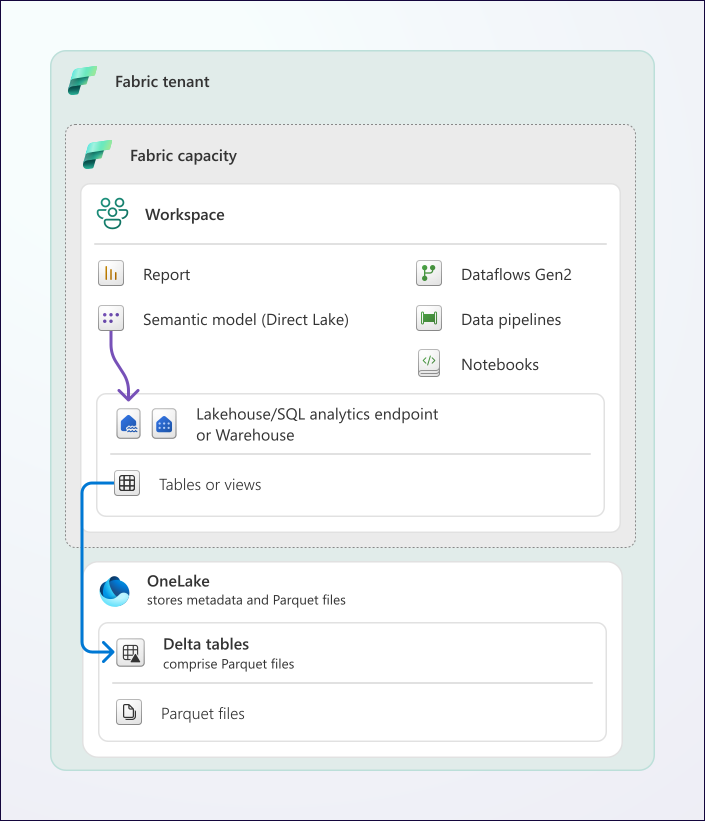 *Source: [Direct Lake Overview](https://learn.microsoft.com/en-us/fabric/fundamentals/direct-lake-overview)* - No data import - Sub-second queries - Automatic refresh - Live connection to Delta | **2. DAX Best Practices** - Measures vs calculated columns - Time intelligence patterns - Performance optimization | **3. Report Design** - Executive vs operational views - Drill-through patterns - Mobile optimization |
❓ Common Participant Questions
Q: "What happens if Direct Lake falls back to DirectQuery?"
A: Discuss fallback triggers and how to avoid them (table size limits, unsupported DAX patterns, complex calculations).
Q: "Can we use Import mode instead?"
A: Yes, but you lose automatic refresh. Discuss trade-offs: Import is faster for complex DAX but requires scheduled refresh.
👥 Hands-On Exercises
| Exercise | Duration | Type |
|---|---|---|
| 13. Create semantic model | 25 min | Guided |
| 14. Write DAX measures | 35 min | Guided |
| 15. Build executive dashboard | 45 min | Independent |
☀️ Afternoon Sessions (13:30 - 17:00)
👥 Audience Expansion: Day 3 afternoon includes all teams (10+).
💡 Key Teaching Points
| **1. Purview Value**  *Source: [Microsoft Purview Governance Portal](https://learn.microsoft.com/en-us/purview/use-microsoft-purview-governance-portal)* - Data discovery - Compliance tracking - Lineage visualization | **2. Classifications** - Automatic vs manual - Gaming-specific patterns - PII detection | **3. Database Mirroring** - Use cases - Limitations - Hybrid patterns |
🎬 Demo Script - Mirroring
If SQL Server source is available:
- Show CDC configuration
- Create mirrored database in Fabric
- Query mirrored data alongside Gold tables
- Show replication lag metrics
If no source available:
- Walk through UI steps with screenshots
- Discuss architecture patterns
- Show Microsoft documentation
👥 Hands-On Exercises
| Exercise | Duration | Type |
|---|---|---|
| 16. Connect Purview to Fabric | 15 min | Guided |
| 17. Create glossary terms | 20 min | Guided |
| 18. View lineage | 15 min | Discussion |
🔧 Troubleshooting Guide
Common Issues & Solutions
| Issue | Solution |
|---|---|
| **Workspace Access** Participants can't access workspace | 1. Check workspace permissions in Fabric admin 2. Verify capacity assignment (F64 must be active) 3. Clear browser cache and cookies 4. Try incognito/private browsing mode |
| **Notebook Failures** Notebook times out or fails | 1. Check Spark session state (restart if needed) 2. Reduce data volume for testing (use LIMIT) 3. Verify Lakehouse is properly attached 4. Check for syntax errors in cell output |
| **Eventstream Not Flowing** No data appearing in KQL | 1. Verify source connection is active 2. Check JSON mapping matches source schema 3. Review ingestion errors in Eventstream monitor 4. Ensure destination table exists |
| **Direct Lake Fallback** Reports show DirectQuery instead of Direct Lake | 1. Check table size limits (< 10GB recommended) 2. Review measure complexity (avoid complex filters) 3. Verify relationships are correct 4. Check for unsupported DAX functions |
| **Purview Scan Fails** Scan shows errors | 1. Verify integration runtime is running 2. Check service account credentials 3. Review firewall rules for Purview access 4. Ensure Fabric workspace permissions include Purview |
📋 Assessment Checkpoints
Day 1 End
| Checkpoint | Criteria | Pass | Fail |
|---|---|---|---|
| Environment | 3 Lakehouses created | ⬜ | ⬜ |
| Bronze Slot | 500K+ records | ⬜ | ⬜ |
| Bronze Player | 10K records, SSN hashed | ⬜ | ⬜ |
| Bronze Financial | CTR flags added | ⬜ | ⬜ |
| Silver Started | At least 1 Silver table | ⬜ | ⬜ |
Day 2 End
| Checkpoint | Criteria | Pass | Fail |
|---|---|---|---|
| SCD Type 2 | Player history tracking | ⬜ | ⬜ |
| Gold KPIs | Hold %, Net Win calculating | ⬜ | ⬜ |
| Eventhouse | Database created | ⬜ | ⬜ |
| KQL Queries | 3+ monitoring queries | ⬜ | ⬜ |
| Real-Time Dashboard | 4+ tiles | ⬜ | ⬜ |
Day 3 End
| Checkpoint | Criteria | Pass | Fail |
|---|---|---|---|
| Semantic Model | Direct Lake mode | ⬜ | ⬜ |
| DAX Measures | 10+ measures | ⬜ | ⬜ |
| Reports | 3 reports complete | ⬜ | ⬜ |
| Purview | Scan complete, terms added | ⬜ | ⬜ |
| Lineage | Visible for Gold tables | ⬜ | ⬜ |
📚 Participant Materials
Pre-Reading (Send 1 Week Before)
| Resource | Link |
|---|---|
| Microsoft Fabric Overview | learn.microsoft.com/fabric |
| Medallion Architecture | Lakehouse Medallion |
| Direct Lake Mode | Direct Lake Docs |
Reference Cards (Print/PDF)
Provide printed or PDF reference cards for:
- Delta Lake commands cheat sheet
- Common KQL queries
- DAX formula patterns
- Keyboard shortcuts for Fabric
Post-POC Resources
| Resource | Description |
|---|---|
| This Repository | Full tutorial documentation |
| Microsoft Learn | Self-paced learning paths |
| Community Forums | Q&A and discussion |
| Support Contacts | Escalation path |
📝 Feedback Collection
Daily Feedback (End of Each Day)
Collect the following:
- What worked well today?
- What could be improved?
- Pace rating (1-5):
[ ] 1 [ ] 2 [ ] 3 [ ] 4 [ ] 5 - Content clarity (1-5):
[ ] 1 [ ] 2 [ ] 3 [ ] 4 [ ] 5 - Any blockers for tomorrow?
Post-POC Survey (Send Within 1 Week)
| Question | Response Type |
|---|---|
| Overall satisfaction | 1-10 scale |
| Most valuable content | Open text |
| Least valuable content | Open text |
| Recommendations for future | Open text |
| Production readiness assessment | Multiple choice |
📞 Contact Information
| Role | Name | Phone | |
|---|---|---|---|
| POC Lead | [Name] | [Email] | [Phone] |
| Microsoft Contact | [Name] | [Email] | [Phone] |
| Technical Support | - | [Email/Teams] | - |
📋 Version History
| Version | Date | Changes | Author |
|---|---|---|---|
| 1.0 | 2026-01-21 | Initial release | Frank Garofalo |
📖 Related Documents
| Document | Description |
|---|---|
| POC Overview | 3-day workshop overview |
| Day 1 Guide | Day 1 detailed session guide |
| Day 2 Guide | Day 2 detailed session guide |
| Day 3 Guide | Day 3 detailed session guide |
| Demo Runbook | Live demo presenter guide |
| Diagram Guide | Mermaid diagram reference |
Instructor Guide Quick Reference
| Day | Start Time | Key Prep |
|---|---|---|
| 1 | 9:00 AM | Data generated, workspace ready |
| 2 | 9:00 AM | Bronze complete, streaming ready |
| 3 | 9:00 AM | Gold complete, Purview configured |