Home > POC Agenda > Day 3: BI, Governance & Mirroring
📅 Day 3: BI, Governance & Database Mirroring
Last Updated: 2026-04-15 | Version: 2.0 Status: ✅ Final | Maintainer: Documentation Team



🏠 Home > 📆 POC Agenda > 📊 Day 3
Date: [INSERT DATE] Duration: 8 hours (9:00 AM - 5:00 PM) Focus: Direct Lake Power BI, Purview governance, Database Mirroring Audience: Data Architects (4) + BI Developers (2) + Data Governance (4+)
Third-party references — publicly sourced, good-faith comparison
This page references non-Microsoft products and services. That information is drawn from each vendor's publicly available documentation and is offered for honest, good-faith comparison only. This is a personal project written from a Microsoft Fabric and Azure perspective; it does not claim expertise in, or authority over, any third-party product, and nothing here is an official statement by, or endorsed by, those vendors. Capabilities, pricing, and features change often — always verify against the vendor's current official documentation. Where a third-party offering is the stronger choice, we say so plainly.
📊 Day 3 Progress Tracker
Day 3 Progress: ░░░░░░░░░░ 0% Complete
────────────────────────────────────────────
🌅 Morning Session 1:   ░░░░░░░░░░  Direct Lake & Power BI
🌅 Morning Session 2:   ░░░░░░░░░░  Power BI Reports
☀️ Afternoon Session 3: ░░░░░░░░░░  Purview Governance
☀️ Afternoon Session 4: ░░░░░░░░░░  Database Mirroring
📋 Materials Checklist
Before starting, ensure the following are ready:
Prerequisites from Day 2
- Gold layer tables populated and optimized
- Real-time analytics operational
- All participants have workspace access
Day 3 Materials
- DAX measure templates prepared
- Report layout templates available
- Purview account configured
- SQL Server source (if available for mirroring demo)
Expanded Audience
- BI Developers notified for 9:00 AM start
- Governance team notified for 1:30 PM start
- All stakeholders notified for final session
🗓️ Daily Schedule At-a-Glance
| Time | Duration | Session | Type | Audience |
|---|---|---|---|---|
| 9:00-10:30 | 1.5 hr | 🌅 Direct Lake & Power BI | 👥 Hands-on | 6 |
| 10:30-10:45 | 15 min | ☕ Break | - | - |
| 10:45-12:30 | 1.75 hr | 🌅 Power BI Reports | 👥 Hands-on | 6 |
| 12:30-13:30 | 1 hr | 🍽️ Lunch | - | - |
| 13:30-15:00 | 1.5 hr | ☀️ Purview Governance | 🎤👥 Demo + Hands-on | 10+ |
| 15:00-15:15 | 15 min | ☕ Break | - | - |
| 15:15-16:30 | 1.25 hr | ☀️ Database Mirroring | 🎤 Demo | 10+ |
| 16:30-17:00 | 30 min | 💬 POC Summary & Next Steps | Discussion | All |
Day 3 Timeline
%%{init: {'theme':'base', 'themeVariables': {'cScale0':'#4CAF50','cScale1':'#2196F3','cScale2':'#FFD700','cScale3':'#CD7F32','cScale4':'#C0C0C0'}}}%%
timeline
    title Day 3: BI, Governance & Mirroring Journey

    section Morning Session 1 — 09:00-10:30
        Create Semantic Model : Direct Lake mode
                               : No refresh needed
        Define Relationships : Star schema
                            : Player-Slot linkage
        Implement DAX : Casino KPIs
                      : Time intelligence
                      : 20+ measures

    section Morning Session 2 — 10:45-12:30
        Executive Dashboard : Net Win
                           : Hold %
                           : Zone Performance
        Slot Operations Report : Performance matrix
                              : Hourly activity
                              : Hold variance
        Player Analytics : Player 360
                        : Churn risk
                        : Value scoring

    section Afternoon Session 3 — 13:30-15:00
        Connect Purview : Register Fabric source
                       : Configure scan
        Review Classifications : PII detection
                              : Financial data
                              : Auto-classification
        Business Glossary : Create terms
                         : Gaming metrics
                         : Compliance definitions
        Data Lineage : Bronze to Gold flow
                    : Impact analysis
                    : Transformation tracking

    section Afternoon Session 4 — 15:15-16:30
        Mirroring Concepts : Near real-time sync
                          : No ETL code
                          : Auto schema sync
        SQL Server Demo : Enable CDC
                       : Configure mirror
                       : Query mirrored data
        Hybrid Architecture : Multi-source strategy
                           : OneLake integration
                           : Production patterns

    section Wrap-up — 16:30-17:00
        POC Review : 3 days complete
                  : Medallion built
                  : Reports delivered
        Next Steps : Production planning
                  : Week 1-4 roadmap
                  : Go/No-Go decision
Key Milestones: - ☕ 9:00 AM: BI Developers join (6 total participants) - 🍽️ 12:30 PM: Lunch break - 👥 1:30 PM: Governance team joins (10+ participants) - 🎉 4:30 PM: POC completion celebration!
👥 Audience Expansion Schedule
┌─────────────────────────────────────────────────────────────────┐
│  9:00 AM ────────────────────────────────────────────── 5:00 PM │
├─────────────────────────────────────────────────────────────────┤
│  Data Architects (4)  ████████████████████████████████████████  │
│  BI Developers (2)    ████████████████████████████████████████  │
│  Governance Team (4+) ░░░░░░░░░░░░░░░░██████████████████████████│
│                                       ↑                         │
│                                    1:30 PM                      │
└─────────────────────────────────────────────────────────────────┘
🌅 Morning Session 1: Direct Lake & Power BI (9:00 - 10:30)
🎯 Session Objectives
| Objective | Duration | Status |
|---|---|---|
| Create Direct Lake semantic model | 30 min | ⬜ |
| Define relationships in star schema | 15 min | ⬜ |
| Implement DAX measures for casino KPIs | 45 min | ⬜ |
📝 Activity 9.1: Create Semantic Model (30 min)
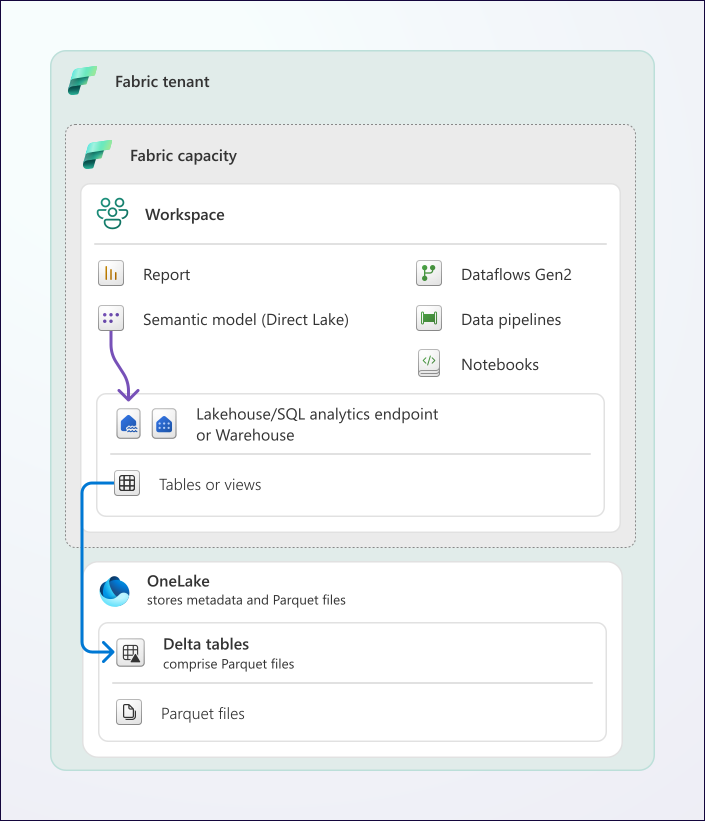
Source: Direct Lake Overview
Steps:
- Open
lh_goldLakehouse - Click New semantic model
- Select tables:
gold_slot_performancegold_player_360gold_compliance_reporting- Name:
Casino Analytics Model
Verify Direct Lake Mode:
- Open model settings
- Confirm "Storage mode: Direct Lake"
- Note: No scheduled refresh needed
💡 Direct Lake Advantage: Data is read directly from Delta tables with no import or refresh required.
📝 Activity 9.2: Define Relationships (15 min)
Create star schema relationships:
┌──────────────────┐
│   dim_date       │
│   (date_key)     │
└────────┬─────────┘
         │
         │ 1:M
         ▼
┌──────────────────────┐     ┌──────────────────┐
│ gold_slot_performance│────▶│   dim_machine    │
│   (business_date)    │ M:1 │   (machine_id)   │
└──────────────────────┘     └──────────────────┘
         │
         │ 1:M
         ▼
┌──────────────────────┐
│  gold_player_360     │
│    (player_id)       │
└──────────────────────┘
📝 Activity 9.3: Create DAX Measures (45 min)
Slot Performance Measures
// Total Coin In
Total Coin In = SUM(gold_slot_performance[total_coin_in])

// Total Coin Out
Total Coin Out = SUM(gold_slot_performance[total_coin_out])

// Net Win
Net Win = [Total Coin In] - [Total Coin Out]

// Hold Percentage
Hold % = DIVIDE([Net Win], [Total Coin In], 0) * 100

// Theoretical Win (assuming 8% hold)
Theoretical Win = [Total Coin In] * 0.08

// Hold Variance
Hold Variance = [Net Win] - [Theoretical Win]

// Win Per Machine Per Day
Win Per Machine =
DIVIDE(
    [Net Win],
    DISTINCTCOUNT(gold_slot_performance[machine_id]),
    0
)

// Games Played
Total Games = SUM(gold_slot_performance[total_games])

// Average Bet
Avg Bet = DIVIDE([Total Coin In], [Total Games], 0)
Player Measures
// Total Players
Total Players = COUNTROWS(gold_player_360)

// VIP Players
VIP Players =
CALCULATE(
    COUNTROWS(gold_player_360),
    gold_player_360[loyalty_tier] IN {"Platinum", "Diamond"}
)

// High Churn Risk
High Churn Risk Players =
CALCULATE(
    COUNTROWS(gold_player_360),
    gold_player_360[churn_risk] = "High"
)

// Average Player Value
Avg Player Value = AVERAGE(gold_player_360[player_value_score])

// Active Players (30 days)
Active Players 30D =
CALCULATE(
    COUNTROWS(gold_player_360),
    gold_player_360[days_since_visit] <= 30
)
Time Intelligence Measures
// Coin In MTD
Coin In MTD = TOTALMTD([Total Coin In], dim_date[date_key])

// Coin In YTD
Coin In YTD = TOTALYTD([Total Coin In], dim_date[date_key])

// Net Win vs Prior Month
Net Win PM =
CALCULATE(
    [Net Win],
    DATEADD(dim_date[date_key], -1, MONTH)
)

// Net Win Growth %
Net Win Growth % =
DIVIDE(
    [Net Win] - [Net Win PM],
    [Net Win PM],
    0
) * 100

// 7-Day Rolling Average
Coin In 7D Avg =
AVERAGEX(
    DATESINPERIOD(dim_date[date_key], MAX(dim_date[date_key]), -7, DAY),
    [Total Coin In]
)
🌅 Morning Session 2: Power BI Reports (10:45 - 12:30)
🎯 Session Objectives
| Objective | Duration | Status |
|---|---|---|
| Build executive dashboard | 45 min | ⬜ |
| Create operational floor report | 45 min | ⬜ |
| Implement player analytics report | 30 min | ⬜ |
📝 Activity 10.1: Executive Dashboard (45 min)
Page Layout:
┌────────────────────────────────────────────────────────────┐
│  CASINO EXECUTIVE DASHBOARD              [Date Slicer]     │
├──────────┬──────────┬──────────┬──────────┬───────────────┤
│ Net Win  │ Hold %   │ Players  │ Games    │ [Zone Slicer] │
│  $2.5M   │   8.2%   │  12,450  │  1.2M    │               │
├──────────┴──────────┴──────────┴──────────┴───────────────┤
│                    NET WIN TREND                           │
│  [Line Chart - Daily Net Win with comparison]             │
├───────────────────────────┬────────────────────────────────┤
│   ZONE PERFORMANCE        │   TOP 10 MACHINES              │
│   [Bar Chart]             │   [Table]                      │
├───────────────────────────┼────────────────────────────────┤
│   PLAYER TIER MIX         │   COMPLIANCE SUMMARY           │
│   [Donut Chart]           │   CTR: 45  SAR: 12  W2G: 234  │
└───────────────────────────┴────────────────────────────────┘
Create Visuals:
| Visual | Type | Data |
|---|---|---|
| KPI Cards | Card | Net Win, Hold %, Unique Players, Total Games |
| Net Win Trend | Line Chart | Net Win by Date with Prior Period |
| Zone Performance | Bar Chart | Net Win by Zone |
| Top Machines | Table | machine_id, zone, net_win, hold_% |
| Player Tier Mix | Donut Chart | Players by Loyalty Tier |
| Compliance Summary | Multi-row Card | Filing counts |
📝 Activity 10.2: Slot Operations Report (45 min)
Page Layout:
┌────────────────────────────────────────────────────────────┐
│  SLOT OPERATIONS                    [Date] [Zone] [Denom] │
├────────────────────────────────────────────────────────────┤
│                  PERFORMANCE MATRIX                        │
│  [Matrix: Zone rows x Denomination columns]               │
│  Values: Coin In, Net Win, Hold %, Games                  │
├───────────────────────────┬────────────────────────────────┤
│   HOURLY ACTIVITY         │   HOLD VARIANCE ANALYSIS      │
│   [Area Chart by hour]    │   [Scatter: Theo vs Actual]   │
├───────────────────────────┼────────────────────────────────┤
│   MANUFACTURER BREAKDOWN  │   JACKPOT SUMMARY             │
│   [Clustered Bar]         │   [Table with sparklines]     │
└───────────────────────────┴────────────────────────────────┘
📝 Activity 10.3: Player Analytics Report (30 min)
Page Layout:
┌────────────────────────────────────────────────────────────┐
│  PLAYER ANALYTICS                         [Tier Slicer]   │
├──────────┬──────────┬──────────┬──────────────────────────┤
│  Total   │   VIP    │ At Risk  │  Avg Value Score        │
│ Players  │ Players  │ (Churn)  │                          │
├──────────┴──────────┴──────────┴──────────────────────────┤
│           PLAYER VALUE DISTRIBUTION                        │
│  [Histogram of player_value_score]                        │
├───────────────────────────┬────────────────────────────────┤
│   TIER BREAKDOWN          │   CHURN RISK BY TIER          │
│   [Stacked Column]        │   [100% Stacked Bar]          │
├───────────────────────────┴────────────────────────────────┤
│             TOP 20 PLAYERS BY THEO                         │
│  [Table: player_id, tier, theo, visits, last_visit, risk] │
└────────────────────────────────────────────────────────────┘
☀️ Afternoon Session 3: Purview Integration (13:30 - 15:00)
🎯 Session Objectives
| Objective | Duration | Status |
|---|---|---|
| Connect Purview to Fabric workspace | 20 min | ⬜ |
| Scan and catalog data assets | 20 min | ⬜ |
| Apply classifications and review | 20 min | ⬜ |
| Create glossary terms | 30 min | ⬜ |
| View data lineage | 20 min | ⬜ |
👥 Audience Expansion: All participants (10+) join for this session
📝 Activity 11.1: Connect Purview to Fabric (20 min)

Source: Microsoft Purview Governance Portal
Steps:
- Open Microsoft Purview Portal
- Navigate to Data Map > Sources
- Click Register > Microsoft Fabric
- Configure:
- Name:
Fabric-Casino-POC - Tenant: Select your tenant
- Workspace:
casino-fabric-poc
📝 Activity 11.2: Create and Run Scan (20 min)
Steps:
- On registered source, click New scan
- Configure:
- Name:
fabric-full-scan - Scope: All Lakehouses
- Scan rule set: System default
- Set trigger: Run once now
- Click Save and Run
📝 Activity 11.3: Review Auto-Classifications (20 min)
Navigate to scanned tables and verify:
| Table | Column | Expected Classification | Status |
|---|---|---|---|
| silver_player_master | ssn_hash | Government ID (Hash) | ⬜ |
| silver_player_master | Email Address | ⬜ | |
| silver_player_master | phone | Phone Number | ⬜ |
| silver_player_master | date_of_birth | Date of Birth | ⬜ |
| bronze_financial_txn | amount | Financial Amount | ⬜ |
📝 Activity 11.4: Create Glossary Terms (30 min)
Business Glossary Hierarchy:
Casino Operations
├── Gaming Metrics
│   ├── Coin In
│   ├── Coin Out
│   ├── Net Win
│   ├── Hold Percentage
│   └── Theoretical Win
├── Player Management
│   ├── Player Theo
│   ├── Player LTV
│   └── Churn Risk
└── Compliance
    ├── CTR (Currency Transaction Report)
    ├── SAR (Suspicious Activity Report)
    └── W-2G
Sample Term: Coin In
Name: Coin In
Definition: Total amount wagered by players on gaming devices.
            Represents the handle or total bets placed.
Acronym: CI
Status: Approved
Steward: Casino Analytics Team
Related Terms: Coin Out, Net Win, Hold Percentage
Resources: NIGC MICS Section 543.24
📝 Activity 11.5: View Data Lineage (20 min)
- Navigate to
gold_slot_performancein catalog - Click Lineage tab
- Observe flow:
bronze_slot_telemetry
        ↓
silver_slot_cleansed
        ↓
gold_slot_performance
        ↓
Casino Analytics Model
        ↓
Executive Dashboard
- Click on each node to see transformation details
- Use Impact Analysis to understand downstream effects
☀️ Afternoon Session 4: Database Mirroring (15:15 - 17:00)
🎯 Session Objectives
| Objective | Duration | Status |
|---|---|---|
| Understand Database Mirroring concepts | 20 min | ⬜ |
| Configure SQL Server mirroring (demo) | 40 min | ⬜ |
| Review Snowflake and Cosmos DB options | 20 min | ⬜ |
| POC Summary and Next Steps | 30 min | ⬜ |
📝 Activity 12.1: Mirroring Overview (20 min)
What is Database Mirroring?
Database mirroring in Microsoft Fabric provides near real-time replication of operational databases to OneLake.
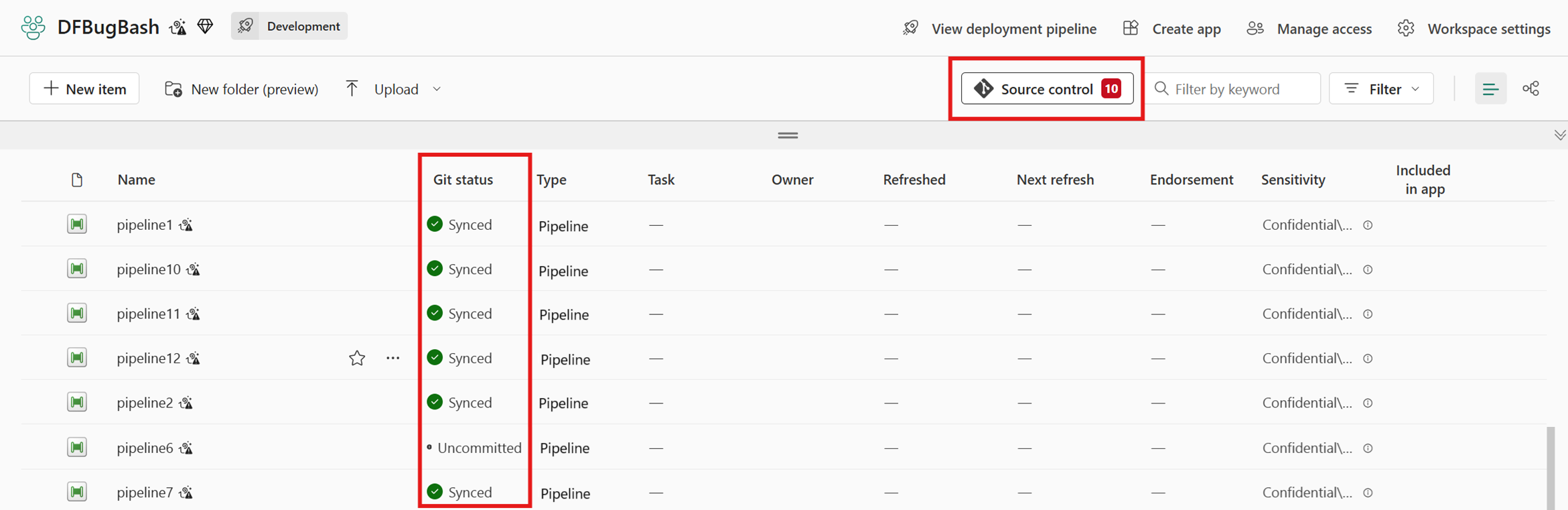
Source: CI/CD for Data Pipelines
Source Database → Change Data Capture → OneLake → Delta Tables
      │                    │                │           │
   SQL Server         Continuous         Automatic   Query with
   Snowflake          Replication        Conversion   Spark/SQL
   Cosmos DB
Benefits:
| Benefit | Description |
|---|---|
| Near real-time | Data available within seconds |
| No ETL code | Automatic replication |
| Auto sync | Schema changes propagate |
| Delta format | Native Lakehouse integration |
📝 Activity 12.2: SQL Server Mirroring Demo (40 min)
Prerequisites (if available): - SQL Server 2016+ or Azure SQL Database - CDC enabled on source
Enable CDC on Source:
-- Enable CDC on database
EXEC sys.sp_cdc_enable_db;

-- Enable CDC on tables
EXEC sys.sp_cdc_enable_table
    @source_schema = N'gaming',
    @source_name = N'slot_transactions',
    @role_name = NULL,
    @supports_net_changes = 1;
Create Mirrored Database in Fabric:
- Open workspace
casino-fabric-poc - Click + New > Mirrored database
- Select Azure SQL Database
- Configure connection:
- Server:
your-sql-server.database.windows.net - Database:
CasinoOperational - Authentication: SQL or Microsoft Entra ID
- Select tables to mirror
- Click Mirror database
Monitor Replication:
- Open mirrored database
- View Replication status
- Check:
- Initial snapshot progress
- Ongoing replication lag
- Table sync status
📝 Activity 12.3: Query Mirrored Data (20 min)
# Read mirrored table
df = spark.table("lh_mirrored.slot_transactions")

# Join with Gold layer
df_enriched = df.join(
    spark.table("lh_gold.gold_player_360"),
    "player_id",
    "left"
)

# Real-time analysis
df.filter(col("transaction_time") > "2024-01-01") \
  .groupBy("machine_id") \
  .agg(sum("amount").alias("total_amount")) \
  .orderBy(col("total_amount").desc()) \
  .show(10)
📝 Activity 12.4: Snowflake & Cosmos DB Overview (20 min)
Snowflake Mirroring: - Connect to Snowflake account - Select databases/schemas/tables - Automatic data type mapping
Cosmos DB Mirroring: - Uses Change Feed - Handles nested documents - Arrays become separate rows - Schema inference automatic
Hybrid Architecture Pattern:
┌─────────────────────────────────────────────────────────────┐
│                     HYBRID ARCHITECTURE                      │
├─────────────────────────────────────────────────────────────┤
│                                                              │
│   Operational Sources              Fabric OneLake           │
│                                                              │
│   ┌──────────┐                    ┌──────────────┐          │
│   │SQL Server│─── Mirroring ────▶│ lh_mirrored  │          │
│   └──────────┘                    └──────┬───────┘          │
│                                          │                   │
│   ┌──────────┐                    ┌──────▼───────┐          │
│   │Snowflake │─── Mirroring ────▶│  Medallion   │          │
│   └──────────┘                    │  Architecture│          │
│                                   └──────┬───────┘          │
│   ┌──────────┐                          │                   │
│   │Cosmos DB │─── Mirroring ────▶       ▼                   │
│   └──────────┘                    ┌──────────────┐          │
│                                   │ Power BI     │          │
│                                   │ Direct Lake  │          │
│                                   └──────────────┘          │
│                                                              │
└─────────────────────────────────────────────────────────────┘
✅ Day 3 Validation Checklist
Direct Lake & Power BI
| Checkpoint | Criteria | Status |
|---|---|---|
| Semantic Model | Created in Direct Lake mode | ⬜ |
| DAX Measures | All calculating correctly | ⬜ |
| Executive Dashboard | Complete | ⬜ |
| Slot Operations Report | Complete | ⬜ |
| Player Analytics Report | Complete | ⬜ |
Purview Governance
| Checkpoint | Criteria | Status |
|---|---|---|
| Purview Connection | Connected to Fabric workspace | ⬜ |
| Scan | Completed successfully | ⬜ |
| Classifications | Verified on player data | ⬜ |
| Glossary Terms | 5+ terms created | ⬜ |
| Lineage | Visible for Gold tables | ⬜ |
Database Mirroring
| Checkpoint | Criteria | Status |
|---|---|---|
| Concepts | Mirroring understood | ⬜ |
| SQL Server Demo | Completed (if source available) | ⬜ |
| Mirrored Data | Queryable | ⬜ |
| Hybrid Architecture | Understood | ⬜ |
🏆 POC Completion Summary
What We Built
| Component | Status | Details |
|---|---|---|
| Bronze Layer | ✅ | 6 tables, raw data preservation |
| Silver Layer | ✅ | SCD Type 2, reconciliation, quality |
| Gold Layer | ✅ | KPIs, star schema, optimized |
| Real-Time | ✅ | Eventhouse, KQL, dashboards |
| Power BI | ✅ | Direct Lake, 3 reports |
| Governance | ✅ | Purview, lineage, glossary |
| Mirroring | ✅ | SQL Server demo |
Architecture Delivered
flowchart TB
    subgraph Sources
        SQL[SQL Server]
        Files[Landing Files]
        Stream[Real-Time]
    end

    subgraph Fabric
        Bronze[Bronze Layer]
        Silver[Silver Layer]
        Gold[Gold Layer]
        RT[Eventhouse]
        DL[Direct Lake]
        PBI[Power BI]
    end

    subgraph Governance
        Purview[Microsoft Purview]
    end

    SQL --> Bronze
    Files --> Bronze
    Stream --> RT
    Bronze --> Silver
    Silver --> Gold
    Gold --> DL
    RT --> DL
    DL --> PBI

    Bronze & Silver & Gold --> Purview
Key Metrics Demonstrated
| Metric | Value |
|---|---|
| Data Volume | ~1 GB |
| Tables Created | 15+ |
| DAX Measures | 20+ |
| KQL Queries | 10+ |
| Reports | 3 |
| Glossary Terms | 10+ |
🚀 Next Steps & Recommendations
Immediate (Week 1-2)
| Priority | Action |
|---|---|
| 1 | Connect production data sources |
| 2 | Expand data generators for more volume |
| 3 | Add additional compliance reports |
Short-Term (Month 1)
| Priority | Action |
|---|---|
| 1 | Implement AI/ML models (Tutorial 09) |
| 2 | Add more real-time use cases |
| 3 | Configure alerting and monitoring |
Long-Term (Quarter 1)
| Priority | Action |
|---|---|
| 1 | Production deployment planning |
| 2 | Security hardening (RLS, DLP) |
| 3 | Cost optimization review |
| 4 | Training program rollout |
📚 Resources & Documentation
Tutorials
| Tutorial | Topic | Link |
|---|---|---|
| 00 | Environment Setup | View |
| 01 | Bronze Layer | View |
| 02 | Silver Layer | View |
| 03 | Gold Layer | View |
| 04 | Real-Time Analytics | View |
| 05 | Direct Lake & Power BI | View |
| 06 | Data Pipelines | View |
| 07 | Governance & Purview | View |
| 08 | Database Mirroring | View |
| 09 | Advanced AI/ML | View |
Microsoft Documentation
| Resource | Link |
|---|---|
| Microsoft Fabric Docs | learn.microsoft.com/fabric |
| Direct Lake Overview | Direct Lake Mode |
| Microsoft Purview | Purview Docs |
| Database Mirroring | Mirroring Docs |
Support Contacts
| Role | Name | Contact |
|---|---|---|
| POC Lead | [Name] | [Email] |
| Microsoft Technical Contact | [Name] | [Email] |
| Partner Support | [Name] | [Email] |
📖 Related Documents
| Document | Description |
|---|---|
| Day 2: Transformations | Previous day's session guide |
| POC Overview | 3-day workshop overview |
| Federal Agency Tracks | Extended federal workshops |
| Instructor Guide | Facilitator notes for Day 3 |
POC Complete!