Home > POC Agenda > Day 1: Medallion Foundation
📅 Day 1: Medallion Foundation
Last Updated: 2026-04-15 | Version: 2.0 Status: ✅ Final | Maintainer: Documentation Team



🏠 Home > 📆 POC Agenda > 🏗️ Day 1
Date: [INSERT DATE] Duration: 8 hours (9:00 AM - 5:00 PM) Focus: Environment setup and Bronze layer implementation Audience: Data Architects (4 participants)
📊 Day 1 Progress Tracker
Day 1 Progress: ░░░░░░░░░░ 0% Complete
────────────────────────────────────────────
🌅 Morning Session 1:   ░░░░░░░░░░  Environment Setup
🌅 Morning Session 2:   ░░░░░░░░░░  Bronze Layer Part 1
☀️ Afternoon Session 3: ░░░░░░░░░░  Bronze Layer Part 2
☀️ Afternoon Session 4: ░░░░░░░░░░  Silver Layer Start
📋 Materials Checklist
Before starting, ensure the following are ready:
Environment
- Azure account with Fabric access confirmed
- F64 capacity available
- All participants have workspace access
Data & Code
- Sample data generated and staged
- Notebooks ready for distribution
- Data generation scripts tested
Logistics
- Projector/display working
- All participants present
- WiFi credentials shared
🗓️ Daily Schedule At-a-Glance
| Time | Duration | Session | Type |
|---|---|---|---|
| 9:00-10:30 | 1.5 hr | 🌅 Environment Setup | 👥 Hands-on |
| 10:30-10:45 | 15 min | ☕ Break | - |
| 10:45-12:30 | 1.75 hr | 🌅 Bronze Layer Part 1 | 👥 Hands-on |
| 12:30-13:30 | 1 hr | 🍽️ Lunch | - |
| 13:30-15:00 | 1.5 hr | ☀️ Bronze Layer Part 2 | 👥 Hands-on |
| 15:00-15:15 | 15 min | ☕ Break | - |
| 15:15-16:45 | 1.5 hr | ☀️ Silver Layer Start | 👥 Hands-on |
| 16:45-17:00 | 15 min | 💬 Day 1 Wrap-up | Discussion |
Day 1 Participant Journey
journey
    title Day 1: Medallion Foundation - Participant Experience
    section Morning - Setup
      Welcome & Introductions: 5: Participant
      Configure Workspace: 4: Participant
      Create Lakehouses: 5: Participant
      Coffee Break: 5: Participant
    section Late Morning - Bronze
      Generate Sample Data: 4: Participant
      Upload to Landing Zone: 5: Participant
      Build Slot Telemetry Notebook: 3: Participant
      Create Table Games Ingestion: 4: Participant
    section Afternoon - More Bronze
      Lunch Break: 5: Participant
      Ingest Player Profiles: 4: Participant
      Handle Financial Transactions: 3: Participant
      Process Compliance Data: 4: Participant
      Coffee Break: 5: Participant
    section Late Afternoon - Silver Start
      Learn Silver Principles: 4: Participant
      Implement Data Cleansing: 3: Participant
      Add Quality Checks: 4: Participant
      Review Day 1 Achievements: 5: Participant
Color Key: - 😄 5 = Excellent experience - 🙂 4 = Good experience
- 😐 3 = Challenging but achievable
🌅 Morning Session 1: Environment Setup (9:00 - 10:30)
🎯 Session Objectives
| Objective | Duration | Status |
|---|---|---|
| Create Fabric workspace with proper capacity settings | 30 min | ⬜ |
| Configure Lakehouse architecture for Bronze/Silver/Gold layers | 30 min | ⬜ |
| Generate and stage sample casino data | 30 min | ⬜ |
📝 Activity 1.1: Workspace Configuration (30 min)
| **Steps:** | **Validation Checkpoint:** - [ ] Workspace created and accessible - [ ] F64 capacity assigned - [ ] All workload types available |
📝 Activity 1.2: Lakehouse Creation (30 min)
Create three Lakehouses for medallion architecture:
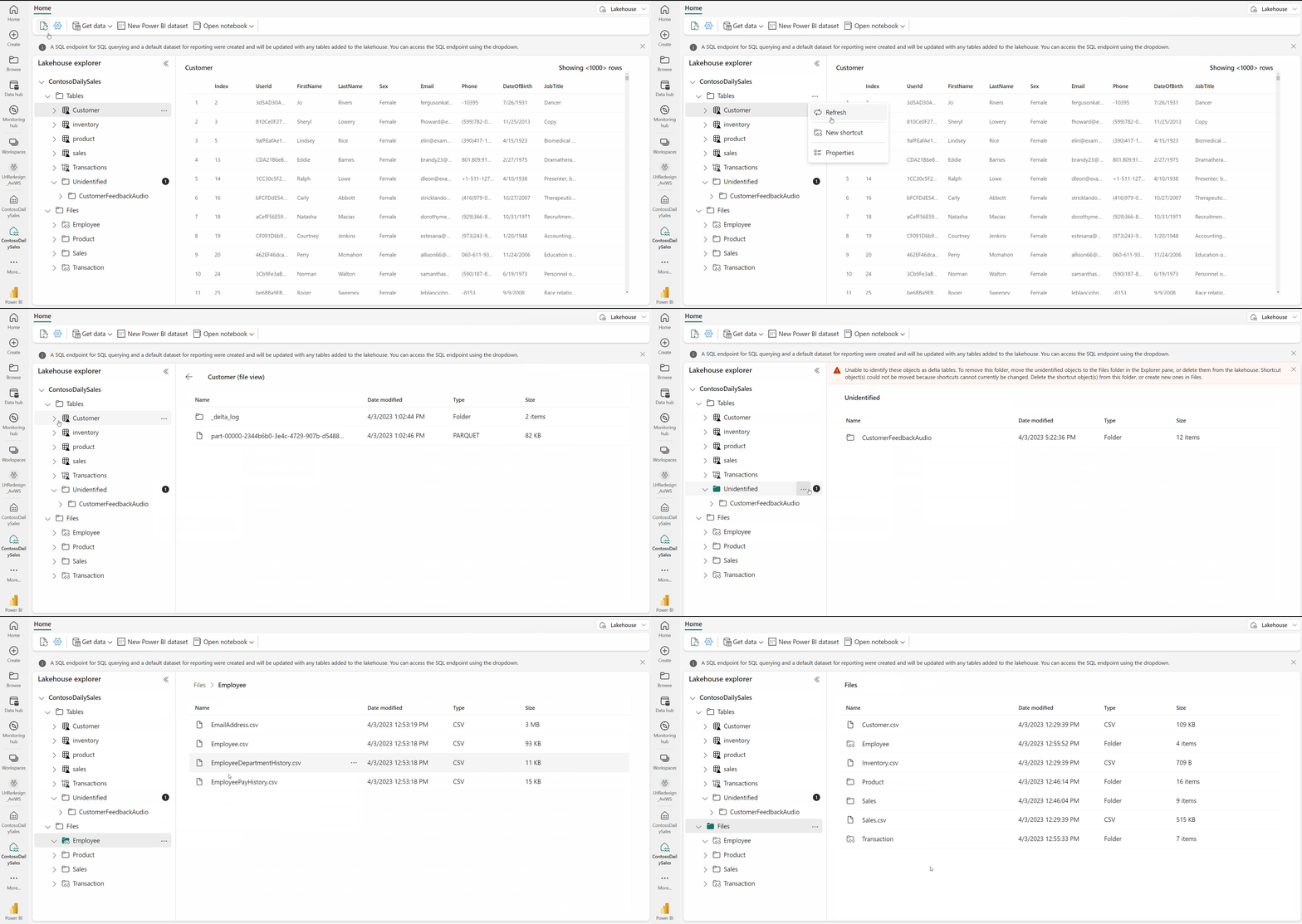
Source: Microsoft Fabric Lakehouse Overview
| Lakehouse | Purpose | Schema | Status |
|---|---|---|---|
lh_bronze | Raw data ingestion | Append-only, schema-on-read | ⬜ |
lh_silver | Cleansed/validated | Schema enforced, partitioned | ⬜ |
lh_gold | Business-ready | Star schema, optimized | ⬜ |
Steps:
- In workspace, click + New > Lakehouse
- Create
lh_bronzefirst - Repeat for
lh_silverandlh_gold - Verify SQL endpoints are created
📝 Activity 1.3: Generate Sample Data (30 min)
Use the data generators to create realistic casino data:
# Navigate to data_generation folder
cd data_generation

# Install dependencies
pip install -r requirements.txt

# Generate 30 days of slot machine data (500K records)
python generate.py slot_machine --records 500000 --days 30 --output ../sample-data/

# Generate player profiles (10K records)
python generate.py player --records 10000 --output ../sample-data/

# Generate compliance data with CTR/SAR patterns
python generate.py compliance --records 5000 --days 30 --output ../sample-data/
Data Files Created:
| File | Description | Status |
|---|---|---|
slot_telemetry_YYYYMMDD.parquet | Slot machine events | ⬜ |
player_profiles.parquet | Player demographics | ⬜ |
table_games_YYYYMMDD.parquet | Table game data | ⬜ |
financial_transactions_YYYYMMDD.parquet | Cage operations | ⬜ |
compliance_events.parquet | Regulatory filings | ⬜ |
🌅 Morning Session 2: Bronze Layer Part 1 (10:45 - 12:30)
🎯 Session Objectives
| Objective | Duration | Status |
|---|---|---|
| Understand Bronze layer principles | 15 min | ⬜ |
| Upload sample data to landing zone | 15 min | ⬜ |
| Implement slot telemetry ingestion | 45 min | ⬜ |
| Implement table games ingestion | 45 min | ⬜ |
📝 Activity 2.1: Bronze Layer Principles (15 min)
💡 Key Concepts
The Bronze layer is the foundation of the Medallion architecture, serving as the raw data landing zone.
Source: Microsoft Fabric Lakehouse Overview
Bronze Layer Rules:
├── Store data exactly as received (raw)
├── Append-only (no updates/deletes)
├── Preserve source metadata
├── Add ingestion timestamp
└── Minimal transformation (only structural)
Table Naming Convention: - Pattern: bronze_{source}_{entity} - Example: bronze_sas_slot_telemetry
📝 Activity 2.2: Upload Sample Data (15 min)
- Open
lh_bronzeLakehouse - Click Get data > Upload files
- Navigate to
sample-data/folder - Upload all generated Parquet files to
Files/landing/
Target Folder Structure:
lh_bronze/
├── Files/
│   └── landing/
│       ├── slot_telemetry/
│       ├── player_profiles/
│       ├── table_games/
│       ├── financial/
│       └── compliance/
└── Tables/
📝 Activity 2.3: Bronze Notebook - Slot Telemetry (45 min)
Create notebook 01_bronze_slot_telemetry:
# Cell 1: Configuration
from pyspark.sql.functions import *
from pyspark.sql.types import *
from datetime import datetime

# Batch tracking
batch_id = datetime.now().strftime("%Y%m%d_%H%M%S")
source_path = "Files/landing/slot_telemetry/"

# Cell 2: Read raw data
df_raw = spark.read.parquet(f"abfss://{source_path}")

print(f"Records loaded: {df_raw.count()}")
print(f"Columns: {df_raw.columns}")

# Cell 3: Add Bronze metadata
df_bronze = df_raw \
    .withColumn("_ingestion_timestamp", current_timestamp()) \
    .withColumn("_batch_id", lit(batch_id)) \
    .withColumn("_source_file", input_file_name())

# Cell 4: Write to Bronze table
df_bronze.write \
    .format("delta") \
    .mode("append") \
    .option("mergeSchema", "true") \
    .saveAsTable("bronze_slot_telemetry")

# Cell 5: Validate
spark.sql("SELECT COUNT(*) as total FROM bronze_slot_telemetry").show()
📝 Activity 2.4: Bronze Notebook - Table Games (45 min)
Create notebook 02_bronze_table_games:
# Similar pattern for table games data
# Focus on RFID tracking and dealer transactions

df_raw = spark.read.parquet("Files/landing/table_games/")

df_bronze = df_raw \
    .withColumn("_ingestion_timestamp", current_timestamp()) \
    .withColumn("_batch_id", lit(batch_id)) \
    .withColumn("_source_file", input_file_name())

df_bronze.write \
    .format("delta") \
    .mode("append") \
    .saveAsTable("bronze_table_games")
👥 Hands-On Exercise (30 min): Participants implement table games notebook independently, then review together.
☀️ Afternoon Session 3: Bronze Layer Part 2 (13:30 - 15:00)
🎯 Session Objectives
| Objective | Duration | Status |
|---|---|---|
| Implement player profile ingestion | 30 min | ⬜ |
| Implement financial transaction ingestion | 30 min | ⬜ |
| Implement compliance data ingestion | 30 min | ⬜ |
📝 Activity 3.1: Player Profile Ingestion (30 min)
Create notebook 03_bronze_player_profile:
# Player data with PII considerations
df_players = spark.read.parquet("Files/landing/player_profiles/")

# Hash SSN immediately at Bronze layer (compliance)
df_bronze = df_players \
    .withColumn("ssn_hash", sha2(col("ssn"), 256)) \
    .drop("ssn") \
    .withColumn("_ingestion_timestamp", current_timestamp()) \
    .withColumn("_batch_id", lit(batch_id))

df_bronze.write \
    .format("delta") \
    .mode("overwrite")  # Full refresh for dimension
    .saveAsTable("bronze_player_profile")
⚠️ Important: SSN is hashed at ingestion for compliance. Original values are never stored.
📝 Activity 3.2: Financial Transaction Ingestion (30 min)
Create notebook 04_bronze_financial_txn:
# Cage operations and financial transactions
df_financial = spark.read.parquet("Files/landing/financial/")

# Add CTR flag for amounts >= $10,000
df_bronze = df_financial \
    .withColumn("ctr_required", col("amount") >= 10000) \
    .withColumn("_ingestion_timestamp", current_timestamp()) \
    .withColumn("_batch_id", lit(batch_id))

df_bronze.write \
    .format("delta") \
    .mode("append") \
    .partitionBy("transaction_date") \
    .saveAsTable("bronze_financial_txn")
💰 CTR Threshold: $10,000 triggers Currency Transaction Report requirements
📝 Activity 3.3: Compliance Data Ingestion (30 min)
Create notebook 05_bronze_compliance:
# CTR, SAR, W-2G filings
df_compliance = spark.read.parquet("Files/landing/compliance/")

df_bronze = df_compliance \
    .withColumn("_ingestion_timestamp", current_timestamp()) \
    .withColumn("_batch_id", lit(batch_id)) \
    .withColumn("_regulatory_category",
        when(col("filing_type") == "CTR", "FinCEN")
        .when(col("filing_type") == "SAR", "FinCEN")
        .when(col("filing_type") == "W2G", "IRS")
        .otherwise("Other"))

df_bronze.write \
    .format("delta") \
    .mode("append") \
    .saveAsTable("bronze_compliance")
☀️ Afternoon Session 4: Silver Layer Introduction (15:15 - 17:00)
🎯 Session Objectives
| Objective | Duration | Status |
|---|---|---|
| Understand Silver layer principles | 20 min | ⬜ |
| Begin slot data cleansing | 50 min | ⬜ |
| Implement data quality checks | 30 min | ⬜ |
📝 Activity 4.1: Silver Layer Principles (20 min)
💡 Key Concepts
Silver Layer Rules:
├── Schema enforcement (strongly typed)
├── Data quality validation
├── Deduplication
├── Standardization (dates, codes, formats)
├── Business rule validation
└── Audit trail (track changes)
Transformation Patterns:
| Pattern | Description |
|---|---|
| NULL handling | Replace with defaults or flag |
| Date standardization | Convert to consistent format |
| Code mapping | Map machine types, zones |
| Outlier flagging | Identify anomalous values |
📝 Activity 4.2: Silver Notebook - Slot Cleansing (50 min)
Create notebook 01_silver_slot_cleansed:
# Read from Bronze
df_bronze = spark.table("lh_bronze.bronze_slot_telemetry")

# Define expected schema
schema_silver = StructType([
    StructField("machine_id", StringType(), False),
    StructField("event_type", StringType(), False),
    StructField("event_timestamp", TimestampType(), False),
    StructField("coin_in", DecimalType(18, 2), True),
    StructField("coin_out", DecimalType(18, 2), True),
    StructField("games_played", IntegerType(), True),
    StructField("jackpot_amount", DecimalType(18, 2), True),
    StructField("zone", StringType(), True),
    StructField("denomination", DecimalType(5, 2), True)
])

# Data quality rules
df_cleaned = df_bronze \
    .filter(col("machine_id").isNotNull()) \
    .filter(col("event_timestamp").isNotNull()) \
    .withColumn("coin_in",
        when(col("coin_in") < 0, 0).otherwise(col("coin_in"))) \
    .withColumn("coin_out",
        when(col("coin_out") < 0, 0).otherwise(col("coin_out"))) \
    .dropDuplicates(["machine_id", "event_timestamp", "event_type"])

# Add quality score
df_silver = df_cleaned \
    .withColumn("_dq_score",
        (when(col("coin_in").isNotNull(), 1).otherwise(0) +
         when(col("zone").isNotNull(), 1).otherwise(0) +
         when(col("denomination").isNotNull(), 1).otherwise(0)) / 3 * 100)

# Write to Silver
df_silver.write \
    .format("delta") \
    .mode("overwrite") \
    .partitionBy("event_date") \
    .saveAsTable("lh_silver.silver_slot_cleansed")
📝 Activity 4.3: Data Quality Dashboard (30 min)
Create validation queries:
-- Quality metrics
SELECT
    COUNT(*) as total_records,
    COUNT(CASE WHEN _dq_score = 100 THEN 1 END) as perfect_quality,
    AVG(_dq_score) as avg_quality_score,
    COUNT(DISTINCT machine_id) as unique_machines
FROM lh_silver.silver_slot_cleansed;

-- Quality by zone
SELECT
    zone,
    COUNT(*) as records,
    AVG(_dq_score) as avg_quality
FROM lh_silver.silver_slot_cleansed
GROUP BY zone
ORDER BY avg_quality DESC;
✅ Day 1 Validation Checklist
Environment
| Checkpoint | Criteria | Status |
|---|---|---|
| Workspace | casino-fabric-poc created | ⬜ |
| Capacity | F64 assigned | ⬜ |
| Lakehouses | Three created (bronze, silver, gold) | ⬜ |
Bronze Layer
| Table | Target | Status |
|---|---|---|
bronze_slot_telemetry | 500K+ records | ⬜ |
bronze_table_games | Populated | ⬜ |
bronze_player_profile | 10K records | ⬜ |
bronze_financial_txn | Populated | ⬜ |
bronze_compliance | Populated | ⬜ |
Silver Layer (Started)
| Table | Criteria | Status |
|---|---|---|
silver_slot_cleansed | Cleansed data | ⬜ |
| Data quality scores | Calculated | ⬜ |
| Deduplication | Verified | ⬜ |
📚 Homework / Preparation for Day 2
Required Reading
- Review Silver Layer Tutorial (Tutorial 02)
Exploration Tasks
- Explore Data:
- Run ad-hoc queries on Bronze tables
- Identify data quality issues
- Note any questions about transformation logic
Background Reading
- Read About:
- SCD Type 2 patterns for player data
- Delta Lake MERGE operations
- Data quality frameworks (Great Expectations)
📘 Instructor Notes
Common Issues & Solutions
| Issue | Solution |
|---|---|
| **Capacity Not Available** | - Verify F64 is assigned to workspace - Check Azure portal for capacity status |
| **File Upload Failures** | - Check file sizes (< 5GB per file recommended) - Verify Parquet format is valid |
| **Notebook Timeouts** | - Increase Spark session timeout - Use smaller data samples for testing |
Key Discussion Points
- Why Bronze layer should be immutable
- Trade-offs between schema-on-read vs schema-on-write
- PII handling strategies at ingestion
- CTR threshold implications ($10K)
🔗 Quick Links
| Resource | Link |
|---|---|
| Tutorial 00 | Environment Setup |
| Tutorial 01 | Bronze Layer |
| Tutorial 02 | Silver Layer |
📖 Related Documents
| Document | Description |
|---|---|
| POC Overview | 3-day workshop overview |
| Day 2: Transformations & Real-Time | Next day's session guide |
| Instructor Guide | Facilitator notes for Day 1 |
| Demo Runbook | Live demo presenter guide |
Day 1 Complete!