
Home > Best Practices > Lakehouse Setup & Organization
🏠 Lakehouse Setup & Organization¶ Deep Dive
Last Updated: 2026-04-15 | Version: 2.0 Status: ✅ Final | Maintainer: Documentation Team



Third-party references — publicly sourced, good-faith comparison
This page references non-Microsoft products and services. That information is drawn from each vendor's publicly available documentation and is offered for honest, good-faith comparison only. This is a personal project written from a Microsoft Fabric and Azure perspective; it does not claim expertise in, or authority over, any third-party product, and nothing here is an official statement by, or endorsed by, those vendors. Capabilities, pricing, and features change often — always verify against the vendor's current official documentation. Where a third-party offering is the stronger choice, we say so plainly.
📋 Overview
The Lakehouse is central to Microsoft Fabric's data architecture, combining data lake flexibility with data warehouse capabilities. This guide covers Delta Lake configuration, medallion architecture implementation, and table maintenance best practices.
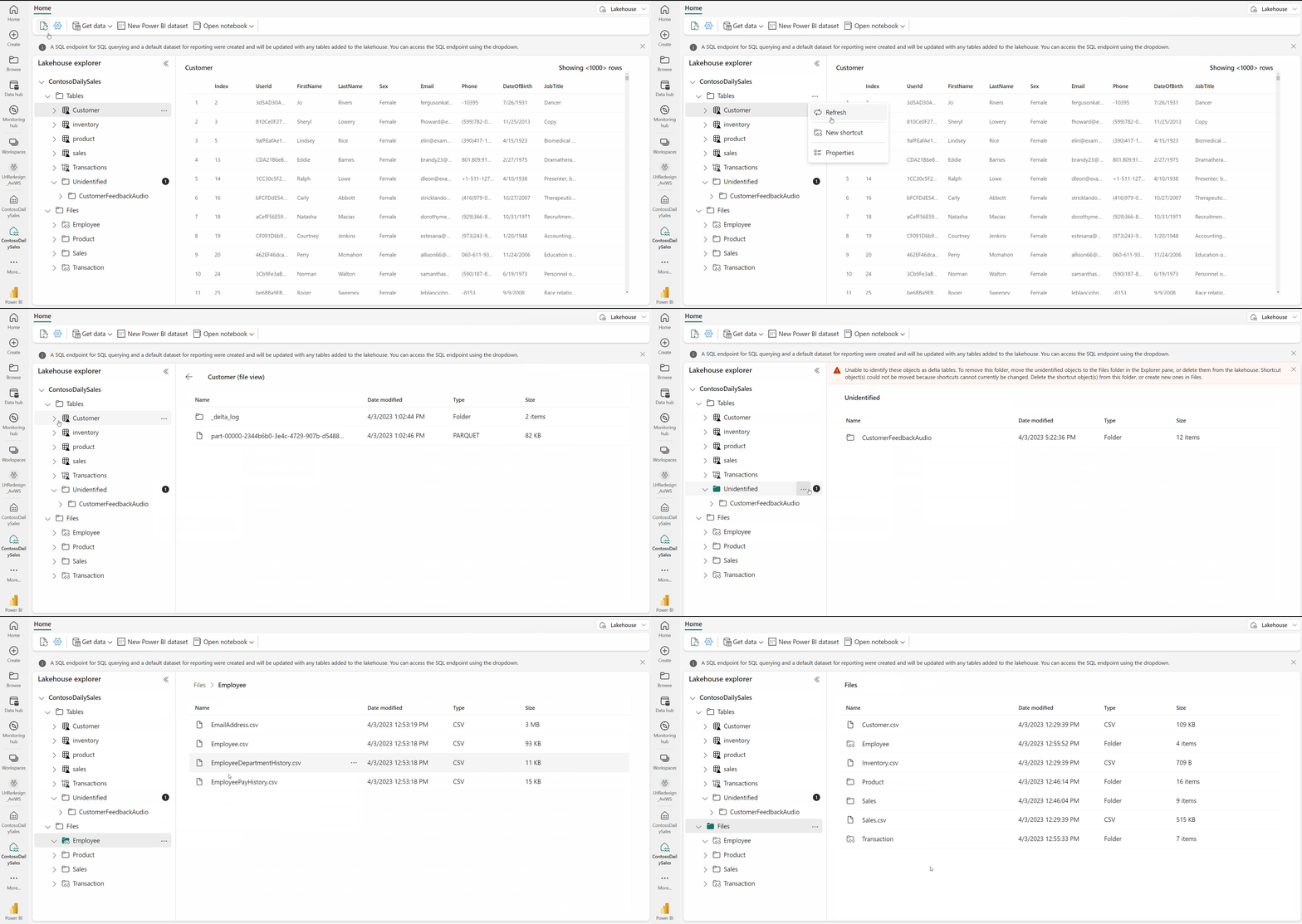
Source: Microsoft Learn - Lakehouse Overview
🏗️ Lakehouse Architecture
Components
Lakehouse
├── Files/           # Unstructured data (landing zone)
│   ├── raw/
│   ├── staging/
│   └── archive/
├── Tables/          # Managed Delta tables
│   ├── bronze_*
│   ├── silver_*
│   └── gold_*
└── SQL Endpoint     # T-SQL access (read-only)
Access Methods
| Access Method | Use Case | Capabilities |
|---|---|---|
| Spark | Data engineering | Full read/write |
| SQL Endpoint | Analytics, BI | Read-only |
| Shortcuts | External data | Virtual access |
| OneLake API | Programmatic | ADLS Gen2 compatible |
🥇 Medallion Architecture
Layer Definitions
flowchart LR
    subgraph Bronze["Bronze Layer"]
        B1[Raw Data]
        B2[Append-Only]
        B3[Source Fidelity]
    end

    subgraph Silver["Silver Layer"]
        S1[Cleansed]
        S2[Validated]
        S3[Deduplicated]
    end

    subgraph Gold["Gold Layer"]
        G1[Business Ready]
        G2[Aggregations]
        G3[Star Schema]
    end

    Bronze --> Silver --> Gold
Layer Characteristics
| Layer | Purpose | Schema | Updates | Retention |
|---|---|---|---|---|
| Bronze | Raw ingestion | Source schema | Append-only | Long-term |
| Silver | Validated data | Enforced schema | MERGE/Upsert | Medium-term |
| Gold | Business views | Star schema | Computed | Based on use |
⚙️ Delta Lake Configuration
Table Creation with Best Practices
# Create optimized Delta table
spark.sql("""
    CREATE TABLE silver_slot_telemetry (
        event_id STRING NOT NULL,
        machine_id STRING NOT NULL,
        player_id STRING,
        event_timestamp TIMESTAMP NOT NULL,
        event_type STRING,
        bet_amount DECIMAL(18,2),
        win_amount DECIMAL(18,2),
        event_date DATE,
        _loaded_at TIMESTAMP,
        _source_file STRING
    )
    USING DELTA
    PARTITIONED BY (event_date)
    TBLPROPERTIES (
        'delta.autoOptimize.optimizeWrite' = 'true',
        'delta.autoOptimize.autoCompact' = 'true',
        'delta.dataSkippingNumIndexedCols' = '8',
        'delta.deletedFileRetentionDuration' = 'interval 7 days'
    )
""")
Key Table Properties
| Property | Default | Recommendation | Purpose |
|---|---|---|---|
delta.autoOptimize.optimizeWrite | false | true | Better file sizes |
delta.autoOptimize.autoCompact | false | true | Reduce small files |
delta.dataSkippingNumIndexedCols | 32 | Match filter columns | Query performance |
delta.deletedFileRetentionDuration | 7 days | 7+ days | Time travel support |
🚀 V-Order Optimization
What is V-Order?
V-Order is a Fabric-specific optimization that improves read performance across all Fabric engines (Spark, SQL, Power BI).
Enabling V-Order
Write-time V-Order:
df.write.format("delta") \
    .option("vorder", "true") \
    .mode("overwrite") \
    .save("/Tables/my_table")
OPTIMIZE with V-Order:
Combined Z-ORDER and V-Order:
📐 Partitioning Strategy
When to Partition
| Data Size | Recommendation |
|---|---|
| < 1 GB | No partitioning |
| 1-100 GB | Single partition column |
| > 100 GB | Consider multiple columns |
Partition Column Selection
Good candidates: - Date columns (event_date, created_date) - Low cardinality columns (region, category) - Frequently filtered columns
Bad candidates: - High cardinality columns (customer_id, transaction_id) - Columns that create thousands of partitions
Example Partition Strategy
# For time-series data, partition by date
df.write.format("delta") \
    .partitionBy("event_date") \
    .mode("overwrite") \
    .saveAsTable("bronze_slot_telemetry")

# For large historical tables, consider year/month
df.write.format("delta") \
    .partitionBy("year", "month") \
    .mode("overwrite") \
    .saveAsTable("archive_transactions")
🔍 Z-ORDER Clustering
What is Z-ORDER?
Z-ORDER colocates related data for efficient data skipping during queries.
Implementation
-- Z-ORDER on frequently filtered columns
OPTIMIZE gold_player_activity
ZORDER BY (player_id, event_date);
Best Practices
- Use on high-cardinality filter columns
- Combine with partitioning (partition first, then Z-ORDER within)
- Limit to 2-4 columns
- Re-run after significant data changes
🔧 Table Maintenance
Three Core Operations
flowchart LR
    A[Table Maintenance] --> B[OPTIMIZE]
    A --> C[V-ORDER]
    A --> D[VACUUM]

    B --> B1[Compacts small files]
    C --> C1[Fabric-optimized encoding]
    D --> D1[Removes old files]
OPTIMIZE Command
Consolidates small files into larger ones:
-- Basic optimize
OPTIMIZE bronze_slot_telemetry;

-- Optimize specific partition
OPTIMIZE bronze_slot_telemetry
WHERE event_date >= '2024-01-01';

-- Optimize with Z-ORDER
OPTIMIZE silver_player_profiles
ZORDER BY (player_id);
Target file size: 128 MB - 1 GB (optimal for Spark)
VACUUM Command
Removes files no longer referenced by Delta log:
from delta.tables import DeltaTable

delta_table = DeltaTable.forPath(spark, "/Tables/bronze_slot_telemetry")

# Vacuum with default 7-day retention
delta_table.vacuum()

# Vacuum with custom retention (requires config change for < 7 days)
delta_table.vacuum(168)  # 168 hours = 7 days
Important: - Default retention is 7 days - Shorter retention impacts time travel - Don't vacuum if Direct Lake semantic models reference old versions
Maintenance Schedule
| Table Type | OPTIMIZE Frequency | VACUUM Frequency |
|---|---|---|
| High-velocity Bronze | Daily | Weekly |
| Silver (incremental) | Daily | Weekly |
| Gold (batch) | After refresh | Monthly |
| Archive | Monthly | Quarterly |
🖥️ Lakehouse UI Maintenance
Using Portal UI
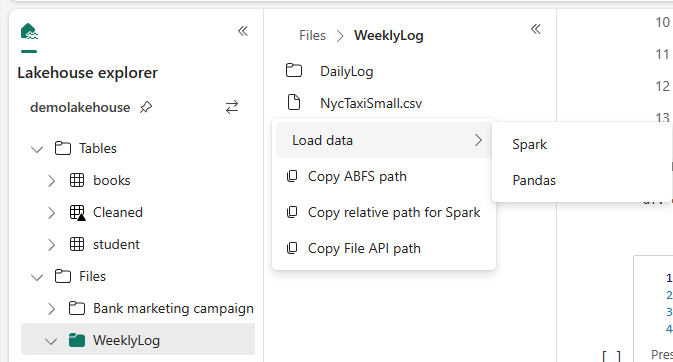
Source: Microsoft Learn - How to Use Notebooks
- Open Lakehouse in Fabric portal
- In Explorer, right-click table
- Select Maintenance
- Choose operations:
- OPTIMIZE
- V-ORDER
- VACUUM
- Click Run now
Automating Maintenance via API
# Using Lakehouse REST API
import requests

workspace_id = "your-workspace-id"
lakehouse_id = "your-lakehouse-id"

# Submit maintenance job
response = requests.post(
    f"https://api.fabric.microsoft.com/v1/workspaces/{workspace_id}/items/{lakehouse_id}/jobs/instances",
    headers={"Authorization": f"Bearer {token}"},
    json={
        "jobType": "TableMaintenance",
        "executionData": {
            "tableName": "bronze_slot_telemetry",
            "optimizeSettings": {
                "vOrder": True,
                "zOrderBy": ["machine_id"]
            },
            "vacuumSettings": {
                "retentionPeriod": "168:00:00"
            }
        }
    }
)
🔗 Shortcuts
When to Use Shortcuts
| Scenario | Use Shortcut? |
|---|---|
| Access ADLS Gen2 without copying | Yes |
| Cross-workspace data access | Yes |
| Real-time external data | Yes |
| Data needs transformation | No (copy first) |
| High-frequency queries | Evaluate (may need local copy) |
Creating Shortcuts

Source: Microsoft Learn - Lakehouse Shortcuts
Lakehouse > Files > New shortcut > Select source
  - OneLake (another Fabric item)
  - Azure Data Lake Storage Gen2
  - Amazon S3
  - Dataverse
  - Google Cloud Storage
Performance Considerations
- Shortcuts add network latency
- Same-region data performs best
- Consider local copy for heavy query workloads
📂 File Organization
Recommended Structure
Files/
├── landing/                    # Initial file drops
│   ├── slot_telemetry/
│   │   └── YYYY/MM/DD/
│   └── player_data/
├── staging/                    # In-progress transformations
├── archive/                    # Historical files
│   └── YYYY/
└── reference/                  # Static reference data

Tables/
├── bronze_sms_slot_events      # Raw from SMS
├── bronze_cms_players          # Raw from CMS
├── silver_slot_telemetry       # Cleansed events
├── silver_player_profiles      # Validated players
├── fact_daily_slot_performance # Gold fact table
├── dim_machine                 # Gold dimension
└── dim_player                  # Gold dimension
✅ Best Practices Checklist
Initial Setup
- Plan medallion layer structure
- Define naming conventions
- Configure default table properties
- Set up maintenance schedules
- Plan partitioning strategy
Ongoing Operations
- Monitor table file counts
- Run OPTIMIZE after large loads
- VACUUM weekly (minimum)
- Review partition effectiveness
- Update Z-ORDER as query patterns change
Performance
- Enable V-Order for Fabric workloads
- Use appropriate partition columns
- Keep files between 128 MB - 1 GB
- Use shortcuts for external data access
- Monitor SQL endpoint query performance
⚠️ Common Issues and Solutions
| Issue | Cause | Solution |
|---|---|---|
| Slow queries | Too many small files | Run OPTIMIZE |
| Storage growth | Old files not cleaned | Run VACUUM |
| Time travel fails | Aggressive VACUUM | Increase retention |
| Partition skew | Poor partition choice | Re-partition data |
| Direct Lake errors | VACUUM removed files | Refresh semantic model |
🔗 Related Documents
| Document | Description |
|---|---|
| Spark & Notebooks | Spark optimization and notebook patterns |
| Warehouse Setup & Configuration | Warehouse schema design and comparison |
| Medallion Architecture Deep Dive | Advanced medallion architecture patterns |
| Decision Guide | Lakehouse vs Warehouse decision criteria |
| Direct Lake | Direct Lake connectivity for Power BI |