
Home > Best Practices > Pipelines & Data Movement
🔄 Pipelines & Data Movement¶ Deep Dive
Last Updated: 2026-04-15 | Version: 2.0 Status: ✅ Final | Maintainer: Documentation Team



Third-party references — publicly sourced, good-faith comparison
This page references non-Microsoft products and services. That information is drawn from each vendor's publicly available documentation and is offered for honest, good-faith comparison only. This is a personal project written from a Microsoft Fabric and Azure perspective; it does not claim expertise in, or authority over, any third-party product, and nothing here is an official statement by, or endorsed by, those vendors. Capabilities, pricing, and features change often — always verify against the vendor's current official documentation. Where a third-party offering is the stronger choice, we say so plainly.
📋 Overview
This guide covers best practices for data movement in Microsoft Fabric, including ETL vs ELT patterns, copy activity optimization, and different load strategies (full, incremental, CDC).
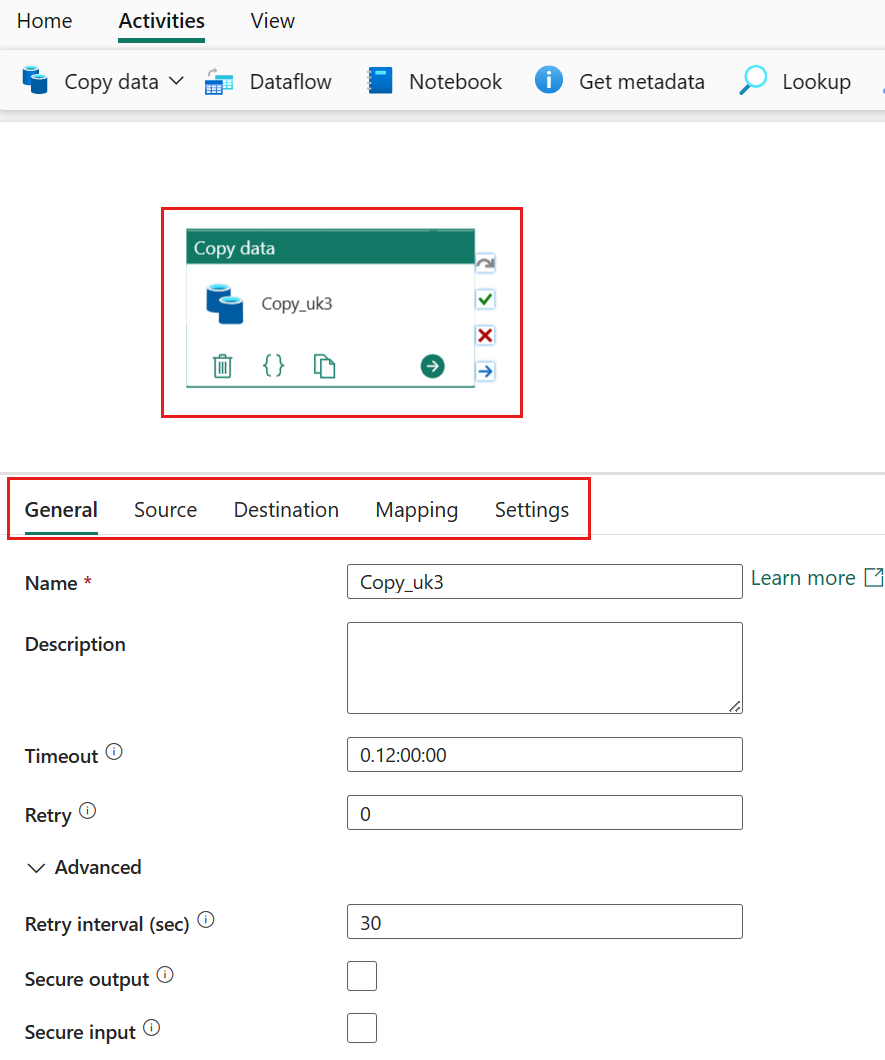
Source: Microsoft Learn - Copy Data Activity
⚖️ ETL vs ELT Decision Framework
Comparison
| Aspect | ETL (Extract-Transform-Load) | ELT (Extract-Load-Transform) |
|---|---|---|
| Transform Location | Source/staging | Destination (Lakehouse/Warehouse) |
| Best For | Complex pre-processing | Large volumes, Spark transforms |
| Tools | Dataflows, gateway | Pipelines + Spark/SQL |
| Performance | Gateway limited | Scales with capacity |
| Complexity | Moderate | Lower initial, higher transform |
Decision Tree
flowchart TD
    A[Data Movement Need] --> B{Data Volume}
    B -->|"< 1 GB"| C{Complex Transform?}
    B -->|1-100 GB| D{Transform Complexity}
    B -->|"> 100 GB"| E[ELT Pattern]

    C -->|Yes| F[ETL with Dataflow]
    C -->|No| G[Direct Copy]

    D -->|Simple| H[Copy + SQL Transform]
    D -->|Complex| I[Copy + Spark Transform]

    E --> J[Copy to Bronze]
    J --> K[Spark Transform]

    F --> L[Target: Lakehouse/Warehouse]
    G --> L
    H --> L
    I --> L
    K --> L
Recommended Pattern: ELT for Fabric
For most Fabric workloads, ELT is preferred:
1. EXTRACT: Copy raw data to Bronze lakehouse
2. LOAD: Land in Delta format
3. TRANSFORM: Use Spark notebooks or Warehouse SQL
Benefits: - Leverages Fabric compute scaling - Reduces gateway load - Enables data replay from Bronze - Supports incremental processing
📋 Copy Activity Optimization
Parallel Copy Configuration
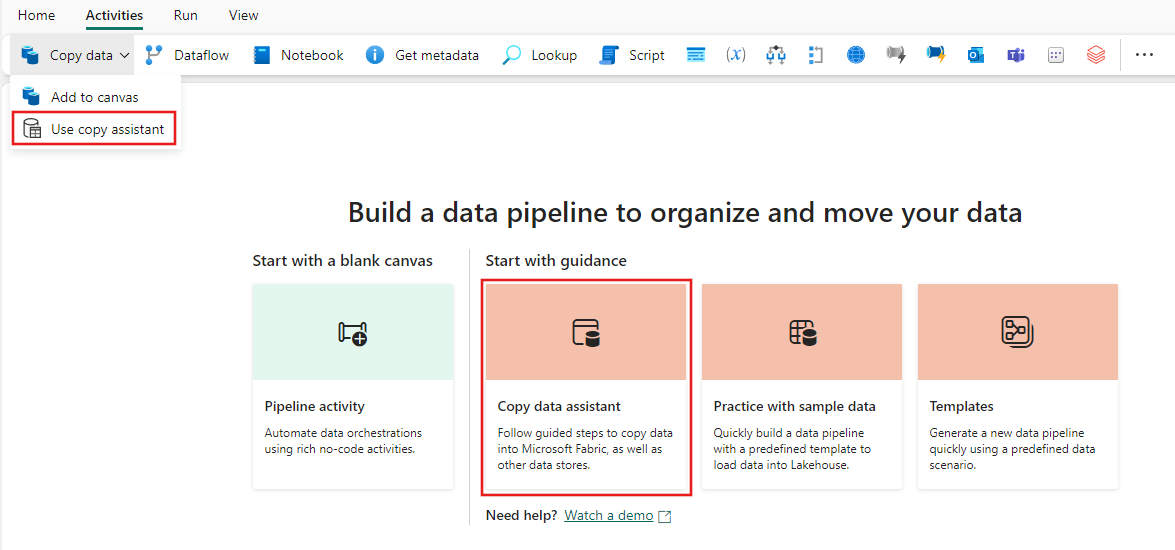
Source: Microsoft Learn - Copy Data Activity
{
  "name": "OptimizedCopyActivity",
  "type": "Copy",
  "typeProperties": {
    "source": {
      "type": "SqlServerSource",
      "partitionOption": "DynamicRange",
      "partitionSettings": {
        "partitionColumnName": "ModifiedDate",
        "partitionUpperBound": "2024-12-31",
        "partitionLowerBound": "2024-01-01"
      }
    },
    "sink": {
      "type": "LakehouseTableSink"
    },
    "parallelCopies": 16,
    "dataIntegrationUnits": 32
  }
}
Partition Options
| Partition Type | Use Case | Configuration |
|---|---|---|
| Physical Partitions | Table has partitions | Auto-detected |
| Dynamic Range | Integer/DateTime column | Specify column, bounds |
| None | Small tables | Default behavior |
Parallel Copy Settings
| Setting | Default | Recommendation |
|---|---|---|
| Parallel Copies | Auto | 4-32 based on source |
| Data Integration Units | Auto | 4-256 based on volume |
| Degree of Copy Parallelism | Auto | Match partition count |
Performance by Scenario
| Source | Destination | Partition | Parallelism | Expected Throughput |
|---|---|---|---|---|
| SQL Server | Lakehouse | None | Auto | ~100 MB/min |
| SQL Server | Lakehouse | Dynamic | 16 | ~500 MB/min |
| SQL Server | Lakehouse | Logical* | 50 | ~2 GB/min |
| Oracle | Lakehouse | Physical | Auto | ~300 MB/min |
| Oracle | Lakehouse | Dynamic | 16 | ~800 MB/min |
*Logical partitioning uses ForEach with date ranges
📦 Load Patterns
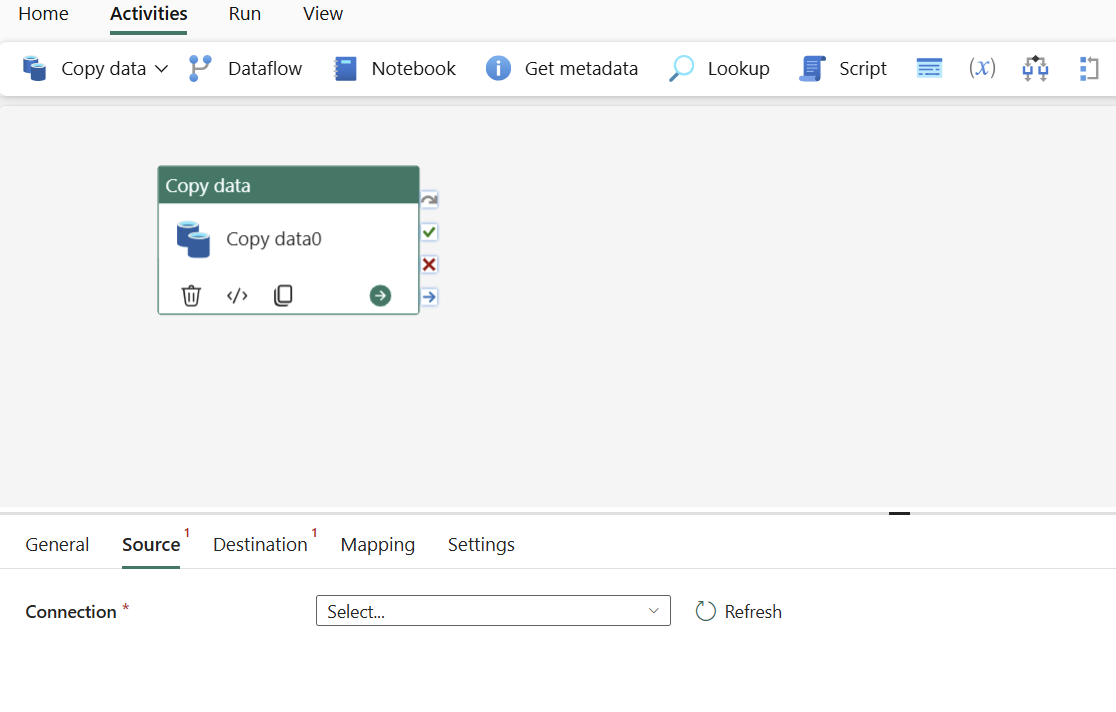
Source: Microsoft Learn - Copy Data Activity
1. Full Load (Truncate and Load)
Use Case: Small-medium tables, reference data, complete refresh needed
{
  "name": "FullLoadPipeline",
  "activities": [
    {
      "name": "TruncateTarget",
      "type": "Script",
      "typeProperties": {
        "scripts": [{
          "text": "TRUNCATE TABLE target_table"
        }]
      }
    },
    {
      "name": "CopyFullData",
      "type": "Copy",
      "dependsOn": [{"activity": "TruncateTarget"}],
      "typeProperties": {
        "source": {"type": "SqlServerSource"},
        "sink": {"type": "LakehouseTableSink"}
      }
    }
  ]
}
2. Incremental Load (Watermark-Based)
Use Case: Large tables with timestamp/ID column for tracking
{
  "name": "IncrementalLoadPipeline",
  "activities": [
    {
      "name": "LookupLastWatermark",
      "type": "Lookup",
      "typeProperties": {
        "source": {
          "type": "LakehouseSource",
          "query": "SELECT MAX(watermark_value) as last_watermark FROM watermark_table WHERE table_name = 'source_table'"
        }
      }
    },
    {
      "name": "LookupCurrentWatermark",
      "type": "Lookup",
      "typeProperties": {
        "source": {
          "type": "SqlServerSource",
          "query": "SELECT MAX(ModifiedDate) as current_watermark FROM source_table"
        }
      }
    },
    {
      "name": "CopyIncrementalData",
      "type": "Copy",
      "dependsOn": [
        {"activity": "LookupLastWatermark"},
        {"activity": "LookupCurrentWatermark"}
      ],
      "typeProperties": {
        "source": {
          "type": "SqlServerSource",
          "query": {
            "value": "SELECT * FROM source_table WHERE ModifiedDate > '@{activity('LookupLastWatermark').output.firstRow.last_watermark}' AND ModifiedDate <= '@{activity('LookupCurrentWatermark').output.firstRow.current_watermark}'",
            "type": "Expression"
          }
        },
        "sink": {
          "type": "LakehouseTableSink",
          "tableOption": "autoCreate"
        }
      }
    },
    {
      "name": "UpdateWatermark",
      "type": "Script",
      "dependsOn": [{"activity": "CopyIncrementalData"}],
      "typeProperties": {
        "scripts": [{
          "text": {
            "value": "UPDATE watermark_table SET watermark_value = '@{activity('LookupCurrentWatermark').output.firstRow.current_watermark}' WHERE table_name = 'source_table'",
            "type": "Expression"
          }
        }]
      }
    }
  ]
}
3. Change Data Capture (CDC)
Use Case: Real-time or near-real-time sync, captures inserts, updates, deletes
Enable CDC on SQL Server Source
-- Enable CDC at database level
EXEC sys.sp_cdc_enable_db;

-- Enable CDC on specific table
EXEC sys.sp_cdc_enable_table
    @source_schema = N'dbo',
    @source_name = N'slot_telemetry',
    @role_name = N'cdc_admin',
    @supports_net_changes = 1;
Copy Job with CDC (Recommended)
Copy Job Configuration:
├── Source: SQL Server (CDC enabled)
├── Mode: Incremental copy
├── Update Method: Merge
├── Key Columns: Auto-detected from PK
└── Schedule: Every 15 minutes
Benefits of Copy Job CDC: - Zero manual intervention - Automatic insert/update/delete handling - Initial full load + subsequent incremental - Built-in checkpointing
4. Delta Load with Merge
Use Case: Upsert pattern - insert new, update existing
# PySpark MERGE pattern in notebook
from delta.tables import DeltaTable

# Read incremental data
df_incremental = spark.read.format("delta").load("/bronze/slot_telemetry_incremental")

# Get target Delta table
delta_table = DeltaTable.forPath(spark, "/silver/slot_telemetry")

# Perform MERGE
delta_table.alias("target").merge(
    df_incremental.alias("source"),
    "target.event_id = source.event_id"
).whenMatchedUpdate(
    set={
        "event_timestamp": "source.event_timestamp",
        "bet_amount": "source.bet_amount",
        "win_amount": "source.win_amount",
        "_updated_at": "current_timestamp()"
    }
).whenNotMatchedInsert(
    values={
        "event_id": "source.event_id",
        "machine_id": "source.machine_id",
        "player_id": "source.player_id",
        "event_timestamp": "source.event_timestamp",
        "bet_amount": "source.bet_amount",
        "win_amount": "source.win_amount",
        "_inserted_at": "current_timestamp()",
        "_updated_at": "current_timestamp()"
    }
).execute()
⚡ Pipeline Performance Optimization
ForEach Parallel Execution

Source: Microsoft Learn - Pipeline Overview
Use ForEach for parallel table processing:
{
  "name": "ParallelTableLoad",
  "type": "ForEach",
  "typeProperties": {
    "isSequential": false,
    "batchCount": 20,
    "items": "@pipeline().parameters.tableList",
    "activities": [
      {
        "name": "CopyTable",
        "type": "Copy",
        "typeProperties": {
          "source": {
            "type": "SqlServerSource",
            "query": "@concat('SELECT * FROM ', item().schemaName, '.', item().tableName)"
          }
        }
      }
    ]
  }
}
ForEach Settings: | Setting | Max Value | Recommendation | |---------|-----------|----------------| | batchCount | 50 | 10-20 for gateway, 30-50 for cloud | | isSequential | false | Always false for parallelism |
Logical Partitioning Design
For very large tables (100GB+), use logical partitioning:
Pipeline Structure:
├── Set Variables (date ranges)
├── ForEach (date buckets, batchCount=50)
│   └── Copy Activity (filtered by date range)
└── Verify Completion
Date Range Generation:
{
  "name": "GenerateDateRanges",
  "type": "SetVariable",
  "typeProperties": {
    "variableName": "dateRanges",
    "value": {
      "value": "@range(0, div(sub(ticks(pipeline().parameters.endDate), ticks(pipeline().parameters.startDate)), ticks('50.00:00:00')))",
      "type": "Expression"
    }
  }
}
🏗️ Pipeline Patterns for Large Tables
Pattern 1: Chunked Full Load
flowchart LR
    A[Get Row Count] --> B[Calculate Chunks]
    B --> C[ForEach Chunk]
    C --> D1[Copy Rows 1-1M]
    C --> D2[Copy Rows 1M-2M]
    C --> D3[Copy Rows 2M-3M]
    D1 --> E[Verify/Merge]
    D2 --> E
    D3 --> E
Pattern 2: Partitioned Incremental
flowchart LR
    A[Get Last Watermark] --> B[Get Current Max]
    B --> C[Calculate Partitions]
    C --> D[ForEach Partition]
    D --> E1[Copy Partition 1]
    D --> E2[Copy Partition 2]
    D --> E3[Copy Partition N]
    E1 --> F[Update Watermark]
    E2 --> F
    E3 --> F
🎯 Sink Optimization
Lakehouse Table Sink

Source: Microsoft Learn - Create First Pipeline
{
  "sink": {
    "type": "LakehouseTableSink",
    "tableActionOption": "Append",
    "partitionOption": "None"
  }
}
Options: - Append - Add rows (incremental) - Overwrite - Replace table (full load)
Warehouse Sink
{
  "sink": {
    "type": "WarehouseSink",
    "writeBehavior": "Insert",
    "preCopyScript": "TRUNCATE TABLE dbo.target_table",
    "tableOption": "autoCreate"
  }
}
File Sink Best Practices
| Setting | Recommendation | Reason |
|---|---|---|
| File format | Parquet | Compression, columnar |
| File size | 100MB - 1GB | Optimal for Spark |
| Compression | Snappy | Balance of speed/size |
| Max rows per file | 1M - 10M | Prevents small files |
🛡️ Error Handling and Retry
Retry Configuration
{
  "policy": {
    "timeout": "7.00:00:00",
    "retry": 3,
    "retryIntervalInSeconds": 30,
    "secureOutput": false,
    "secureInput": false
  }
}
Error Handling Pattern
{
  "activities": [
    {
      "name": "TryCopyData",
      "type": "Copy",
      "...": "..."
    },
    {
      "name": "LogError",
      "type": "Script",
      "dependsOn": [
        {
          "activity": "TryCopyData",
          "dependencyConditions": ["Failed"]
        }
      ],
      "typeProperties": {
        "scripts": [{
          "text": "INSERT INTO error_log VALUES ('@{activity('TryCopyData').error.message}', GETDATE())"
        }]
      }
    },
    {
      "name": "SendAlert",
      "type": "WebActivity",
      "dependsOn": [
        {
          "activity": "TryCopyData",
          "dependencyConditions": ["Failed"]
        }
      ]
    }
  ]
}
📊 Performance Benchmarks
Copy Activity Performance Reference
| Source | Volume | Partition | Parallelism | Duration |
|---|---|---|---|---|
| SQL Server (on-prem) | 10 GB | None | Auto | ~25 min |
| SQL Server (on-prem) | 10 GB | Dynamic | 16 | ~8 min |
| SQL Server (on-prem) | 100 GB | Logical | 50 | ~45 min |
| Oracle (on-prem) | 10 GB | Physical | Auto | ~15 min |
| Oracle (on-prem) | 100 GB | Dynamic | 32 | ~60 min |
| Azure SQL | 10 GB | Dynamic | 16 | ~5 min |
| Azure SQL | 100 GB | Dynamic | 32 | ~25 min |
Benchmarks vary based on network, gateway, and source performance
✅ Best Practices Checklist
Copy Activity
- Use parallel copy with partitioning for large tables
- Set appropriate DIU based on volume
- Use Dynamic Range for tables without physical partitions
- Enable staging for cross-region copies
Incremental Loads
- Use watermark columns (timestamp or incremental ID)
- Store watermarks in control table
- Handle late-arriving data with buffer
- Consider CDC for real-time needs
Pipeline Design
- Use ForEach for parallel table processing
- Implement proper error handling
- Add logging and monitoring
- Use parameters for reusability
- Document pipeline dependencies
🔗 Related Documents
| Document | Description |
|---|---|
| Metadata-Driven Pipelines | Dynamic, configuration-based pipeline patterns |
| Data Gateway Optimization | Gateway configuration for on-premises sources |
| Source-Specific Patterns | Oracle and SQL Server extraction patterns |
| Decision Guide | Choosing the right data movement tool |
| Incremental Refresh & CDC | Advanced incremental and CDC patterns |
| Copy Job CDC | Copy Job CDC feature documentation |