
Home > Best Practices > Data Gateway Optimization
🌐 Data Gateway Optimization¶ Deep Dive
Last Updated: 2026-04-15 | Version: 2.0 Status: ✅ Final | Maintainer: Documentation Team



Third-party references — publicly sourced, good-faith comparison
This page references non-Microsoft products and services. That information is drawn from each vendor's publicly available documentation and is offered for honest, good-faith comparison only. This is a personal project written from a Microsoft Fabric and Azure perspective; it does not claim expertise in, or authority over, any third-party product, and nothing here is an official statement by, or endorsed by, those vendors. Capabilities, pricing, and features change often — always verify against the vendor's current official documentation. Where a third-party offering is the stronger choice, we say so plainly.
📋 Overview
The on-premises data gateway is critical for connecting Fabric to on-premises data sources like Oracle, SQL Server, and file systems. Proper configuration dramatically impacts data movement performance.
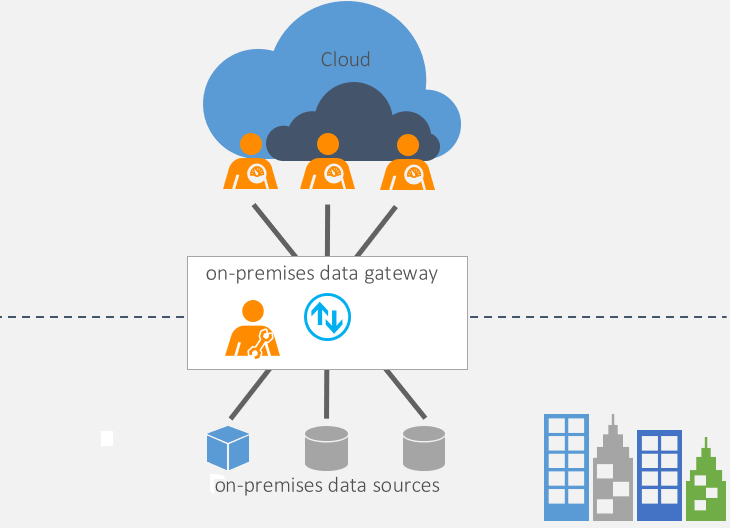
Source: Microsoft Learn - On-premises Data Gateway
🔌 Gateway Types
| Gateway Type | Use Case | Management | Best For |
|---|---|---|---|
| Standard Mode | Multiple users, production | Customer-managed | Enterprise workloads |
| Personal Mode | Single user, development | Self-managed | Developer testing |
| VNet Gateway | Azure resources | Microsoft-managed | Azure-hosted sources |
Recommendation: Use Standard Mode for production workloads. Personal Mode doesn't support DirectQuery or live connections.
📐 Gateway Sizing Guidelines
Hardware Requirements
| Workload Size | CPU Cores | RAM | Network | Storage |
|---|---|---|---|---|
| Small (< 10 concurrent) | 8 cores | 8 GB | 1 Gbps | SSD recommended |
| Medium (10-50 concurrent) | 16 cores | 16 GB | 10 Gbps | SSD required |
| Large (50+ concurrent) | 32+ cores | 32+ GB | 10 Gbps | NVMe SSD |
Sizing Formula
Estimated Cores = (Peak Concurrent Queries × 2) + (Concurrent Refreshes × 4)
Estimated RAM = (Concurrent Operations × 512 MB) + 4 GB base
🔄 Parallel and Concurrent Connections
Mashup Container Configuration
The gateway uses "mashup containers" to execute queries. Key settings in Microsoft.PowerBI.DataMovement.Pipeline.GatewayCore.dll.config:
<!-- Location: Program Files\On-premises data gateway\ -->

<!-- Maximum containers for refresh operations -->
<setting name="MashupDefaultPoolContainerMaxCount" serializeAs="String">
    <value>8</value>  <!-- Increase for more parallel refreshes -->
</setting>

<!-- Maximum memory per container (MB) -->
<setting name="MashupDefaultPoolContainerMaxWorkingSetInMB" serializeAs="String">
    <value>2048</value>  <!-- Increase for large datasets -->
</setting>

<!-- Maximum containers for DirectQuery -->
<setting name="MashupDQPoolContainerMaxCount" serializeAs="String">
    <value>8</value>  <!-- Increase for more concurrent DQ queries -->
</setting>

<!-- Disable auto-scaling to use manual settings -->
<setting name="MashupDisableContainerAutoConfig" serializeAs="String">
    <value>True</value>
</setting>
Recommended Container Settings by Workload
| Workload | DefaultPoolMaxCount | DQPoolMaxCount | WorkingSetMB |
|---|---|---|---|
| Light | 4 | 4 | 1024 |
| Medium | 8 | 8 | 2048 |
| Heavy | 16 | 16 | 4096 |
| Enterprise | 32 | 32 | 8192 |
Note: After changing settings, set MashupDisableContainerAutoConfig to True and restart the gateway.
⚡ Performance Optimization
Network Optimization
Gateway <--> Data Source: Minimize hops, same network segment
Gateway <--> Fabric: Fast, reliable connection
Checklist: - [ ] Place gateway on same network as data sources - [ ] Ensure low latency to Azure (< 50ms) - [ ] Remove firewall throttling - [ ] Configure Azure ExpressRoute for critical workloads
Streaming Mode
Enable streaming to reduce memory usage for large datasets:
<!-- Enable streaming for faster performance -->
<setting name="StreamBeforeRequestCompletes" serializeAs="String">
    <value>True</value>
</setting>
Caution: May cause issues with slow sources or unstable connections.
Spool Storage
Monitor spool storage location for disk space:
Best Practice: Use SSD/NVMe for spool storage, monitor free space.
🔗 High Availability Clustering
Cluster Configuration
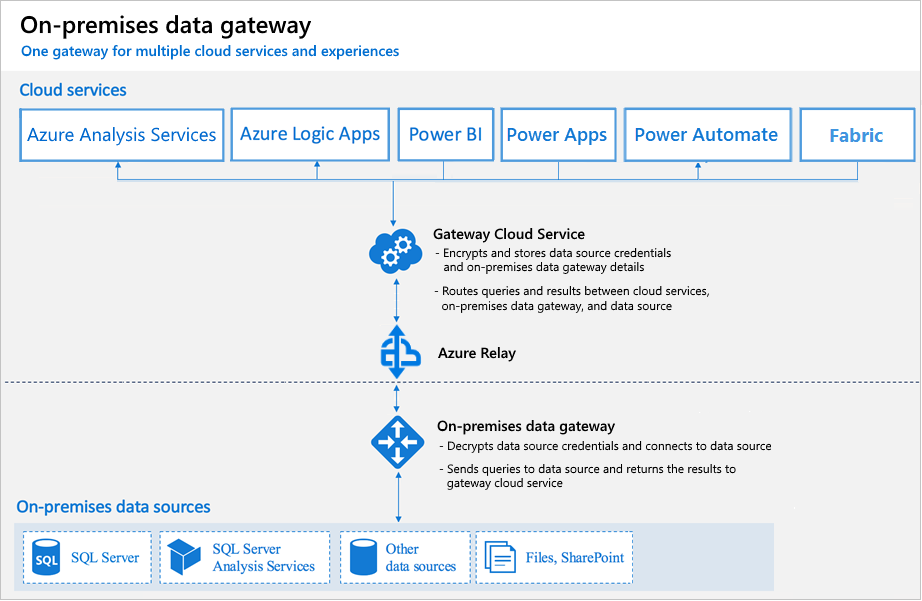
Source: Microsoft Learn - On-premises Data Gateway In-Depth
flowchart LR
    subgraph Cluster["Gateway Cluster"]
        G1[Gateway Node 1]
        G2[Gateway Node 2]
        G3[Gateway Node 3]
    end

    DS[(Data Sources)]
    Fabric[Microsoft Fabric]

    DS --> Cluster
    Cluster --> Fabric
Cluster Setup Steps
- Install primary gateway on first server
- Install additional gateways selecting "Add to existing cluster"
- Use same recovery key for all cluster members
- Configure load balancing in admin portal
Load Balancing Modes
| Mode | Description | Use Case |
|---|---|---|
| Round Robin | Distributes evenly | General workloads |
| Failover | Primary with backup | High availability |
| Custom | Manual assignment | Specific workload routing |
🔧 Gateway for Fabric Pipelines
Required Firewall Rules
| Domain | Port | Purpose |
|---|---|---|
*.core.windows.net | 443 | Storage access |
*.dfs.fabric.microsoft.com | 443 | OneLake access |
*.datawarehouse.fabric.microsoft.com | 1433 | Warehouse access |
*.frontend.clouddatahub.net | 443 | Pipeline execution |
Pipeline-Specific Settings
For maximum pipeline performance with gateway:
Pipeline Copy Activity Settings:
├── Degree of Copy Parallelism: Auto or 4-16
├── Data Integration Units: Auto or 4-256
└── Parallel Copy: Enable with partitioning
📊 Monitoring and Troubleshooting
Enable Additional Logging
Log Location: C:\Users\PBIEgwService\AppData\Local\Microsoft\On-premises data gateway\Logs
Key Performance Counters
Monitor these Windows performance counters:
\Process(Microsoft.PowerBI.Gateway*)\% Processor Time
\Process(Microsoft.PowerBI.Gateway*)\Working Set
\Network Interface(*)\Bytes Total/sec
\LogicalDisk(*)\Disk Transfers/sec
Common Issues and Solutions
| Issue | Symptom | Solution |
|---|---|---|
| Slow queries | Long refresh times | Increase container count, check network |
| Memory errors | OOM exceptions | Increase WorkingSetMB, add RAM |
| Connection timeouts | Intermittent failures | Check network, increase timeout |
| Throttling | 429 errors | Add cluster nodes, reduce concurrency |
💻 Gateway Configuration Script
# Gateway Configuration Helper Script

# Check current gateway settings
function Get-GatewayConfig {
    $configPath = "C:\Program Files\On-premises data gateway\Microsoft.PowerBI.DataMovement.Pipeline.GatewayCore.dll.config"

    if (Test-Path $configPath) {
        [xml]$config = Get-Content $configPath

        $settings = @{
            "DefaultPoolContainerMaxCount" = $config.configuration.applicationSettings.
                'Microsoft.PowerBI.DataMovement.Pipeline.GatewayCore.GatewayCoreSettings'.
                setting | Where-Object { $_.name -eq "MashupDefaultPoolContainerMaxCount" } |
                Select-Object -ExpandProperty value

            "DQPoolContainerMaxCount" = $config.configuration.applicationSettings.
                'Microsoft.PowerBI.DataMovement.Pipeline.GatewayCore.GatewayCoreSettings'.
                setting | Where-Object { $_.name -eq "MashupDQPoolContainerMaxCount" } |
                Select-Object -ExpandProperty value

            "WorkingSetMB" = $config.configuration.applicationSettings.
                'Microsoft.PowerBI.DataMovement.Pipeline.GatewayCore.GatewayCoreSettings'.
                setting | Where-Object { $_.name -eq "MashupDefaultPoolContainerMaxWorkingSetInMB" } |
                Select-Object -ExpandProperty value
        }

        return $settings
    }
    else {
        Write-Error "Gateway config not found at $configPath"
    }
}

# Display current configuration
$config = Get-GatewayConfig
Write-Host "Current Gateway Configuration:"
$config | Format-Table -AutoSize
✅ Best Practices Summary
Do's
- Use Standard Mode gateway for production
- Deploy gateway close to data sources
- Configure gateway clusters for HA
- Monitor performance counters
- Use SSD storage for spool
- Size containers based on workload
Don'ts
- Don't use Personal Mode for production
- Don't place gateway far from data sources
- Don't ignore memory/disk warnings
- Don't share gateway across incompatible workloads
- Don't forget to test failover
🧮 Capacity Planning Calculator
# Gateway Sizing Calculator

def calculate_gateway_sizing(
    concurrent_refreshes: int,
    concurrent_dq_queries: int,
    avg_dataset_size_mb: int,
    peak_data_volume_gb: int
) -> dict:
    """
    Calculate recommended gateway sizing.
    """
    # Container calculations
    refresh_containers = max(4, concurrent_refreshes * 2)
    dq_containers = max(4, concurrent_dq_queries)

    # Memory calculations (MB)
    base_memory_mb = 4096
    per_container_mb = max(512, avg_dataset_size_mb)
    total_memory_mb = base_memory_mb + (refresh_containers * per_container_mb)

    # CPU calculations
    base_cores = 4
    cores_per_container = 0.5
    total_cores = int(base_cores + (refresh_containers + dq_containers) * cores_per_container)

    # Network calculations (Mbps)
    network_mbps = max(1000, peak_data_volume_gb * 100)

    return {
        "recommended_cores": max(8, total_cores),
        "recommended_ram_gb": max(8, total_memory_mb // 1024),
        "refresh_containers": refresh_containers,
        "dq_containers": dq_containers,
        "working_set_mb": per_container_mb,
        "network_mbps": network_mbps,
        "cluster_nodes": 1 if concurrent_refreshes < 20 else 2 if concurrent_refreshes < 50 else 3
    }

# Example usage
sizing = calculate_gateway_sizing(
    concurrent_refreshes=20,
    concurrent_dq_queries=10,
    avg_dataset_size_mb=500,
    peak_data_volume_gb=50
)

print("Recommended Gateway Sizing:")
for key, value in sizing.items():
    print(f"  {key}: {value}")
🔗 Related Documents
| Document | Description |
|---|---|
| Workspaces & Naming Conventions | Workspace organization and naming standards |
| Pipelines & Data Movement | Pipeline optimization and load patterns |
| Source-Specific Patterns | Oracle and SQL Server extraction patterns |
| Oracle Gateway Troubleshooting | Gateway troubleshooting for Oracle workloads |
| Network Security | Network security and firewall configuration |