🚀 Deployment Guide¶ Runbook



Last Updated: 2025-01-21 | Version: 1.0.0
📊 Visual Overview
Microsoft Fabric Deployment Architecture
Before diving into deployment steps, it's helpful to understand how Fabric integrates with Azure services:

Source: Microsoft Fabric licenses
Lakehouse End-to-End Architecture
This POC deploys a complete lakehouse solution following Microsoft's recommended architecture pattern:
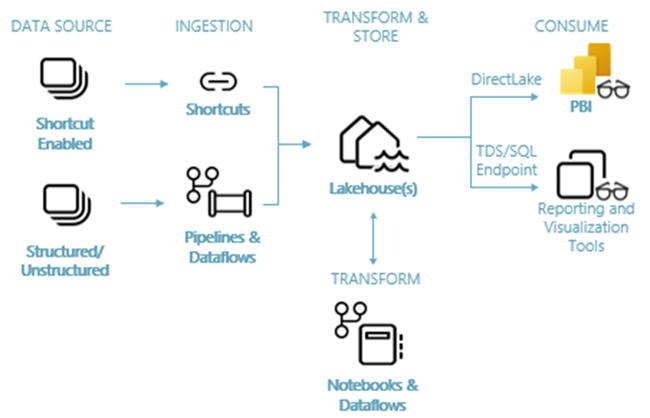
Source: Lakehouse Tutorial Introduction
Deployment Decision Flowchart
This flowchart guides you through the deployment process from prerequisites to verification:
%%{init: {'theme':'base', 'themeVariables': { 'primaryColor':'#2196F3','primaryTextColor':'#fff','primaryBorderColor':'#1976D2','lineColor':'#FFD700','secondaryColor':'#4CAF50','tertiaryColor':'#CD7F32','fontSize':'14px'}}}%%
flowchart TD
    Start([Start Deployment]) --> CheckPrereq{Prerequisites<br/>Complete?}

    CheckPrereq -->|No| InstallTools[Install Required Tools:<br/>- Azure CLI 2.50+<br/>- Bicep 0.22+<br/>- PowerShell 7.0+]
    InstallTools --> AzureAccess{Azure Access<br/>Ready?}
    AzureAccess -->|No| SetupAccess[Setup Azure Subscription<br/>& Resource Providers]
    SetupAccess --> CheckPrereq
    AzureAccess -->|Yes| CheckPrereq

    CheckPrereq -->|Yes| ChooseMethod{Choose Deployment<br/>Method}

    ChooseMethod -->|Quick Start| QuickDeploy[Azure CLI Deployment]
    ChooseMethod -->|Containerized| DockerDeploy[Docker Deployment]
    ChooseMethod -->|Automated| ScriptDeploy[Script-Based Deployment]
    ChooseMethod -->|CI/CD| GHActions[GitHub Actions]

    QuickDeploy --> AzLogin[az login]
    DockerDeploy --> DataGen[Generate Sample Data<br/>with Docker Compose]
    ScriptDeploy --> RunScript[Execute deploy.ps1]
    GHActions --> SetupOIDC[Configure OIDC<br/>Authentication]

    AzLogin --> Validate[Run What-If Analysis]
    DataGen --> UploadData[Upload to Azure Storage]
    RunScript --> Validate
    SetupOIDC --> TriggerWorkflow[Trigger Workflow]

    Validate --> ValidateOK{Validation<br/>Passed?}
    ValidateOK -->|No| FixIssues[Review & Fix Issues]
    FixIssues --> Validate
    ValidateOK -->|Yes| Deploy[Deploy Infrastructure<br/>via Bicep]

    UploadData --> Deploy
    TriggerWorkflow --> Deploy

    Deploy --> PostConfig[Post-Deployment<br/>Configuration:<br/>- Create Lakehouses<br/>- Import Notebooks<br/>- Configure Access]

    PostConfig --> Verify[Run Verification Script]
    Verify --> VerifyOK{All Checks<br/>Passed?}

    VerifyOK -->|No| Troubleshoot[Troubleshooting:<br/>- Check Logs<br/>- Verify Permissions<br/>- Review Resources]
    Troubleshoot --> Verify

    VerifyOK -->|Yes| Complete([Deployment Complete!<br/>Ready for Tutorials])

    style Start fill:#4CAF50,stroke:#2E7D32,color:#fff
    style Complete fill:#FFD700,stroke:#F57F17,color:#000
    style CheckPrereq fill:#2196F3,stroke:#1976D2,color:#fff
    style AzureAccess fill:#2196F3,stroke:#1976D2,color:#fff
    style ChooseMethod fill:#2196F3,stroke:#1976D2,color:#fff
    style ValidateOK fill:#2196F3,stroke:#1976D2,color:#fff
    style VerifyOK fill:#2196F3,stroke:#1976D2,color:#fff
    style Deploy fill:#CD7F32,stroke:#8B5A2B,color:#fff
    style Troubleshoot fill:#ff9800,stroke:#f57c00,color:#fff
Deployment State Diagram
Track your deployment progress through these states:
%%{init: {'theme':'base', 'themeVariables': { 'primaryColor':'#C0C0C0','primaryTextColor':'#000','primaryBorderColor':'#999','lineColor':'#2196F3','secondaryColor':'#4CAF50','tertiaryColor':'#CD7F32','fontSize':'14px'}}}%%
stateDiagram-v2
    [*] --> NotStarted: Initialize

    NotStarted --> PreparingEnvironment: Start Deployment

    PreparingEnvironment --> ValidatingPrerequisites: Tools Installed
    ValidatingPrerequisites --> PreparingEnvironment: Missing Requirements
    ValidatingPrerequisites --> Deploying: Prerequisites Met

    Deploying --> DeploymentFailed: Error Occurred
    DeploymentFailed --> Deploying: Retry
    DeploymentFailed --> RollingBack: Critical Failure
    RollingBack --> NotStarted: Rollback Complete

    Deploying --> Deployed: Bicep Deployment Success

    Deployed --> Configuring: Start Post-Config
    Configuring --> ConfigurationFailed: Config Error
    ConfigurationFailed --> Configuring: Fix & Retry

    Configuring --> Verifying: Configuration Complete

    Verifying --> VerificationFailed: Tests Failed
    VerificationFailed --> Troubleshooting: Investigate
    Troubleshooting --> Verifying: Issues Resolved

    Verifying --> Verified: All Tests Passed

    Verified --> ProductionReady: Final Sign-off
    ProductionReady --> [*]: Complete

    note right of NotStarted
        Prerequisites ready
        Tools installed
        Azure access configured
    end note

    note right of Deploying
        Bicep template execution
        Resource provisioning
        Network configuration
    end note

    note right of Verified
        All checks passed:
        ✓ Fabric capacity
        ✓ Storage & networking
        ✓ Security & monitoring
    end note

    note right of ProductionReady
        Ready for:
        - Data ingestion
        - Pipeline execution
        - Tutorial walkthroughs
    end note
📋 Prerequisites
Before deploying, ensure you have completed all items in the Prerequisites Guide.
Azure Requirements
| Requirement | Details |
|---|---|
| Azure Subscription | Owner or Contributor access |
| Microsoft Fabric | Enabled in your tenant |
| Resource Providers | See list below |
Required Resource Providers:
Microsoft.Fabric
Microsoft.Purview
Microsoft.Storage
Microsoft.KeyVault
Microsoft.Network
Microsoft.OperationalInsights
Local Tools
| Tool | Minimum Version | Check Command |
|---|---|---|
| Azure CLI | 2.50+ | az --version |
| Bicep | 0.22+ | az bicep version |
| Git | 2.40+ | git --version |
| PowerShell | 7.0+ | pwsh --version |
Install Required Tools
# Install/Update Azure CLI
winget install -e --id Microsoft.AzureCLI

# Install Bicep
az bicep install
az bicep upgrade

# Install PowerShell 7+
winget install -e --id Microsoft.PowerShell
🛠️ Quick Deployment
Follow these steps for a rapid deployment to the development environment.
Step 1: Clone and Configure
# Clone repository
git clone https://github.com/fgarofalo56/Suppercharge_Microsoft_Fabric.git
cd Suppercharge_Microsoft_Fabric

# Copy environment template
cp .env.sample .env

# Edit .env with your values
code .env  # or your preferred editor
📝 Note: Ensure all required values in
.envare populated before proceeding.
Step 2: Login to Azure
# Interactive login
az login

# Set subscription
az account set --subscription "<subscription-id>"

# Verify
az account show
Step 3: Validate Deployment
# Build and validate Bicep
az bicep build --file infra/main.bicep

# What-if analysis (preview changes)
az deployment sub what-if \
  --location eastus2 \
  --template-file infra/main.bicep \
  --parameters infra/environments/dev/dev.bicepparam
💡 Pro Tip: Always run what-if analysis before deployment to preview resource changes and catch potential issues early.
Step 4: Deploy
# Deploy infrastructure
az deployment sub create \
  --name "fabric-poc-$(date +%Y%m%d-%H%M%S)" \
  --location eastus2 \
  --template-file infra/main.bicep \
  --parameters infra/environments/dev/dev.bicepparam
🐳 Docker Deployment
Use Docker to run data generators without installing Python dependencies locally. The generated data will be ingested into your Fabric Lakehouse following this pattern:

Source: What is Data Engineering in Fabric
Quick Start with Docker
# Generate demo data (quick, small dataset)
docker-compose run --rm demo-generator

# Generate full dataset (30 days, all domains)
docker-compose run --rm data-generator

# Output data will be in ./output directory
Available Docker Services
| Service | Description | Use Case |
|---|---|---|
data-generator | Full dataset generation | POC data population |
demo-generator | Small demo dataset | Quick testing |
streaming-generator | Real-time event streaming | Event Hub integration |
data-validator | Data quality validation | Verify generated data |
🔍 Click to expand: Docker Commands & Environment Variables
### Docker Commands# Build the Docker image
docker-compose build
# Generate specific data volumes
docker-compose run --rm data-generator --slots 100000 --players 5000
# Generate data in CSV format
docker-compose run --rm data-generator --all --format csv
# Stream to Azure Event Hub
EVENTHUB_CONNECTION_STRING="your-connection-string" \
EVENTHUB_NAME="slot-telemetry" \
docker-compose up streaming-generator
Using Docker with Fabric Upload
After generating data, upload to Fabric:
# 1. Generate data
docker-compose run --rm data-generator --all --days 30

# 2. Upload to Azure Storage (for Fabric import)
az storage blob upload-batch \
  --source ./output \
  --destination bronze \
  --account-name $STORAGE_ACCOUNT_NAME

# 3. Import into Fabric Lakehouse via notebooks
📜 Script-Based Deployment
PowerShell scripts for automated deployment workflows.
Available Scripts
| Script | Purpose | Usage |
|---|---|---|
scripts/deploy.ps1 | Full infrastructure deployment | CI/CD pipelines |
scripts/generate-data.ps1 | Data generation wrapper | Local/Docker execution |
scripts/validate.ps1 | Run validation tests | Quality assurance |
Full Deployment Script
# Deploy infrastructure with all defaults
./scripts/deploy.ps1 -Environment dev

# Deploy with custom parameters
./scripts/deploy.ps1 `
  -Environment staging `
  -Location westus2 `
  -SkipValidation $false

# Deploy with cost estimation first
./scripts/deploy.ps1 -Environment prod -ShowCostEstimate
Data Generation Script
# Generate all data locally
./scripts/generate-data.ps1 -All -Days 30

# Generate via Docker
./scripts/generate-data.ps1 -UseDocker -All -Days 14

# Generate specific data types
./scripts/generate-data.ps1 -Slots 50000 -Players 2000 -Format csv
Validation Script
# Run all validations
./scripts/validate.ps1

# Run specific validation suites
./scripts/validate.ps1 -Suite "slot_machine"

# Generate HTML report
./scripts/validate.ps1 -OutputReport ./validation-report.html
Script Parameters Reference
See individual script help for full parameter documentation:
Get-Help ./scripts/deploy.ps1 -Full
Get-Help ./scripts/generate-data.ps1 -Full
Get-Help ./scripts/validate.ps1 -Full
🌍 Environment-Specific Deployment
Environment Comparison
| Setting | 🔧 Development | 🧪 Staging | 🏭 Production |
|---|---|---|---|
| SKU | F2/F4 | F16/F32 | F64+ |
| Auto-pause | Enabled | Enabled | Disabled |
| Private Endpoints | Optional | Recommended | Required |
| Geo-redundancy | Disabled | Enabled | Enabled |
| Cost Alerts | Optional | Enabled | Enabled |
| Resource Lock | None | CanNotDelete | CanNotDelete |
🔧 Development Deployment
az deployment sub create \
  --location eastus2 \
  --template-file infra/main.bicep \
  --parameters infra/environments/dev/dev.bicepparam
🧪 Staging Deployment
az deployment sub create \
  --location eastus2 \
  --template-file infra/main.bicep \
  --parameters infra/environments/staging/staging.bicepparam
🏭 Production Deployment
az deployment sub create \
  --location eastus2 \
  --template-file infra/main.bicep \
  --parameters infra/environments/prod/prod.bicepparam
⚠️ Warning: Production deployments should go through proper change management processes and approval workflows.
🔄 GitHub Actions Deployment
Azure Deployment Sequence
This sequence diagram illustrates the Azure deployment process flow:
%%{init: {'theme':'base', 'themeVariables': { 'actorBkg':'#2196F3','actorBorder':'#1976D2','actorTextColor':'#fff','actorLineColor':'#FFD700','signalColor':'#CD7F32','signalTextColor':'#000','labelBoxBkgColor':'#C0C0C0','labelBoxBorderColor':'#999','labelTextColor':'#000','loopTextColor':'#000','noteBkgColor':'#FFD700','noteTextColor':'#000','noteBorderColor':'#F57F17','activationBkgColor':'#4CAF50','activationBorderColor':'#2E7D32','sequenceNumberColor':'#fff','fontSize':'14px'}}}%%
sequenceDiagram
    autonumber
    actor User
    participant CLI as Azure CLI
    participant AAD as Entra ID
    participant ARM as Azure Resource Manager
    participant Fabric as Fabric Capacity
    participant Storage as Storage Account
    participant Lakehouse as Fabric Lakehouses
    participant Purview as Purview Account

    Note over User,Purview: 🔐 Authentication Phase
    User->>CLI: az login
    CLI->>AAD: Authenticate User
    AAD-->>CLI: Return Token
    CLI-->>User: Login Successful

    User->>CLI: az account set --subscription
    CLI->>AAD: Verify Subscription Access
    AAD-->>CLI: Access Confirmed

    Note over User,Purview: ✅ Validation Phase
    User->>CLI: az deployment sub what-if
    CLI->>ARM: Validate Template
    ARM->>ARM: Check Resource Providers
    ARM->>ARM: Validate Parameters
    ARM-->>CLI: Validation Results
    CLI-->>User: Display Changes Preview

    Note over User,Purview: 🚀 Deployment Phase
    User->>CLI: az deployment sub create
    CLI->>ARM: Submit Deployment
    ARM->>ARM: Create Resource Group

    par Parallel Resource Deployment
        ARM->>Fabric: Provision Fabric Capacity
        Fabric-->>ARM: Capacity Created (F4/F16/F64)
    and
        ARM->>Storage: Create Storage Account
        Storage->>Storage: Enable ADLS Gen2
        Storage->>Storage: Create Containers (bronze/silver/gold)
        Storage-->>ARM: Storage Ready
    and
        ARM->>Purview: Deploy Purview Account
        Purview->>Purview: Initialize Catalog
        Purview-->>ARM: Purview Ready
    end

    ARM-->>CLI: Deployment Status
    CLI-->>User: Deployment Complete

    Note over User,Purview: ⚙️ Post-Configuration Phase
    User->>Fabric: Navigate to Fabric Portal
    User->>Fabric: Create Workspace
    Fabric->>Fabric: Link to Capacity
    User->>Lakehouse: Create Bronze Lakehouse
    User->>Lakehouse: Create Silver Lakehouse
    User->>Lakehouse: Create Gold Lakehouse
    Lakehouse-->>User: Lakehouses Created

    User->>Storage: Connect Lakehouses to Storage
    Storage-->>Lakehouse: Link Established

    User->>Purview: Configure Data Catalog
    Purview->>Lakehouse: Scan Lakehouses
    Lakehouse-->>Purview: Metadata Indexed

    Note over User,Purview: ✔️ Verification Phase
    User->>CLI: ./scripts/verify-deployment.sh
    CLI->>Fabric: Check Capacity Status
    Fabric-->>CLI: ✓ Active
    CLI->>Storage: Verify Containers
    Storage-->>CLI: ✓ bronze, silver, gold
    CLI->>Purview: Test Connectivity
    Purview-->>CLI: ✓ Accessible
    CLI->>Lakehouse: Validate Configuration
    Lakehouse-->>CLI: ✓ Ready
    CLI-->>User: ✅ All Checks Passed

    Note over User,Purview: 🎉 Deployment Complete - Ready for Data Ingestion
Setting Up OIDC Authentication
🔍 Click to expand: OIDC Setup Commands
#### 1. Create Microsoft Entra ID Application# Create app registration
az ad app create --display-name "github-fabric-poc"
# Get app ID
APP_ID=$(az ad app list --display-name "github-fabric-poc" --query "[0].appId" -o tsv)
# Create service principal
az ad sp create --id $APP_ID
# Get subscription and tenant IDs
SUBSCRIPTION_ID=$(az account show --query id -o tsv)
TENANT_ID=$(az account show --query tenantId -o tsv)
# Assign Contributor role
az role assignment create \
--assignee $APP_ID \
--role "Contributor" \
--scope "/subscriptions/$SUBSCRIPTION_ID"
# Create federated credential for main branch
az ad app federated-credential create \
  --id $APP_ID \
  --parameters '{
    "name": "github-main",
    "issuer": "https://token.actions.githubusercontent.com",
    "subject": "repo:<your-org>/Suppercharge_Microsoft_Fabric:ref:refs/heads/main",
    "audiences": ["api://AzureADTokenExchange"]
  }'

# Create federated credential for pull requests
az ad app federated-credential create \
  --id $APP_ID \
  --parameters '{
    "name": "github-pr",
    "issuer": "https://token.actions.githubusercontent.com",
    "subject": "repo:<your-org>/Suppercharge_Microsoft_Fabric:pull_request",
    "audiences": ["api://AzureADTokenExchange"]
  }'
Manual Workflow Trigger
# Trigger deployment via GitHub CLI
gh workflow run deploy-infra.yml \
  --ref main \
  -f environment=dev
⚙️ Post-Deployment Configuration
1. Verify Fabric Capacity
# List Fabric capacities
az resource list \
  --resource-type "Microsoft.Fabric/capacities" \
  --query "[].{Name:name, Location:location, SKU:sku.name}"
2. Configure Fabric Workspace
After Bicep deployment, complete these manual steps in Fabric Portal:
| Step | Action | Details |
|---|---|---|
| 1 | Navigate to Fabric | app.fabric.microsoft.com |
| 2 | Create workspace | Link to deployed capacity |
| 3 | Create Lakehouses | One per medallion layer |
| 4 | Import notebooks | From notebooks/ directory |
3. Connect Purview
# Get Purview account endpoint
az purview account show \
  --name "<purview-account-name>" \
  --resource-group "<resource-group>" \
  --query "endpoints"
4. Configure Key Vault Access
# Grant current user access
az keyvault set-policy \
  --name "<keyvault-name>" \
  --upn "$(az ad signed-in-user show --query userPrincipalName -o tsv)" \
  --secret-permissions get list set delete
✅ Deployment Verification
Automated Verification Script
Expected Output:
✓ Fabric capacity deployed
✓ Purview account accessible
✓ Storage account created
✓ Key Vault configured
✓ Network connectivity verified
Manual Verification Checklist
| Component | Check | Status |
|---|---|---|
| Fabric capacity | Shows in Azure portal | ☐ |
| Fabric capacity | Shows in Fabric admin portal | ☐ |
| Purview account | Accessible via portal | ☐ |
| Storage account | ADLS Gen2 enabled | ☐ |
| Key Vault | Secrets accessible | ☐ |
| Log Analytics | Receiving logs | ☐ |
| Private endpoints | Connected (if enabled) | ☐ |
🔧 Troubleshooting
🔍 Click to expand: Common Issues & Solutions
### Common Issues #### Issue: Fabric Capacity Deployment Fails > ⚠️ **Warning:** Resource provider registration can take up to 10 minutes to complete. Wait for "Registered" status before proceeding. **Solution:**az provider register --namespace Microsoft.Fabric
az provider show --namespace Microsoft.Fabric --query "registrationState"
🔍 Click to expand: Deployment Logs & Debugging
### Deployment Logs > 💡 **Pro Tip:** Keep deployment names handy for troubleshooting. They follow the pattern `fabric-poc-YYYYMMDD-HHMMSS`. Store recent deployment names in your notes.🗑️ Cleanup
Remove All Resources
# Delete resource group (removes all resources)
az group delete --name "rg-fabric-poc-dev" --yes --no-wait

# Or delete specific deployment
az deployment sub delete --name "<deployment-name>"
Preserve Specific Resources
# Remove lock before deletion (if locked)
az lock delete --name "CanNotDelete" --resource-group "rg-fabric-poc-dev"
⚠️ Warning: Resource deletion is irreversible. Ensure backups exist before cleanup.
💰 Cost Optimization
For detailed cost estimates and optimization strategies, see the comprehensive Cost Estimation Guide.
Quick Cost Reference
| Environment | Fabric SKU | Monthly Estimate |
|---|---|---|
| Development | F4 | $450 - $650 |
| Staging | F16 | $1,800 - $2,500 |
| Production POC | F64 | $9,500 - $12,500 |
Development Environment
| Strategy | Implementation |
|---|---|
| Use smaller SKU | F2 or F4 for development |
| Enable auto-pause | Suspend when idle |
| Schedule pause | Stop overnight/weekends |
Production Environment
| Strategy | Implementation |
|---|---|
| Reserved capacity | For predictable costs |
| Monitor consumption | Via Log Analytics |
| Set up alerts | Before budget exceeded |
Create Cost Alert
az monitor metrics alert create \
  --name "fabric-cost-alert" \
  --resource-group "rg-fabric-poc-prod" \
  --scopes "<capacity-resource-id>" \
  --condition "total Cost > 1000" \
  --window-size 1d \
  --action "<action-group-id>"
Related Cost Resources
- Cost Estimation Guide - Detailed cost breakdown and scenarios
- Azure Pricing Calculator - Current pricing
📚 Next Steps
After successful deployment, proceed with these guides:
| Step | Guide | Description |
|---|---|---|
| 1 | Tutorial 00: Environment Setup | Configure your workspace |
| 2 | Tutorial 01: Bronze Layer | Build ingestion pipelines |
| 3 | Generate Sample Data | Create test datasets |
📚 Related Documentation
| Document | Description |
|---|---|
| 🏗️ Architecture | System architecture and design |
| 🔐 Security Guide | Security controls and compliance |
| 📋 Prerequisites | Setup requirements |
📖 Documentation maintained by: Frank Garofalo 🔗 Repository: Suppercharge_Microsoft_Fabric