
🏆 Microsoft Fabric Best Practices Guide¶ Deep Dive
Last Updated: 2026-04-15 | Version: 2.0 Status: ✅ Final | Maintainer: Documentation Team



📖 Deep-Dive Guides
For expanded best practices in specific areas, see the deep-dive documents:
| Guide | Description |
|---|---|
| Error Handling & Monitoring | Pipeline error architecture, production error table design, stored procedures, error classification, PySpark patterns |
| Alerting & Data Activator | Data Activator setup, alert patterns (DQ, pipeline, SLA, anomaly), Teams/email integration, runbook templates |
| Performance & Parallelism | Copy activity DIU optimization, Spark tuning, pipeline parallelism, Direct Lake performance, KQL optimization |
| Data Governance Deep Dive | Purview integration, federal data classification (CUI/FOUO/PII/PHI), RLS/CLS patterns, compliance frameworks |
New Fabric Features
| Guide | Description |
|---|---|
| Fabric IQ | Natural language analytics, setup, per-agency use cases, semantic model optimization |
| Real-Time Intelligence | Eventstreams, Eventhouse, real-time dashboards, KQL patterns, streaming architecture |
| AI Copilot Configuration | Per-workload Copilot setup, enterprise rollout, security considerations |
| Data Mesh & Enterprise Patterns | Domain ownership, multi-agency workspace topology, data product contracts, federated governance |
🎯 Overview
This guide provides enterprise best practices for organizing, securing, and optimizing Microsoft Fabric environments. These recommendations are based on Microsoft's official guidance combined with real-world casino/gaming industry implementations.
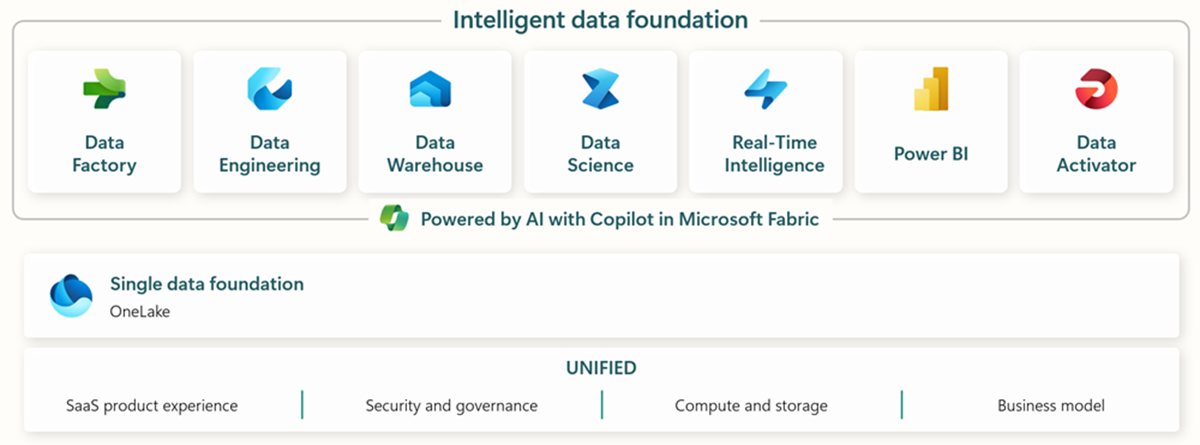
Source: What is Microsoft Fabric?
Key Principles
| Principle | Description |
|---|---|
| Separation of Concerns | Isolate workloads by purpose, environment, and security boundary |
| Least Privilege | Grant minimum permissions required for each role |
| Scalability | Design for growth with modular, reusable patterns |
| Governance | Implement consistent policies across all workspaces |
| Cost Efficiency | Optimize capacity usage and storage costs |
🏗️ Workspace Organization
Single vs. Multiple Workspaces
Choosing between single and multiple workspaces depends on your organization's size, security requirements, and team structure.
Decision Framework
flowchart TD
    A[Start: Workspace Design] --> B{Team Size?}
    B -->|"Small < 10"| C{Security Isolation<br/>Required?}
    B -->|Medium 10-50| D{Multiple Domains/<br/>Business Units?}
    B -->|Large 50+| E[Multiple Workspaces<br/>by Domain]

    C -->|No| F[Single Workspace<br/>with Folders]
    C -->|Yes| G[Multiple Workspaces<br/>by Layer]

    D -->|No| H{Compliance<br/>Requirements?}
    D -->|Yes| I[Domain-Based<br/>Workspaces]

    H -->|Standard| J[Layer-Based<br/>Workspaces]
    H -->|Strict PCI/NIGC| K[Isolated Workspaces<br/>+ Private Endpoints]

    style F fill:#90EE90
    style G fill:#87CEEB
    style I fill:#FFB6C1
    style K fill:#DDA0DD
Workspace Patterns
Pattern 1: Single Workspace (Small Teams, POC)
Best For: Teams < 10, proof-of-concept, rapid prototyping
📁 casino-fabric-workspace/
├── 🏠 Lakehouses
│   ├── lh_bronze
│   ├── lh_silver
│   └── lh_gold
├── 📊 Semantic Models
│   └── Casino Analytics Model
├── 📈 Reports
│   └── Executive Dashboard
├── 🔄 Pipelines
│   └── Daily ETL Pipeline
└── 📓 Notebooks
    ├── bronze/
    ├── silver/
    └── gold/
Pros: - Simple to manage - Easy cross-item references - Minimal permission complexity - Ideal for POC and small teams
Cons: - No environment isolation - Mixed dev/prod artifacts - Limited security boundaries - Scaling challenges
Pattern 2: Layer-Based Workspaces (Medium Teams)
Best For: Teams 10-30, clear medallion architecture, moderate security needs
📁 Workspaces Structure:
├── ws-casino-bronze/
│   ├── 🏠 lh_bronze_raw
│   ├── 🏠 lh_bronze_staging
│   └── 📓 Bronze Notebooks
├── ws-casino-silver/
│   ├── 🏠 lh_silver_cleansed
│   ├── 🏠 lh_silver_conformed
│   └── 📓 Silver Notebooks
├── ws-casino-gold/
│   ├── 🏠 lh_gold_analytics
│   ├── 📊 Semantic Models
│   └── 📈 Reports
└── ws-casino-shared/
    ├── 📁 Reference Data
    └── 🔄 Shared Pipelines
Workspace Permissions:
| Workspace | Data Engineers | Data Analysts | Business Users |
|---|---|---|---|
| ws-casino-bronze | Admin | Viewer | None |
| ws-casino-silver | Contributor | Viewer | None |
| ws-casino-gold | Contributor | Contributor | Viewer |
| ws-casino-shared | Viewer | Viewer | Viewer |
Pattern 3: Domain + Environment Workspaces (Enterprise)
Best For: Large enterprises, multiple business units, strict compliance (PCI-DSS, NIGC)
📁 Enterprise Workspace Structure:
│
├── 🎰 Slots Domain
│   ├── ws-slots-dev/
│   ├── ws-slots-test/
│   ├── ws-slots-staging/
│   └── ws-slots-prod/
│
├── 🃏 Table Games Domain
│   ├── ws-tables-dev/
│   ├── ws-tables-test/
│   ├── ws-tables-staging/
│   └── ws-tables-prod/
│
├── 👤 Player Analytics Domain
│   ├── ws-players-dev/
│   ├── ws-players-test/
│   ├── ws-players-staging/
│   └── ws-players-prod/
│
├── 📋 Compliance Domain (Isolated)
│   ├── ws-compliance-dev/
│   ├── ws-compliance-test/
│   └── ws-compliance-prod/  ← Private Endpoint Only
│
└── 🔧 Platform/Shared
    ├── ws-platform-shared/
    ├── ws-reference-data/
    └── ws-monitoring/
Cross-Workspace Data Flow:
flowchart LR
    subgraph Bronze["Bronze Workspaces"]
        B1[ws-slots-bronze]
        B2[ws-tables-bronze]
        B3[ws-players-bronze]
    end

    subgraph Silver["Silver Workspaces"]
        S1[ws-slots-silver]
        S2[ws-tables-silver]
        S3[ws-players-silver]
    end

    subgraph Gold["Gold Workspaces"]
        G1[ws-analytics-gold]
        G2[ws-reporting-gold]
    end

    B1 --> S1
    B2 --> S2
    B3 --> S3

    S1 --> G1
    S2 --> G1
    S3 --> G1

    G1 --> G2

    style Bronze fill:#CD7F32
    style Silver fill:#C0C0C0
    style Gold fill:#FFD700
Workspace Naming Conventions
| Pattern | Example | Use Case |
|---|---|---|
ws-{domain}-{env} | ws-slots-prod | Domain + environment |
ws-{org}-{project}-{env} | ws-acme-casino-dev | Multi-tenant |
ws-{layer}-{domain} | ws-gold-analytics | Layer-focused |
ws-{region}-{domain}-{env} | ws-us-slots-prod | Multi-region |
Recommended: ws-{domain}-{layer}-{env} - Example: ws-slots-bronze-dev, ws-players-gold-prod
📁 Folder Structure & Hierarchy
Lakehouse Folder Organization
📁 lh_bronze/
├── 📂 Files/
│   ├── 📁 landing/              # Raw file drops
│   │   ├── slot_telemetry/
│   │   ├── player_sessions/
│   │   └── cage_transactions/
│   ├── 📁 archive/              # Processed files (dated)
│   │   └── 2026/01/28/
│   ├── 📁 rejected/             # Failed/invalid files
│   │   └── 2026/01/28/
│   └── 📁 schemas/              # Schema definitions
│       └── slot_telemetry.json
│
└── 📂 Tables/
    ├── 🔷 bronze_slot_telemetry
    ├── 🔷 bronze_player_sessions
    └── 🔷 bronze_cage_transactions
Silver Layer Organization
📁 lh_silver/
├── 📂 Files/
│   ├── 📁 checkpoints/          # Streaming checkpoints
│   └── 📁 temp/                 # Processing temp files
│
└── 📂 Tables/
    ├── 📁 cleansed/
    │   ├── 🔷 silver_slot_telemetry
    │   └── 🔷 silver_player_sessions
    ├── 📁 conformed/
    │   ├── 🔷 silver_slot_enriched
    │   └── 🔷 silver_player_enriched
    └── 📁 dimensions/
        ├── 🔷 dim_machine
        ├── 🔷 dim_player
        └── 🔷 dim_date
Gold Layer Organization
📁 lh_gold/
├── 📂 Files/
│   ├── 📁 exports/              # Scheduled exports
│   └── 📁 ml_models/            # Trained models
│
└── 📂 Tables/
    ├── 📁 facts/
    │   ├── 🔷 fact_slot_performance
    │   ├── 🔷 fact_player_activity
    │   └── 🔷 fact_compliance_transactions
    ├── 📁 aggregates/
    │   ├── 🔷 agg_daily_revenue
    │   ├── 🔷 agg_hourly_floor_activity
    │   └── 🔷 agg_player_lifetime_value
    └── 📁 dimensions/
        ├── 🔷 dim_date
        ├── 🔷 dim_machine
        ├── 🔷 dim_player
        └── 🔷 dim_zone
🔄 Environment Strategy (Dev/Test/Prod)
Recommended Environment Setup
flowchart LR
    subgraph DEV["Development"]
        D_WS[Dev Workspace]
        D_CAP[F2-F8 Capacity]
        D_DATA[Sample Data]
    end

    subgraph TEST["Test/QA"]
        T_WS[Test Workspace]
        T_CAP[F8-F16 Capacity]
        T_DATA[Anonymized Prod Data]
    end

    subgraph STAGING["Staging/UAT"]
        S_WS[Staging Workspace]
        S_CAP[F16-F32 Capacity]
        S_DATA[Production Mirror]
    end

    subgraph PROD["Production"]
        P_WS[Prod Workspace]
        P_CAP[F64+ Capacity]
        P_DATA[Live Data]
    end

    DEV -->|PR Merge| TEST
    TEST -->|Approved| STAGING
    STAGING -->|Release| PROD

    style DEV fill:#90EE90
    style TEST fill:#87CEEB
    style STAGING fill:#FFD700
    style PROD fill:#FF6B6B
Environment Configuration Matrix
| Aspect | Development | Test | Staging | Production |
|---|---|---|---|---|
| Capacity SKU | F2-F8 | F8-F16 | F16-F32 | F64+ |
| Data | Sample/Synthetic | Anonymized | Prod Mirror | Live |
| Refresh Frequency | Manual | Daily | Near Real-time | Real-time |
| Git Branch | feature/* | develop | release/* | main |
| Access | Developers | QA + Devs | UAT Team | Ops + Analysts |
| Monitoring | Basic | Standard | Full | Full + Alerts |
| Backup | None | Weekly | Daily | Continuous |
| Private Endpoints | No | No | Optional | Required |
Deployment Pipeline Configuration
# deployment-pipeline-config.yaml
pipeline:
  name: "Casino Analytics Deployment"
  stages:
    - name: Development
      workspace: ws-casino-dev
      capacity: F8
      git_branch: develop
      deployment_rules:
        - allow_direct_publish: true
        - require_approval: false

    - name: Test
      workspace: ws-casino-test
      capacity: F16
      git_branch: release/*
      deployment_rules:
        - allow_direct_publish: false
        - require_approval: true
        - approvers: ["qa-team@casino.com"]
        - run_tests: true

    - name: Staging
      workspace: ws-casino-staging
      capacity: F32
      git_branch: release/*
      deployment_rules:
        - require_approval: true
        - approvers: ["tech-lead@casino.com", "pm@casino.com"]
        - uat_sign_off: required

    - name: Production
      workspace: ws-casino-prod
      capacity: F64
      git_branch: main
      deployment_rules:
        - require_approval: true
        - approvers: ["cto@casino.com", "compliance@casino.com"]
        - change_window: "Tue-Thu 02:00-06:00 UTC"
        - rollback_enabled: true
🏅 Medallion Architecture Placement
Option A: All Layers in Single Workspace
When to Use: - Small teams (< 10 people) - POC/Prototype - Simple data flows - Minimal security requirements
flowchart TB
    subgraph WS["Single Workspace: ws-casino-analytics"]
        subgraph Bronze["Bronze Layer"]
            B1[lh_bronze]
        end
        subgraph Silver["Silver Layer"]
            S1[lh_silver]
        end
        subgraph Gold["Gold Layer"]
            G1[lh_gold]
            SM[Semantic Model]
            RPT[Reports]
        end

        B1 --> S1 --> G1 --> SM --> RPT
    end

    style Bronze fill:#CD7F32
    style Silver fill:#C0C0C0
    style Gold fill:#FFD700
Pros: Simple, fast development, easy debugging Cons: No isolation, mixed permissions, scaling limits
Option B: Separate Workspaces per Layer
When to Use: - Medium teams (10-50 people) - Clear team boundaries (ingest vs. analytics) - Different refresh cadences per layer - Cost allocation by layer
flowchart TB
    subgraph WS_B["ws-casino-bronze"]
        B1[lh_bronze]
        B_NB[Ingestion Notebooks]
        B_PIPE[Ingestion Pipelines]
    end

    subgraph WS_S["ws-casino-silver"]
        S1[lh_silver]
        S_NB[Transform Notebooks]
    end

    subgraph WS_G["ws-casino-gold"]
        G1[lh_gold]
        SM[Semantic Model]
        RPT[Reports]
    end

    B1 -->|Shortcut| S1
    S1 -->|Shortcut| G1
    G1 --> SM --> RPT

    style WS_B fill:#CD7F32,color:#fff
    style WS_S fill:#C0C0C0
    style WS_G fill:#FFD700
Data Access Pattern:
# In Silver workspace, reference Bronze via shortcut
df_bronze = spark.read.format("delta").load(
    "abfss://ws-casino-bronze@onelake.dfs.fabric.microsoft.com/lh_bronze.Lakehouse/Tables/bronze_slot_telemetry"
)
Option C: Domain + Layer Matrix (Enterprise)
When to Use: - Large enterprises (50+ people) - Multiple business domains - Strict compliance (PCI-DSS, NIGC, SOX) - Different data retention policies
                    │  Development  │    Test     │   Production
────────────────────┼───────────────┼─────────────┼────────────────
Slots Domain        │               │             │
  ├── Bronze        │ ws-slots-b-d  │ ws-slots-b-t│ ws-slots-b-p
  ├── Silver        │ ws-slots-s-d  │ ws-slots-s-t│ ws-slots-s-p
  └── Gold          │ ws-slots-g-d  │ ws-slots-g-t│ ws-slots-g-p
────────────────────┼───────────────┼─────────────┼────────────────
Players Domain      │               │             │
  ├── Bronze        │ ws-play-b-d   │ ws-play-b-t │ ws-play-b-p
  ├── Silver        │ ws-play-s-d   │ ws-play-s-t │ ws-play-s-p
  └── Gold          │ ws-play-g-d   │ ws-play-g-t │ ws-play-g-p
────────────────────┼───────────────┼─────────────┼────────────────
Compliance Domain   │               │             │
  ├── Bronze        │ ws-comp-b-d   │ ws-comp-b-t │ ws-comp-b-p ←
  ├── Silver        │ ws-comp-s-d   │ ws-comp-s-t │ ws-comp-s-p ← Private
  └── Gold          │ ws-comp-g-d   │ ws-comp-g-t │ ws-comp-g-p ← Endpoints
Workspace-to-Workspace Data Sharing
Use OneLake Shortcuts for cross-workspace data access:
# Create shortcut from Gold workspace to Silver lakehouse
from azure.fabric import FabricClient

client = FabricClient()
client.create_shortcut(
    workspace_id="ws-casino-gold-prod",
    lakehouse_id="lh_gold",
    shortcut_name="silver_slot_data",
    target_workspace_id="ws-casino-silver-prod",
    target_lakehouse_id="lh_silver",
    target_path="/Tables/silver_slot_enriched"
)
🔐 Security Best Practices
Role-Based Access Control (RBAC)
| Role | Workspace | Item | Data | Use Case |
|---|---|---|---|---|
| Admin | Full control | Full control | Full control | Platform admins |
| Member | Manage settings | Create/edit/delete | Read/write | Data engineers |
| Contributor | View only | Create/edit | Read/write | Analysts |
| Viewer | View only | View only | Read only | Business users |
Casino-Specific Security Zones
flowchart TB
    subgraph Public["Public Zone (Viewer)"]
        PBI[Power BI Reports]
        DASH[Dashboards]
    end

    subgraph Internal["Internal Zone (Contributor)"]
        GOLD[Gold Layer]
        SM[Semantic Models]
    end

    subgraph Restricted["Restricted Zone (Member)"]
        SILVER[Silver Layer]
        BRONZE[Bronze Layer]
    end

    subgraph Compliance["Compliance Zone (Admin Only)"]
        CTR[CTR Data]
        SAR[SAR Data]
        PII[Player PII]
    end

    Public --> Internal --> Restricted --> Compliance

    style Public fill:#90EE90
    style Internal fill:#87CEEB
    style Restricted fill:#FFD700
    style Compliance fill:#FF6B6B
Row-Level Security (RLS) Example
// RLS Rule: Regional Manager sees only their region
[Region Security] =
VAR UserRegion = LOOKUPVALUE(
    UserMapping[Region],
    UserMapping[UserEmail],
    USERPRINCIPALNAME()
)
RETURN
    fact_slot_performance[region] = UserRegion
    || UserRegion = "ALL"
📊 Naming Conventions
Standard Naming Patterns
| Item Type | Pattern | Example |
|---|---|---|
| Workspace | ws-{domain}-{layer}-{env} | ws-slots-gold-prod |
| Lakehouse | lh_{layer}_{domain} | lh_bronze_slots |
| Table (Bronze) | bronze_{source}_{entity} | bronze_sis_slot_events |
| Table (Silver) | silver_{entity}_{qualifier} | silver_slot_enriched |
| Table (Gold) | {type}_{entity} | fact_slot_performance, dim_machine |
| Notebook | nb_{layer}_{action}_{entity} | nb_bronze_ingest_slots |
| Pipeline | pl_{frequency}_{action} | pl_daily_bronze_refresh |
| Semantic Model | sm_{domain}_analytics | sm_casino_analytics |
| Report | rpt_{audience}_{topic} | rpt_exec_daily_revenue |
Abbreviations
| Full Name | Abbreviation |
|---|---|
| Development | dev |
| Test | test |
| Staging | stg |
| Production | prod |
| Bronze | b, bronze |
| Silver | s, silver |
| Gold | g, gold |
| Dimension | dim |
| Fact | fact |
| Aggregate | agg |
⚡ Performance Optimization
V-Order Optimization
Always enable V-Order for Gold layer tables:
# Write with V-Order optimization
df.write \
    .format("delta") \
    .mode("overwrite") \
    .option("vorder", "true") \
    .option("optimizeWrite", "true") \
    .saveAsTable("lh_gold.fact_slot_performance")
Partitioning Strategy
| Table Type | Partition Column | Rationale |
|---|---|---|
| Fact tables | business_date | Time-series queries |
| Large dimensions | region or category | Filter pushdown |
| Event tables | event_date, event_hour | Real-time queries |
# Partition by date for time-series data
df.write \
    .format("delta") \
    .partitionBy("business_date") \
    .mode("overwrite") \
    .saveAsTable("lh_gold.fact_daily_revenue")
Query Optimization Checklist
- Use predicate pushdown with date filters
- Avoid
SELECT *- specify columns - Pre-aggregate where possible
- Use Z-ORDER for frequently filtered columns
- Monitor query plans with EXPLAIN
💰 Cost Management
Capacity Right-Sizing
| Workload Type | Recommended SKU | Notes |
|---|---|---|
| Development | F2-F8 | Pause when not in use |
| Test/QA | F8-F16 | Schedule auto-pause |
| Production (Small) | F16-F32 | Monitor utilization |
| Production (Large) | F64+ | Enable bursting |
Cost Optimization Strategies
- Auto-pause development capacities after hours
- Use reserved capacity for production (40% savings)
- Archive old data to cheaper storage tiers
- Optimize refresh schedules to reduce peak loads
- Monitor capacity metrics weekly
Cost Allocation Tags
{
  "workspace_tags": {
    "cost_center": "gaming-analytics",
    "department": "data-engineering",
    "environment": "production",
    "project": "casino-fabric-poc"
  }
}
📚 Related Documentation
| Document | Description |
|---|---|
| 🏗️ Architecture | System architecture overview |
| 🚀 Deployment Guide | Infrastructure deployment |
| 🔐 Security Guide | Security configuration |
| 📖 Tutorial 20: Best Practices | Hands-on best practices tutorial |
📖 References
- Microsoft Fabric Workspace Documentation
- OneLake Architecture
- Deployment Pipelines
- Security in Microsoft Fabric
📖 Documentation maintained by: Frank Garofalo 🔗 Repository: Suppercharge_Microsoft_Fabric